Table of Contents >> Show >> Hide
- Why Most Consumer UPS Units Have Such Short Runtime
- The Core Mod: Replace Tiny Runtime With Real Capacity
- Why Cooling Is Not Optional
- Runtime Math: The Beast Still Obeys the Numbers
- Lead-Acid, AGM, Marine, or LiFePO4?
- The Fuse Is Not Decoration
- Safety: The Part That Keeps the Beast From Biting
- What the Best DIY UPS Mods Get Right
- Where a Long-Endurance UPS Makes Sense
- Common Failure Points in Old UPS Units
- Specific Example: From Ten Minutes to Several Hours
- Experience Notes: What Living With a Long-Endurance UPS Teaches You
- Conclusion
A dead uninterruptible power supply usually has the glamour of a tired toaster: it sits under a desk, beeps like an angry smoke alarm, and eventually gets tossed because the battery has given up. But for hardware tinkerers, that “junk” UPS is not always junk. Sometimes it is a perfectly useful inverter, charger, transfer switch, case, control board, and alarm system wearing one very dead sealed lead-acid battery like a tiny electrical backpack.
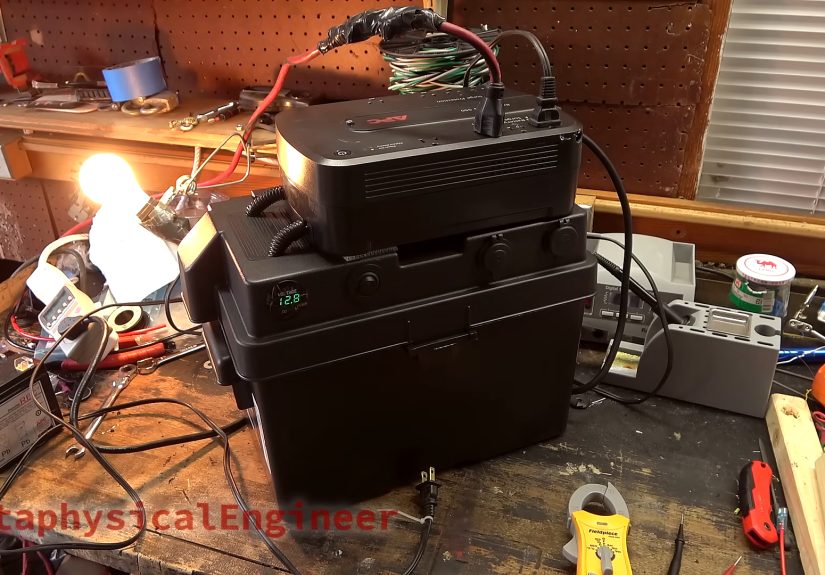
The idea behind the project “Mods Turn Junk UPS Into A Long-Endurance Beast” is simple, clever, and slightly mischievous: take an old home-office UPS, replace its small internal battery with a much larger deep-cycle battery, add cooling, add monitoring, add fuses, and suddenly a device meant to keep a computer alive for a few minutes can support a modest load for much longer. It is not magic. It is battery capacity, heat management, and a healthy respect for the fact that high current can make metal glow in ways metal should not glow.
This article explores how a discarded UPS can become a long-endurance backup power system, why the mod works, where it can fail, and what builders should think about before turning a sad beige box into a blackout survival sidekick.
Why Most Consumer UPS Units Have Such Short Runtime
A typical consumer UPS is designed for ride-through power, not all-night operation. Its job is usually to keep a desktop PC, router, NAS, workstation, or point-of-sale terminal alive long enough for a graceful shutdown. That is why many small UPS units ship with compact 12-volt sealed lead-acid batteries rated around 7Ah to 9Ah. They are affordable, reliable, easy to charge, and compact enough to fit inside a case that can hide under a desk.
The tradeoff is runtime. A 12V 9Ah battery has about 108 watt-hours of theoretical energy. After inverter losses, battery aging, voltage cutoff limits, and high-discharge effects, the usable energy is noticeably lower. That is why a UPS can look beefy on the outside but still panic after ten minutes of powering a gaming PC. The battery is not lazy; it is just small.
Manufacturers also design small UPS units around the thermal limits of the battery they ship with. If the original battery can only run the inverter for several minutes at a high load, the inverter, transformer, MOSFETs, heatsinks, and case ventilation may not be built for hours of continuous operation. This is the point where enthusiastic DIY energy storage meets the stern school principal known as physics.
The Core Mod: Replace Tiny Runtime With Real Capacity
The classic long-endurance UPS modification replaces the small internal sealed lead-acid battery with a much larger external battery. In the Hackaday-featured build, the maker rescued a discarded APC-style UPS labeled as broken, discovered that the main issue was a dead battery, and built a system around a marine deep-cycle battery mounted in a plastic battery box.
A deep-cycle battery is a better fit than a normal car starting battery because it is designed to deliver energy over a longer period instead of delivering a huge burst for a few seconds to crank an engine. Starter batteries love short dramatic performances. Deep-cycle batteries are more like marathon runners with less interest in applause.
The mod also added practical accessories: a voltmeter, a USB charger, a switched 12V outlet, and a fan installed where the original internal battery used to live. The clever touch was using the UPS alarm behavior to activate cooling, so the fan runs when the unit is actually working on battery power. That saves energy and noise while targeting the moment when heat matters most.
Why Cooling Is Not Optional
Adding a larger battery does not automatically make a UPS safe for long runtime. It only means the inverter can now be asked to work much longer than the manufacturer expected. That is like asking a sprinter to run a marathon because you bought them bigger shoes.
Inverter sections create heat. Transformers create heat. MOSFETs create heat. Electrolytic capacitors age faster when they are hot. A UPS that runs happily for five minutes at 400 watts may not be happy after an hour, especially if the case has minimal airflow. Cheap consumer units often rely on the fact that the battery dies before the electronics reach dangerous temperatures.
Forced-air cooling is therefore one of the most important parts of a long-endurance UPS mod. A small fan can move air across the transformer and heatsinks, but good builders do not simply bolt on a fan and declare victory. They test temperatures under realistic loads. They check whether the transformer becomes too hot to touch. They look for airflow paths instead of just creating a tiny fan that heroically cools one plastic wall.
Runtime Math: The Beast Still Obeys the Numbers
A larger battery can dramatically extend runtime, but the final result depends on load, battery size, inverter efficiency, battery chemistry, and discharge rate. A rough calculation starts with watt-hours:
Battery watt-hours = battery voltage × amp-hours.
A 12V 100Ah battery contains about 1,200Wh of nominal energy. But lead-acid batteries should not normally be drained to zero if long life matters. If you use only 50% of that capacity, you have about 600Wh before inverter losses. With an 85% efficient inverter, that becomes roughly 510Wh usable at the AC outlet.
For a 50W networking load, that could mean around 10 hours. For a 100W mini-PC and router setup, maybe 5 hours. For a 300W desktop load, the same system may deliver closer to 1.5 hours, and possibly less because lead-acid batteries lose effective capacity at higher discharge rates. This is where Peukert’s law enters the chat, wearing safety glasses and ruining everyone’s overly optimistic spreadsheet.
The big lesson is that long runtime comes from reducing load as much as increasing battery size. A UPS powering a modem, router, fiber ONT, and small server may run for hours. A UPS powering a workstation, three monitors, speakers, and a lava lamp shaped like a rocket may not.
Lead-Acid, AGM, Marine, or LiFePO4?
Most traditional UPS units are designed around sealed lead-acid or valve-regulated lead-acid batteries. They charge at voltages and profiles suitable for that chemistry. That makes external lead-acid or AGM batteries the most straightforward choice for many DIY modifications, provided voltage, wiring, fusing, and ventilation are handled correctly.
Marine deep-cycle batteries are popular because they are widely available, rugged, and relatively affordable. AGM batteries are sealed, lower-maintenance, and less prone to spilling than flooded batteries, though they still require correct charging and should not be cooked by excessive float voltage. Flooded lead-acid batteries can vent hydrogen during charging and require more care, including ventilation and protection against acid exposure.
LiFePO4 batteries are tempting because they offer longer cycle life, lighter weight, and better usable capacity. However, they are not automatically drop-in replacements for every UPS. They require a proper battery management system, suitable charging behavior, and compatibility with the UPS voltage expectations. Some UPS units may misread lithium voltage curves, shut down unexpectedly, overcharge, undercharge, or fail battery tests. Lithium can be excellent when designed into a system properly; it can be trouble when treated as a shiny blue box of miracles.
The Fuse Is Not Decoration
A large external battery can deliver enormous current into a short circuit. That is great if you are welding. It is less great if your “welding rod” is an accidental wire rub-through under your desk. Proper fusing close to the battery is essential. The fuse protects the wiring, the UPS, and the surrounding environment from becoming a surprise toaster oven.
Cable gauge matters too. Long, thin wires create voltage drop and heat. Connectors should be rated for the expected current. Battery terminals should be covered so a dropped screwdriver does not become a firework. Strain relief should prevent cables from pulling loose. In other words, the boring mechanical details are what keep the exciting electrical details from becoming too exciting.
Safety: The Part That Keeps the Beast From Biting
A UPS contains mains voltage, high-current DC wiring, charging circuits, capacitors, and an inverter capable of producing AC output. Even unplugged equipment can hold charge in capacitors. Anyone modifying a UPS should understand electrical safety, battery safety, and local regulations. This is not the ideal first project for someone whose electrical toolkit consists of a butter knife and confidence.
Several safety principles matter most:
- Use fuses near the battery. The fuse should be sized to protect the cable and circuit.
- Match voltage correctly. Some UPS units use 12V packs, while others use 24V, 36V, 48V, or higher battery strings.
- Ventilate batteries and electronics. Heat shortens battery life and can damage inverter components.
- Do not exceed realistic load limits. A larger battery does not upgrade the inverter’s thermal design.
- Recycle old lead-acid batteries properly. They contain lead and acid and should go through approved recycling channels.
- Do not bypass protective systems casually. Alarms, low-voltage cutoffs, and battery tests exist for reasons.
The safest long-endurance power system is one designed for external battery packs from the start. Commercial extended-runtime UPS models include matching chargers, thermal design, firmware settings, and battery connectors. A DIY build can be rewarding, but it must be approached as an electrical engineering project, not a weekend craft involving sparks and optimism.
What the Best DIY UPS Mods Get Right
The strongest long-endurance UPS builds share a few habits. First, they start with a UPS that is worth saving. A reputable pure sine wave or line-interactive unit is generally more attractive than the cheapest square-wave bargain box. Second, they test the UPS with the intended load before building the final enclosure. Third, they watch temperature, voltage, and behavior over time.
Good builders also understand that the UPS charger may not be designed to recharge a large external battery quickly. A small internal charger that used to refill a 9Ah battery may need a very long time to recharge a 100Ah battery. In some cases, the charger could run warm or struggle. Builders sometimes use an external smart charger matched to the battery chemistry, but that must be integrated carefully to avoid conflicts with the UPS electronics.
Monitoring is another smart addition. A simple voltmeter helps, but voltage alone does not tell the full story of lead-acid state of charge under load. A current meter or battery monitor can give a better picture. Temperature sensors can reveal whether the transformer or inverter is being pushed too hard. The goal is to know what the system is doing before it expresses itself through smoke.
Where a Long-Endurance UPS Makes Sense
This type of project is most useful when the load is modest and important. Networking gear is a perfect example. A modem, router, switch, and fiber terminal may draw only 20W to 60W combined. During an outage, keeping internet access alive can be more useful than keeping a power-hungry desktop running.
Home labs are another common use case. A small server, NAS, or Raspberry Pi cluster can benefit from hours of backup if the system is efficient. Security cameras, low-power radios, weather stations, aquarium controllers, and smart-home hubs are also reasonable candidates. The less power the load consumes, the more impressive the runtime becomes.
On the other hand, using a modified consumer UPS to run space heaters, refrigerators, laser printers, large power tools, or high-startup-current devices is usually a bad idea. Some loads draw heavy surge currents. Some do not like modified sine wave output. Some simply exceed the sensible thermal envelope of the inverter. The beast may be strong, but it is not a dragon.
Common Failure Points in Old UPS Units
A dead battery is the most common reason a UPS gets discarded, but it is not the only possible problem. Old electrolytic capacitors can dry out. Relays can wear. Fans can fail. Connectors can corrode. Charging circuits can drift. Firmware may assume a specific battery size and become confused when runtime no longer matches expectations.
Some UPS units also perform automatic self-tests. If the battery voltage sags, the UPS may shut down or report a battery fault. With a modified battery system, self-test behavior can be unpredictable. That does not mean every mod will fail, but it does mean the system should be tested under controlled conditions before it is trusted with important equipment.
Another concern is waveform quality. Many inexpensive standby UPS units produce a stepped approximation of a sine wave when running on battery. Modern switch-mode power supplies often tolerate this, but not always. Active power factor correction, audio equipment, motors, and some sensitive electronics may prefer a pure sine wave UPS.
Specific Example: From Ten Minutes to Several Hours
Imagine a UPS originally shipped with a 12V 9Ah battery. It might run a 120W desktop setup for several minutes after losses and cutoff limits. Replace that battery with a properly fused 12V 100Ah deep-cycle battery, keep the load to 80W, add cooling, and the runtime can rise dramatically.
The math is not perfect, but the direction is clear. The original battery may offer less than 100Wh usable. The larger battery may offer several hundred usable watt-hours even with conservative discharge limits. At low loads, that can mean hours of backup. At high loads, it can still help, but heat and battery discharge behavior become much more important.
This is why the most successful builds do not simply chase the largest battery. They build a balanced system: reasonable load, suitable battery, correct wiring, cooling, monitoring, safe enclosure, and realistic expectations.
Experience Notes: What Living With a Long-Endurance UPS Teaches You
After the excitement of the first successful blackout test, a long-endurance UPS becomes less like a gadget and more like a small piece of infrastructure. You stop thinking, “Will it work?” and start thinking, “How quietly, safely, and predictably will it work at 2:13 a.m. when the power company is apparently fighting a raccoon in a transformer box?”
The first experience lesson is that load discipline matters more than bragging rights. It is tempting to plug everything into the backup system because empty outlets look lonely. But every extra device steals runtime. A long-endurance UPS feels magical when it powers only essentials: router, modem, small server, phone charger, maybe an LED lamp. It feels much less magical when someone adds a desktop PC, monitor, speakers, and a printer “just for a second.” That second has a way of becoming the moment the battery drops like a rock.
The second lesson is that noise and heat shape real-world satisfaction. A fan that sounds acceptable during a five-minute test may become annoying during a three-hour outage. A warm transformer may seem fine at first, then slowly climb toward uncomfortable temperatures. The best setups use larger, slower fans, clean airflow paths, and enough spacing around the UPS and battery box. Heat is not dramatic until it is, and then it tends to be very dramatic.
The third lesson is that monitoring changes behavior. A voltmeter on the box makes the system feel alive. A battery monitor that shows current and estimated remaining capacity is even better. Once you can see how much power each device consumes, you naturally become more efficient. You discover that one old switch wastes more energy than the router. You learn that a mini-PC sips power while a desktop gulps it like a thirsty camel with a spreadsheet addiction.
The fourth lesson is maintenance. Batteries age even when outages are rare. Lead-acid batteries dislike heat, deep discharge, and neglect. Terminals need inspection. Fuses should be accessible. Cables should be checked for abrasion. Battery boxes should stay dry and stable. A backup system is only useful if it is ready before the lights go out. Testing once or twice a year under a controlled load is much better than discovering during a storm that your “beast” has quietly become a decorative plastic cube.
The fifth lesson is humility. A modified UPS can be extremely useful, but it is not a whole-house generator, solar power station, or certified energy storage system. It is a clever, practical bridge for selected loads. Treat it with respect and it can keep communication, small computers, and essential electronics alive through outages. Treat it like an infinite power bucket and it will remind you that electricity has a dry sense of humor.
Conclusion
Turning a junk UPS into a long-endurance beast is one of those projects that captures the best side of DIY electronics: reuse, measurement, practical problem-solving, and just enough rebellion against planned obsolescence to feel satisfying. A discarded UPS with a dead battery may still contain a useful inverter, charger, transfer circuit, enclosure, and alarm system. Add a properly matched external battery, real fusing, better cooling, and careful monitoring, and it can become a capable backup system for low-to-moderate loads.
The key is restraint. The larger battery extends runtime, but it does not magically upgrade the UPS inverter, cooling system, charger, wiring, or safety rating. A successful build respects heat, current, battery chemistry, and realistic load limits. For routers, home labs, small servers, and communications gear, the result can be genuinely useful. For heavy appliances and careless experimentation, it can become a lesson delivered in smoke.
Note: This article is for educational and editorial purposes. Modifying UPS equipment involves mains voltage, high-current batteries, fire risk, and possible code or warranty issues. Anyone attempting similar work should have proper electrical knowledge, use suitable protection, follow applicable regulations, and consult qualified professionals when needed.