Table of Contents >> Show >> Hide
- What Makes the SafeType Vertical Keyboard So Different?
- Why Ergonomic Keyboard Design Still Matters
- How SafeType Tries to Put Pain in the Rear-View
- Where the SafeType Keyboard May Actually Help
- The Trade-Offs No Honest Review Should Ignore
- SafeType vs. Modern Ergonomic Keyboards
- Who Should Consider It, and Who Probably Shouldn’t
- Final Verdict: Strange, Serious, and More Thoughtful Than It Looks
- What the SafeType Experience Feels Like in Real Use
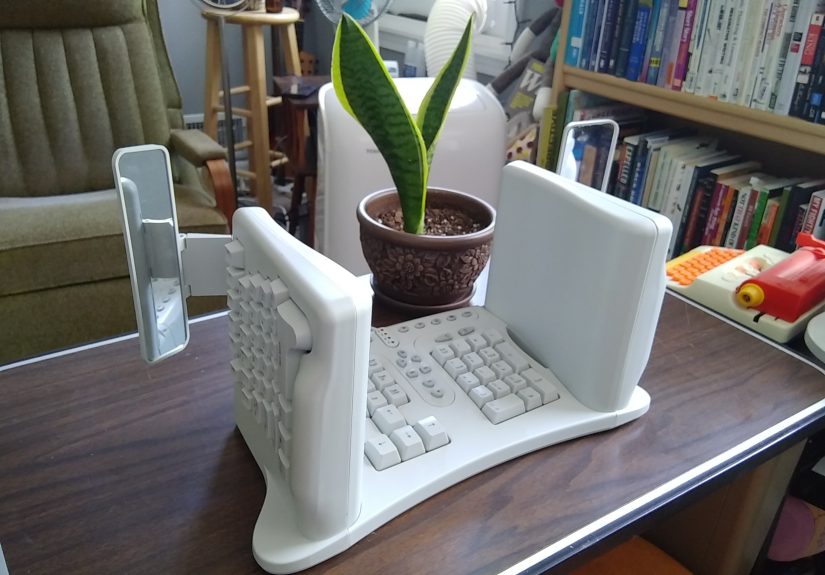
At first glance, the SafeType™ Vertical Keyboard looks less like an office tool and more like something borrowed from a low-budget spaceship bridge. It has upright key wells, wing-like mirrors, and the kind of silhouette that makes ordinary keyboards look embarrassingly flat. But behind the oddball design is a serious goal: reduce the awkward wrist and forearm positions that can make long typing sessions feel like a slow-motion argument between your hands and your job.
That is what makes the SafeType interesting. It is not trying to be a prettier keyboard. It is trying to be a more forgiving one. Instead of forcing your palms downward over a flat board, it rotates the typing surfaces inward so your hands sit in more of a handshake posture. The mirrors are there for a reason too, not because the keyboard wants to cosplay as a tiny forklift. They help users see function keys and the number row that would otherwise hide from view.
In a world full of “ergonomic” gear that amounts to little more than a curved space bar and some marketing adjectives, the SafeType takes the radical route. It asks a bigger question than most peripherals do: what if the keyboard itself is the problem, not your tolerance for discomfort?
What Makes the SafeType Vertical Keyboard So Different?
The SafeType keeps the familiar QWERTY logic most typists already know, but it reorients the two alphanumeric sections into steep vertical faces. That change matters because traditional keyboards encourage palm-down typing, also called forearm pronation. Over time, that posture can combine with wrist extension and side bending in ways ergonomists have been grumbling about for decades.
SafeType’s answer is simple in concept and dramatic in execution: rotate the hands inward, keep the wrists straighter, and let the forearms rest in a more neutral position. In theory, that should reduce some of the postural stress associated with conventional keyboards. In practice, it also means the keyboard looks like it was designed by someone who got tired of compromise and went directly to “fine, let’s rebuild the whole thing.”
The Mirrors Are Weird, but They’re Not a Gimmick
The mirrors are the detail everyone remembers, and they are also the detail that makes the design usable. Because the key surfaces face inward, the upper rows are not naturally visible while typing. SafeType solves that by using small fold-out mirrors so users can check finger placement without twisting their necks or abandoning the typing position. It is delightfully strange and deeply practical at the same time.
There is also a subtle message in that decision: this keyboard was built for people who already touch type or are at least close to it. SafeType is not holding the hand of the hunt-and-peck crowd. It is for users who want a familiar layout, but a very unfamiliar posture.
Why Ergonomic Keyboard Design Still Matters
Typing is low drama, which is exactly why it can become high trouble. A single keystroke is harmless. Ten thousand of them, repeated day after day with poor setup, can turn into a complaint department run by your wrists, forearms, shoulders, and neck. That is why keyboard ergonomics are not about luxury. They are about exposure. The longer you type, the more tiny inefficiencies start collecting interest.
Research on alternative keyboards has repeatedly focused on the same cluster of issues: pronation, wrist extension, and ulnar deviation. In regular human language, that means palms turned down too far, wrists bent upward too much, and hands drifting sideways instead of staying closer to a neutral line. Flat keyboards can encourage all three, especially when paired with a bad chair height, a high desk, or a user who types like they are trying to win a speed duel with gravity.
That does not mean one unusual keyboard is a miracle cure. It means posture matters, setup matters, and input devices are not neutral just because they are common. The most ordinary object on your desk may also be the most physically bossy.
Neutral Posture Is the Boring Hero
Most good ergonomics advice is not glamorous. Keep the wrists closer to straight. Let the shoulders relax. Keep the elbows near a comfortable bend. Support the forearms. Put the keyboard where your body can reach it without impersonating a pretzel. Then add movement breaks because even a perfect posture becomes a bad idea if you lock yourself into it for hours.
This is where the SafeType earns real attention. Its vertical layout is an aggressive attempt to make neutral posture easier to maintain, at least for the hands and forearms. It is not the only way to chase that goal, but it is certainly one of the least shy.
How SafeType Tries to Put Pain in the Rear-View
The SafeType’s biggest strength is that it tackles a real ergonomic complaint with a design that is hard to misunderstand. Some ergonomic keyboards offer light tenting, slight curvature, or adjustable angles that users may never bother to tune properly. SafeType skips the polite suggestion and goes straight to a fixed, high-commitment posture.
That boldness has advantages. For the right user, the keyboard can reduce the palm-down orientation that traditional boards encourage. It can also keep the wrists from collapsing into the upward bend that often comes with thick keyboards and bad desk geometry. Because the layout is still based on standard typing logic, it does not demand a completely new alphabet soup of finger assignments. In that sense, SafeType is radical in posture, but conservative in language.
There is another important detail that rarely gets enough airtime: support. With a vertical design, gravity is no longer your assistant. Your hands are more likely to need proper armrest or forearm support so the shoulders do not end up doing unpaid overtime. A SafeType on a sloppy workstation is like putting racing tires on a shopping cart. The keyboard matters, but the setup matters just as much.
Where the SafeType Keyboard May Actually Help
The SafeType makes the most sense for a narrow but very real group of users. First, it can appeal to touch typists who spend long hours at a desktop and already know that pronation-heavy typing does not feel great. Writers, coders, transcriptionists, analysts, customer support staff, and anyone whose workday is basically a love letter to the keyboard may appreciate a device built around neutral wrist posture rather than standard office tradition.
Second, it may be a better fit for people who have already tried gentler ergonomic solutions and still want something more decisive. A mild split keyboard helps some users. A tented model helps others. But the SafeType is for the person who has looked at all of those and said, “Nice effort, but my wrists are still filing complaints.”
Third, it has value for users who want a standard key logic without diving into a fully custom ergonomic rabbit hole. Not everyone wants to learn layers, ortholinear boards, thumb clusters, or firmware tinkering that sounds like a side quest in a mechanical keyboard RPG. SafeType offers a different posture without requiring a completely different typing philosophy.
The Trade-Offs No Honest Review Should Ignore
Adaptation Is Part of the Price
There is no such thing as a radical ergonomic keyboard with a zero-minute learning curve. SafeType is no exception. Even research on less extreme alternative keyboards shows that posture improvements and productivity do not always arrive on the same schedule. Some fixed and split designs preserve typing speed reasonably well after training, while more aggressive layouts can slow users down in the short term. Translation: your wrists may be happier before your words per minute are.
That is not failure. It is adaptation. But users should know what they are signing up for. If you need instant speed on day one, the SafeType may feel like trying to drive a stick shift after years of automatic transmission. Possible? Absolutely. Elegant at first? Not remotely.
It Is Not a Medical Wand
Let’s keep this grounded. A more neutral typing posture can reduce certain ergonomic risk factors. That is meaningful. But it is not the same thing as a guaranteed fix for wrist pain, repetitive strain injury, or carpal tunnel symptoms. Even occupational guidance on alternative keyboards is careful about this. The keyboard can help improve posture, but it does not erase workload, force, stress, desk height, mouse placement, or the basic fact that your body was not meant to become a decorative office statue.
If pain is persistent, worsening, or paired with numbness and weakness, a keyboard upgrade is not the whole conversation. That is when workstation changes, rest patterns, and professional medical advice belong in the chat too.
It Is Spectacularly Unsubtle
Some ergonomic keyboards whisper, “I’m different.” The SafeType arrives wearing a cape. That is either charming or ridiculous depending on your taste, your workspace, and how much you enjoy being asked, “Wait, what on earth is that?”
For some people, that boldness is a feature. The design is memorable because it is purposeful. For others, it is a barrier. The SafeType will never be the keyboard equivalent of blending in. It is the opposite of beige office camouflage.
SafeType vs. Modern Ergonomic Keyboards
Today’s ergonomic keyboard market is broader than it used to be. You can find split keyboards, tented keyboards, low-profile boards, negative-slope trays, compact layouts, and highly programmable devices with enough customization options to make your toaster feel underachieving. In that crowd, the SafeType still stands out because it chooses commitment over adjustability.
A modern split keyboard may let you experiment with angles, spacing, and tenting until you find a sweet spot. The SafeType basically says, “Here is the posture; meet me halfway.” That makes it less flexible, but also more distinctive. It is not trying to be everyone’s ergonomic keyboard. It is trying to be exactly right for a smaller group of users who benefit from a strong vertical orientation and can work within its rules.
That means the SafeType is best understood not as a mainstream office upgrade, but as a specialty tool. It is closer to an ergonomic intervention than a casual peripheral refresh. You do not buy it because your old keyboard is boring. You buy it because your old keyboard may be winning the argument against your wrists.
Who Should Consider It, and Who Probably Shouldn’t
If you are a confident touch typist, type for hours every day, and care deeply about wrist posture, the SafeType is worth serious consideration. It can also make sense if you have already tried more conventional ergonomic keyboards and still feel like your hands are working in a posture your body never approved.
On the other hand, if you need to look at the keys constantly, switch desks all day, or want a keyboard that works well in a cramped setup with no forearm support, this is probably not your best match. Users who want portability, minimalist aesthetics, or the crisp feel of popular modern mechanical boards may also find the SafeType less compelling. This is not a “buy first, figure it out later” device. It rewards fit, not impulse.
Final Verdict: Strange, Serious, and More Thoughtful Than It Looks
The joke is easy. A vertical keyboard with mirrors sounds like something dreamed up by a committee of chiropractors and sci-fi prop builders. But the punchline fades once you look at the design logic. SafeType is solving a real problem with a genuinely original form factor, and that alone makes it more interesting than a lot of “ergonomic” keyboards that barely leave the parking lot.
Will it work for everyone? Absolutely not. Will it instantly erase all typing pain? Also no. But if your job demands long hours at the keyboard, if neutral wrist posture matters to you, and if you are willing to trade familiarity of form for a more deliberate hand position, the SafeType is more than a curiosity. It is a serious attempt to make typing less punishing.
And honestly, in a product category crowded with cautious half-steps, there is something refreshing about a keyboard that looked at the entire problem and decided to come in sideways. Literally.
What the SafeType Experience Feels Like in Real Use
Using the SafeType in day-to-day work is less like “trying a new keyboard” and more like renegotiating a peace treaty with your hands. The first impression for many users is usually not instant relief. It is confusion, curiosity, and a brief moment of wondering whether the keyboard was designed by an ergonomist or a prankster with excellent intentions. You sit down, place your hands at the sides, and your brain immediately notices that the normal visual cues are gone. The usual flat map of the keys has been folded up like a tiny cardboard theater.
Then the mirrors start making sense. They are not elegant in the showroom sense, but they are useful in the “oh, that is why those are there” sense. During the first few sessions, many people would probably glance at them more than they expect, especially for the number row, function keys, and any reach that normally depends on muscle memory plus a quick downward look. That process can feel clumsy at first, but it also reveals something important: the SafeType assumes you are willing to build a new habit rather than demand instant comfort.
After the novelty wears off, the real question becomes whether the posture feels better over time. For some users, the answer may be yes in a very specific way. The forearms can feel less twisted, and the wrists may feel less collapsed into the upward bend that flat keyboards often encourage. That does not produce fireworks. It produces subtler wins: less irritation after long email sessions, less sense that your hands are being pressed into a shape they never requested, and a more relaxed feeling through the shoulders when the desk, chair, and arm support are set up correctly.
But the “when set up correctly” part is doing a lot of work there. Without support under the arms or forearms, the experience can shift from promising to tiring. A vertical keyboard asks more from the rest of the workstation than a regular one does. If the chair is too low, the desk too high, or the mouse parked halfway to another zip code, the benefits can get diluted fast. In that situation, the SafeType does not feel revolutionary. It feels needy.
There is also the social experience, which should not be ignored. A SafeType on your desk will start conversations whether you want them or not. Coworkers may stare. Friends may laugh. Someone will almost certainly ask if it is upside down. If you enjoy unusual tools, that attention is part of the fun. If you prefer your workspace to attract the same amount of attention as a stapler, the SafeType will test your tolerance for being the person with the spaceship keyboard.
In the long run, the experience is probably best described as a trade. You exchange immediate familiarity for the possibility of better typing posture. You trade sleek normalcy for deliberate weirdness. And if you are the right user, that trade can feel smart rather than silly. The SafeType is not the keyboard for everyone, but for the users it clicks with, the mirrors stop being a joke, the shape stops being shocking, and the whole thing starts to feel less like a novelty and more like a tool that finally understood the assignment.