Table of Contents >> Show >> Hide
- Before You Unblock: A 30-Second Reality Check
- What Unblocking Actually Changes on Roblox
- The Fastest Method: Unblock From Your Blocked Users List (Works for Most People)
- Unblock Directly From a Profile or In-Game Menu (When You Need It “Right Now”)
- If You Unblocked Them and Things Still Aren’t Working
- Console Network Unblocking (Xbox & PlayStation)
- After You Unblock: Smart Safety Moves (Without Killing the Fun)
- FAQ: Quick Answers That Save You a Headache
- Extra: Real-World “Unblock” Experiences (The Stuff Nobody Warns You About)
You know that awkward moment when you meant to block the “FREE ROBUX!!!!” spammer… but somehow blocked your actual friend who
just wanted to show you their new avatar drip? Yeah. Roblox blocking is wonderfully effective, and also a little too easy to
tap by accidentespecially on mobile.
The good news: unblocking someone on Roblox is quick once you know where Roblox hides the list (spoiler: it’s in Settings, not
in a magical “Undo My Mistakes” button). The slightly more complicated news: if you play on console, you may need to manage
two kinds of blocksyour Roblox account block list and your console network’s block list (Xbox or PlayStation).
Before You Unblock: A 30-Second Reality Check
- Blocking isn’t the same as unfriending. Blocking cuts off direct interaction. Unfriending just removes someone from your connections.
- Unblocking doesn’t automatically “fix everything.” You may still have privacy settings that limit chat, invites, or who can join you.
- If a parent/guardian blocked the user, you might not be able to undo it. In that case, Roblox will usually guide you to request an unblock.
- If the person was rude or creepy, you don’t “owe” them an unblock. Your peace > their feelings.
What Unblocking Actually Changes on Roblox
When you block someone on Roblox, you generally won’t be able to directly interact: no direct messages, no connection requests,
no invites (like experience or party invites), and you won’t remain connected/following each other in the same way. Roblox also
doesn’t send the other person a “You’ve been blocked!” notification, which is honestly polite.
Unblocking reverses that wallmeaning you can interact again, as long as your privacy, chat, and parental controls allow it.
Think of it like unlocking a door… that still might have a security system, a guard dog, and your mom saying “Who is that?”
The Fastest Method: Unblock From Your Blocked Users List (Works for Most People)
Roblox’s official path is basically the same everywhere: Settings → Privacy & content maturity →
Blocked users → Unblock → Save.
How to Unblock Someone on a Computer (Web Browser)
- Open a browser and sign in to your Roblox account.
- Click the gear icon (or Settings) near the top-right area of the site.
- Choose Settings.
- Open Privacy & content maturity.
- Select Blocked users.
- Find the username you want to unblock, then click Unblock next to their name.
- Click Save (don’t skip thisyour future self will thank you).
Tip: If you don’t see “Privacy & content maturity,” look for a privacy-related tab. Roblox occasionally updates labels,
but the blocked list still lives in the privacy/settings neighborhood.
How to Unblock Someone on Mobile (iPhone/iPad/Android)
- Open the Roblox app and make sure you’re logged in to the right account.
- Tap More (often the three dots icon).
- Tap Settings.
- Go to Privacy & content maturity.
- Tap Blocked users.
- Tap Unblock next to the user’s name.
- Tap Save (if you see it).
Mobile gotcha: If you’re on a smaller screen, Roblox may tuck options into scrollable sections. When in doubt,
scroll slowly and look for “Blocked users.”
How to Unblock Someone on Console (Xbox or PlayStation)
Here’s the trick: Roblox on console is designed mainly for playing, not deep account management. You can sometimes unblock
someone inside a game, but the most reliable method is still using your account settings on a phone or computer.
- Best option: Use the computer/mobile steps above to unblock from Blocked users.
- Quick in-game option: While in an experience, open the People list/menu and look for an Unblock button next to the player (details below).
- Also check platform blocks: If you blocked them on Xbox or PlayStation, Roblox unblocking alone may not restore communication.
Unblock Directly From a Profile or In-Game Menu (When You Need It “Right Now”)
Option A: Unblock From the User’s Profile
- Open the user’s Roblox profile (search their name or tap it from a recent player list).
- Tap or click the three dots menu on their profile.
- Select Unblock User (or “Unblock”).
If you’re thinking, “I can’t find the three dots,” you’re not alone. Roblox likes minimalist design… which sometimes means “Where
did the button go?” Check the upper-right corner of the profile area and look for a small menu icon.
Option B: Unblock Inside an Experience (People Menu / Leaderboard)
This is perfect for the “Oops, I blocked the wrong person mid-game” situation.
- Open the in-game menu:
- PC: press Esc (then go to the People tab).
- Many experiences: use the Leaderboard/player list (often upper-right).
- Find the user’s name in the list.
- Select the user and choose Unblock (or use the unblock button next to their name).
Note: Some experiences hide the leaderboard on small screens, and some creators customize menus. If you can’t find
it, fall back to the Settings method.
If You Unblocked Them and Things Still Aren’t Working
If you clicked Unblock and expected instant best-friend vibes but nothing changed, here are the most common reasons.
1) They Blocked You Back
Roblox unblocking removes your block. It does not remove their block. If they blocked you, you won’t be able to message
or interact normally until they unblock you too. The only fix is… them.
2) A Parent or Guardian Blocked the User
If your account has parental controls with a linked parent/caregiver, you may see a message that you can’t unblock that person.
In many cases, Roblox will let you send a request for your parent/caregiver to review. If you’re under 13, this comes up more
often because Roblox’s parental controls are designed to keep those changes adult-approved.
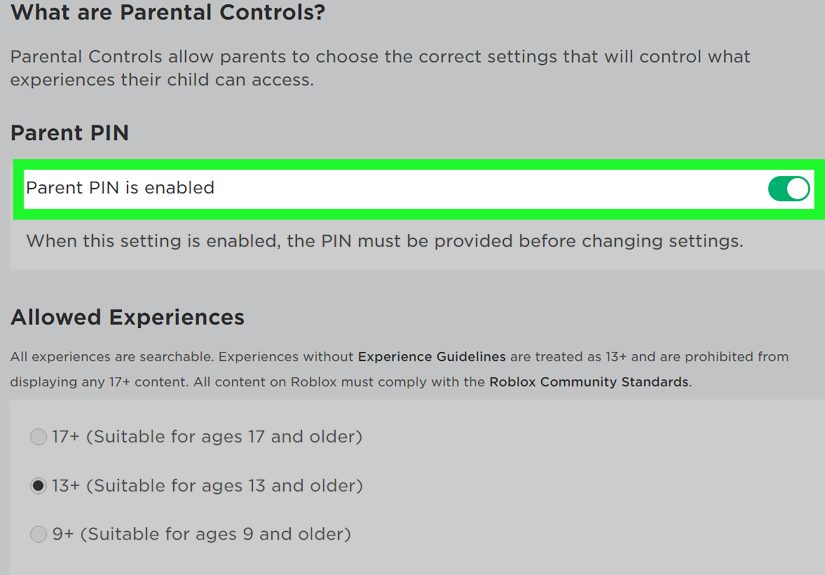
3) Your Account Settings Are Locked (PIN / Parental Controls)
Sometimes Roblox requires an account PIN (or parental privilege approval) to change privacy-related settingsincluding unblocking.
If it looks like the button “does nothing,” it may be waiting for verification.
- If it’s your PIN, enter it when prompted.
- If it’s a parent/guardian PIN, ask them to approve the change.
4) Your Privacy Settings Still Limit Messages or Invites
Even with someone unblocked, Roblox may limit how you can communicate depending on your age settings, account configuration, and
privacy choices. For example, your account could be set to:
- Only allow messages from connections/friends.
- Limit chat in certain experiences.
- Restrict invites or party features.
If you want to reconnect with someone you unblocked, check your privacy settings and make sure they match what you’re trying to do
(without opening the floodgates to strangers).
5) You Blocked Them on Xbox or PlayStation Too
Console networks can block communication independently of Roblox. So you might unblock on Roblox, but your console still says,
“Nope. Not today.” Fix that by reviewing your console’s blocked list (steps below).
6) The Classic Fix: Sign Out, Restart, and Try Again
Not glamorous, but effective. If Roblox menus are lagging behind:
- Log out of Roblox and log back in.
- Close and reopen the app.
- Restart your device/console if the list won’t refresh.
Console Network Unblocking (Xbox & PlayStation)
If you’re on console, do this once so you don’t accidentally “double-block” someone again.
How to Unblock Someone on PlayStation (PS5 / PS4)
PlayStation has its own “Blocked Players” list. If someone is blocked here, it can affect messages, party features, and moreno
matter what Roblox says.
- Open Game Base (PS5) or your friends/social area.
- Find Game Base settings (or privacy/social settings depending on your console).
- Open Blocked Players.
- Select the person and choose Unblock.
If you want to play together again, you may need to send a new friend request after unblockingPlayStation won’t always restore
friend status automatically.
How to Unblock Someone on Xbox (Console, App, or PC)
Xbox also maintains a separate blocked list. The menu names can shift as Xbox updates the interface, but the idea is the same:
find your social/friends settings, open your blocked list, and remove the block.
- Open your profile and go to your social or friends area.
- Look for a filter or list option like Blocked.
- Select the player and choose Unblock.
Shortcut: If you can search for their gamertag, open their profile and look for an unblock option in the “More”
(three dots) menu.
After You Unblock: Smart Safety Moves (Without Killing the Fun)
Unblocking is a toolnot a contract. If you unblock someone and they go right back to being a problem, you can re-block them
instantly. Here’s how to stay comfortable while keeping your social options open:
- Keep messages to connections only if random DMs stress you out.
- Use private servers or play with people you know when you want a calmer vibe.
- Report + block if someone is harassing you or breaking rules. You’re not “snitching,” you’re cleaning up your game.
- Talk to a trusted adult if someone makes you uncomfortable or pressures you for personal info.
FAQ: Quick Answers That Save You a Headache
Will the person know I unblocked them?
Usually, no. Roblox generally doesn’t send a notification for blocks, and unblocking doesn’t pop up an alert either. (Your friend
may still notice because they can message you again, but that’s more “science” than “notification.”)
Does unblocking automatically re-add them as a friend/connection?
Not necessarily. You may need to send a new connection/friend request if you want them back on your list.
I unblocked them, but chat still doesn’t work. Why?
Most commonly: your privacy settings limit chat, a parent/guardian setting is controlling communication, or they still have you
blocked. Check those before you blame your Wi-Fi (even if blaming your Wi-Fi is emotionally satisfying).
Can I unblock someone my parent/guardian blocked?
In many cases, noyou’ll need to request the change so the parent/caregiver can approve it. Roblox is intentionally strict here.
Extra: Real-World “Unblock” Experiences (The Stuff Nobody Warns You About)
Let’s talk about the situations that make people Google “how to unblock someone on Roblox” at 1:00 a.m. like it’s an emergency
room for friendships. The steps are easy; the emotions are the DLC.
Experience #1: The accidental block during chaos. You’re in a fast-paced experience, the server is loud, someone’s
jumping around your character like a caffeinated kangaroo, and you hit the menu trying to mute them… but your thumb chooses
block. Suddenly, your friend goes silent, you can’t invite them back, and the only thing louder than the in-game soundtrack
is the “uh-oh” in your brain. The in-experience People menu method can save you here because it’s basically the “undo button”
Roblox never officially called an undo button.
Experience #2: The “we argued, now we’re fine” unblock. Sometimes blocking is a timeout. Maybe someone spammed your
chat, maybe they were mean, maybe you both said things you regret. Then, a day later, you’re fine againbecause human beings are
complicated and also because everyone missed the group hangout. Unblocking is your way of saying, “I’m open to normal again,”
but smart players also tweak privacy settings afterward: maybe keep DMs to connections, maybe avoid public servers when you’re
already annoyed, maybe set boundaries before it turns into a block-fest sequel.
Experience #3: The parent/guardian block surprise. This one confuses a lot of people: you try to unblock and Roblox
says you can’t. It can feel unfair in the momentlike the game is refusing to listenbut it’s usually tied to a safety system.
If you’re under 13 or your account is linked to a parent/caregiver, Roblox may require adult approval to unblock someone they
blocked. The best move here isn’t to panic-click settings; it’s to talk it out. If the person is a real friend from school or
family, that’s a simple conversation. If the person is a “friend” you’ve never met who keeps asking weird questions, the block
is probably doing you a favor.
Experience #4: The “I unblocked them… but nothing changed” mystery. This is where console players get hit hardest.
You unblock on Roblox, but you still can’t join parties or talk. That’s when you realize your console network has its own blocked
list. It’s like you removed one lock, but there’s a second lock you forgot existed. Once you clear the Xbox/PlayStation blocked
list, things usually snap back to normaland you feel like a tech wizard, even though the real wizardry was just finding the menu.
Experience #5: The safety wake-up call. Many players first learn about blocking/unblocking because something felt
offsomeone being rude, pressuring them, or trying to get personal info. If you unblock someone and the bad behavior returns,
it’s completely okay to re-block immediately and report if needed. Blocking is not “dramatic.” It’s a tool for controlling your
space, the same way you’d walk away from someone who’s being gross in real life. The best Roblox experiences are creative,
collaborative, and funso protect your fun like it’s rare loot.
Bottom line: unblocking is simple, but you’re still in charge of who gets access to your time, your chat, and your attention.
Use the tools, trust your instincts, and remember: you can be kind and have boundaries. Roblox allows both.