Table of Contents >> Show >> Hide
- Before You Start: A 30-Second Prep That Saves 30 Minutes
- Quick “Which Expedition Do I Have?” Cheat Sheet
- The 10 Steps to Set a Timex Expedition
- Step 1) Identify your exact model (so you don’t fight the wrong controls)
- Step 2) Learn the three crown positions (analog/chrono models)
- Step 3) Set the time (analog)
- Step 4) Set the date (and day, if you have it) without “date-wheel drama”
- Step 5) Confirm AM/PM (the #1 reason the date flips at noon)
- Step 6) Set time and date (digital Expeditions)
- Step 7) Set alarms and timers (digital models)
- Step 8) Set (or re-zero) the chronograph hands (chronograph Expeditions)
- Step 9) Test INDIGLO® and any “night mode” behavior
- Step 10) “Seal the deal”: push the crown in, check water resistance habits, and do a final sanity check
- Troubleshooting: When Your Expedition Doesn’t Cooperate
- Trail-Tested Experiences: What Setting a Timex Expedition Feels Like in Real Life (500+ Words)
- Conclusion
The Timex Expedition is basically the “jeans and boots” of watches: tough, practical, and somehow appropriate for both hiking trails and grocery-store aisles. But even the toughest watch has one soft spotwhen the clocks change, your watch doesn’t. So let’s fix that.
This guide walks you through setting most Timex Expedition models, including: classic analog (3-hand with or without date), digital (with mode/set buttons), and Expedition chronographs (extra sub-dials and pushers). Since Expedition is a whole family (not one single watch), I’ll show you the universal steps firstand point out the “if your watch looks like this…” forks along the way.
Before You Start: A 30-Second Prep That Saves 30 Minutes
- Find a reliable time source (your phone is perfect).
- Dry hands + dry watch (water-resistant ≠ “press buttons underwater”).
- Grab a pen tip or paperclip if your model has small recessed buttons (some do).
- Look at the caseback (the metal back of the watch). If you see a model/module code, that’s your “cheat code” for finding the exact manual.
Quick “Which Expedition Do I Have?” Cheat Sheet
| What you see | You likely have | You’ll use |
|---|---|---|
| One crown only, no extra buttons | Analog (time/date) | Crown positions |
| Crown + 2 pushers (top/bottom) | Chronograph | Crown + pushers |
| Four buttons, digital screen | Digital (alarm/timer/time zones) | MODE / SET / + / – (names vary) |
| Extra hands labeled tide/temp/compass | Special feature Expedition | Crown + feature buttons |
The 10 Steps to Set a Timex Expedition
Step 1) Identify your exact model (so you don’t fight the wrong controls)
Timex Expedition watches share a name, not a single instruction set. Your first win is identifying what you’re holding:
- Analog: you’ll set time/date with the crown.
- Digital: you’ll set time/date using a “set” flow (hold SET, then tap NEXT/MODE, adjust with +/–).
- Chronograph: you’ll set the main time like analog, plus you may need to “zero” the chronograph hands.
If you can find a model or module code on the caseback, it’s the fastest path to the exact button map. If you can’t find it, don’t worrythese steps still work for most Expeditions.
Step 2) Learn the three crown positions (analog/chrono models)
On most analog Timex watches, the crown has “levels”:
- Position 0: crown fully pushed in (normal running).
- Position 1: crown pulled out slightly (often quick-set date).
- Position 2: crown pulled out fully (set the time).
Some chronograph manuals label these as A (in), B (middle), C (out). Same ideajust alphabet-flavored.
Step 3) Set the time (analog)
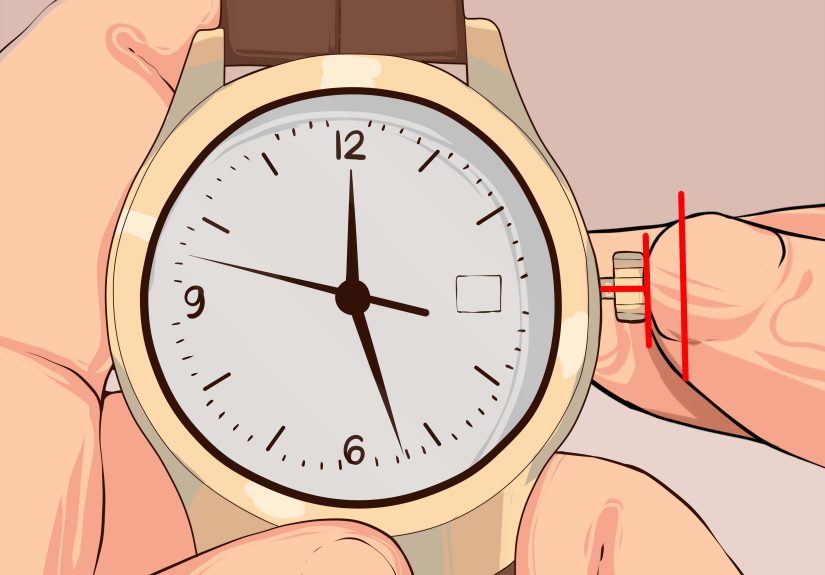
- Pull the crown all the way out to the farthest position (time-setting position).
- Turn the crown to move the hands to the correct time.
- Push the crown fully back in when finished.
Pro move: If your watch has a date window, set the time by moving the hands forward past 12. When the date flips, you’ve found midnight. That helps you avoid accidentally setting 7:00 PM when you meant 7:00 AM.
Step 4) Set the date (and day, if you have it) without “date-wheel drama”
If your Expedition has a date window (or day-date), you’ll typically do this:
- Pull the crown out to the middle position (quick-set position).
- Turn the crown to advance the date (and the day, if your model supports it via the crown).
- Push the crown fully back in.
Important: Many watches shouldn’t be quick-set during the late-evening “changeover zone” when the date mechanism is already gearing up to flip. A safe habit is to first set the time to about 6:30 (AM or PM), then quick-set the date, then return to the correct time.
Step 5) Confirm AM/PM (the #1 reason the date flips at noon)
If your date changes at lunchtime, your watch is living its best “I’m 12 hours off” life. Fix it like this:
- Pull the crown to the time-setting position.
- Advance the hands forward until the date changesthis is midnight.
- Now set the correct time from there (AM hours after midnight, PM hours after noon).
This one check prevents a shocking number of “My watch is haunted” conversations.
Step 6) Set time and date (digital Expeditions)
Digital Timex Expedition models typically follow a “hold to enter settings, tap to move, press to change” pattern. The button names vary, but the flow is usually the same:
- Go to the main time display.
- Press and hold the SET button until something starts flashing (time zone or seconds).
- Press NEXT (or MODE) to cycle through fields (hour → minute → seconds → month → day → year, etc.).
- Use + / – (or START/STOP and RESET) to change the flashing value.
- Press DONE (or SET again) to save and exit.
Common options you may see while cycling: 12/24-hour format, date format (MM-DD vs DD-MM), hourly chime on/off, button beep on/off, and multiple time zones.
Step 7) Set alarms and timers (digital models)
If your Expedition is digital, it probably has at least one alarmand possibly multiple alarms plus a countdown timer. Here’s the typical setup:
- Press MODE until you reach ALARM (or AL).
- Press SET to enter alarm settings (hour flashes).
- Adjust hour/minute with +/–, then press NEXT/MODE to move through fields.
- Press DONE to save.
- Toggle the alarm on/off (often with START/SPLIT or a dedicated button) until the alarm icon appears/disappears.
For the timer, switch MODE to TIMER (TR), press SET, set hours/minutes/seconds, choose whether it stops or repeats, then START to run it.
Step 8) Set (or re-zero) the chronograph hands (chronograph Expeditions)
Chronographs can be perfectly set for timebut still show the stopwatch hand sitting at 57 seconds like it’s refusing to participate. That usually means the chronograph hands need re-zeroing.
- Make sure the chronograph is stopped and reset (typically: top pusher starts/stops, bottom pusher resets).
- Pull the crown to the specified calibration position (often the middle or fully out position in chronograph manuals).
- Use the pushers to move the chronograph hands back to “0” (12 o’clock) as instructed for your sub-dials.
- Push the crown back in to resume normal operation.
Once the hands are aligned, your stopwatch won’t look like it’s permanently timing how long you’ve been avoiding laundry.
Step 9) Test INDIGLO® and any “night mode” behavior
A lot of Expeditions include INDIGLO® illumination. Depending on the model, you may:
- Press a dedicated light button, or
- Press the crown (some analog models activate light by pushing the crown inward), or
- Enable a night mode that makes the light easier to trigger.
After you finish setting, test the light once. If it flashes or fails, the battery may be lowespecially if the watch has been sitting in a drawer plotting its comeback.
Step 10) “Seal the deal”: push the crown in, check water resistance habits, and do a final sanity check
The most important “setting” is the one people forget: returning the watch to its sealed, normal state.
- Push the crown fully in (and screw it down if your case uses a screw-down crown).
- Don’t press buttons underwater unless your watch is specifically rated for that behavior.
- Confirm the time, date, and alarm icon status (on/off) before you walk away.
Congratulationsyour Timex Expedition now agrees with the current timeline.
Troubleshooting: When Your Expedition Doesn’t Cooperate
If the date won’t change (or changes at weird times)
- AM/PM mismatch: set midnight correctly by advancing past a date change, then set time.
- You set the date during the danger zone: move the hands to a safer time (like 6:30), then quick-set again.
- It’s mid-month but the date shows “1” tomorrow: check if the month/day format is reversed (digital models can switch formats).
If buttons don’t respond (digital)
- Try a long press on SET (many models require it to enter settings).
- Make sure you’re in the Time display (some settings only start from Time mode).
- If the display is dim or flickers, a battery change is likely.
If the chronograph hand won’t return to zero
- Stop the chronograph, then reset.
- If it still sits off-center, run the re-zero calibration steps (Step 8).
Trail-Tested Experiences: What Setting a Timex Expedition Feels Like in Real Life (500+ Words)
The first time I had to set a Timex Expedition in the real world, it wasn’t in a calm, well-lit room with a fresh cup of coffee. It was in a dim cabin, with a headlamp that kept sliding down my forehead like it had somewhere else to be. The watch was fine. The human operating it? Questionable.
Here’s what I learned quickly: the Expedition is built for the outdoors, but your setting process should still be done like you’re handling a tiny mechanical negotiation. Not because it’s fragilebecause the fastest way to feel silly is to set the time perfectly… and then realize the date flips at noon.
On one trip, I watched that exact mistake unfold in real time. A friend set the time to “7:15” and walked away feeling accomplished. Twelve hours later, the date changed while we were making sandwiches. Suddenly the watch was reporting a new day at lunchtime, like it had decided to adopt a Mediterranean schedule. The fix was simpleadvance the hands until the date flips (true midnight), then set the correct timebut the lesson stuck: always verify AM/PM on any watch with a date.
Another memorable moment came during daylight saving time. Phones change automatically, but a Timex Expedition is proudly old-school: it waits for you to show leadership. I did the “quick hour shift” in about 15 secondsuntil I realized the watch had a day-date complication and I was adjusting things near the late-evening date-change zone. The watch didn’t break, but the date acted weird for a bit, like it was thinking, “I’d love to help, but you’re currently tugging on the gears while I’m busy.” That’s when the “set it to 6:30 first” habit became my rule. If I’m unsure whether the watch thinks it’s AM or PM, I temporarily set it to 6:30, then set the date, then return to the correct time. It’s the watch equivalent of clearing your workspace before assembling furnitureboring, but it prevents dramatic language later.
Digital Expeditions come with a different kind of adventure: the button dance. On a windy overlook, I tried to set a timer while holding a snack in one hand, and I discovered that “press and hold SET” is a lot harder when you’re also trying not to drop trail mix into a backpack pocket full of lint. Digital models are logical, though: once you understand that one button enters settings, one button moves to the next field, and two buttons change the value, the whole system makes sense. The key is patienceif you jab buttons like you’re trying to win an arcade game, you’ll overshoot the hour, flip the date format, and accidentally turn on the hourly chime (which is fun until it starts beeping forever in a quiet room).
My favorite Expedition “experience” is still INDIGLO®. If you’ve ever fumbled for a phone flashlight at 3 a.m. and been immediately blinded by your own decisions, you understand the joy of a gentle glow that lights up the dial without turning your face into a beacon. On certain models, the crown-press light feels almost magical the first timelike the watch is quietly saying, “Relax. I’ve got this.” It’s also a sneaky battery indicator: if INDIGLO® is dim or inconsistent, the watch may be telling you it’s time for a battery swap.
The Expedition’s whole personality is reliability, and setting it becomes a small ritual: dry hands, correct crown position, confirm midnight/date behavior, lock the crown back down, and head out. Once you’ve done it a couple of times, you stop thinking of it as “programming a watch” and start thinking of it as “checking gear before a trip.” And honestly? That fits the Expedition vibe perfectly.
Conclusion
Setting a Timex Expedition isn’t hardit’s just different depending on whether you have analog, digital, or chronograph features. If you remember three things, you’ll be set for life: identify your controls, confirm AM/PM by checking when the date flips, and always push the crown fully back in when you’re done. Do that, and your Expedition will keep doing what it does best: showing up, taking knocks, and staying readable when the sun doesn’t.