Table of Contents >> Show >> Hide
- Why Checking Your Green Dot Balance Regularly Matters
- 6 Easy Ways to Check the Balance on a Green Dot Card
- 1) Check Your Green Dot Balance in the Mobile App
- 2) Check Your Balance Online at GreenDot.com
- 3) Text Your Balance to Green Dot (Quick SMS Method)
- 4) Call the Automated Customer Service Line
- 5) Call a Live Green Dot Customer Service Agent
- 6) Use an ATM Balance Inquiry (Best for Cash Access Moments)
- Which Green Dot Balance Check Method Is Best?
- Tips to Avoid Fees When Checking Your Balance
- What If You Can’t Access Your Green Dot Balance?
- Security Tips When Checking Your Green Dot Card Balance
- Final Thoughts
- Real-Life Experiences and Scenarios (Extended Guide)
If you’ve ever stood in a checkout line doing mental math like, “Okay… coffee was $6, groceries were $42, and I definitely bought something online at 1 a.m.,” this article is for you.
Checking your Green Dot card balance is actually pretty easy once you know where to look. The trick is choosing the method that fits the moment: quick text check, app login, ATM, or a good old-fashioned phone call. And because prepaid cards can come with different fee structures, it also helps to know which options are usually free and which ones can cost you a little extra.
In this guide, we’ll break down 6 easy ways to check your Green Dot card balance, plus smart tips for avoiding balance inquiry fees, handling common issues, and keeping your account secure. We’ll also cover real-life examples and user experiences at the end so you can see which method works best in everyday situations.
Why Checking Your Green Dot Balance Regularly Matters
Before we jump into the how-to, here’s the short version of why this matters: prepaid cards are great for budgeting, but they only work smoothly when you know your available funds. A quick balance check can help you:
- Avoid declined transactions at checkout
- Track spending and stick to a budget
- Catch suspicious charges early
- Avoid unnecessary fees (especially ATM and live-agent balance checks on some prepaid cards)
- Confirm deposits, transfers, or refunds posted correctly
In other words, a 10-second balance check can save you from a 20-minute headache later.
6 Easy Ways to Check the Balance on a Green Dot Card
1) Check Your Green Dot Balance in the Mobile App
This is usually the fastest and most convenient option. Green Dot’s app is built for day-to-day account management, and it lets you view your balance and transaction history in one place.
How to do it:
- Open the Green Dot mobile app
- Sign in with your account credentials
- Your available balance should appear on the main account screen
- Tap into your account to review recent transactions
Why this method is great:
- Available 24/7
- You can see transaction history, not just the number
- You can also use account alerts and chat support in the app
If you check your balance often, the app is probably your best friend. It’s the “look once, know everything” option.
2) Check Your Balance Online at GreenDot.com
If you’re on a laptop (or just don’t feel like using the app), Green Dot also lets you check your balance online. This is ideal if you want a bigger screen to review transactions or you’re already working at your computer.
How to do it:
- Go to the official Green Dot login page
- Enter your User ID and Password
- Log in to your account dashboard
- View your balance and transaction history
Pro tip: Always use the official Green Dot website and avoid logging in through random links in emails or texts. If you need the login page, go directly to the site yourself.
This method is especially helpful when you want to compare several transactions, verify a deposit, or check your balance before paying bills online.
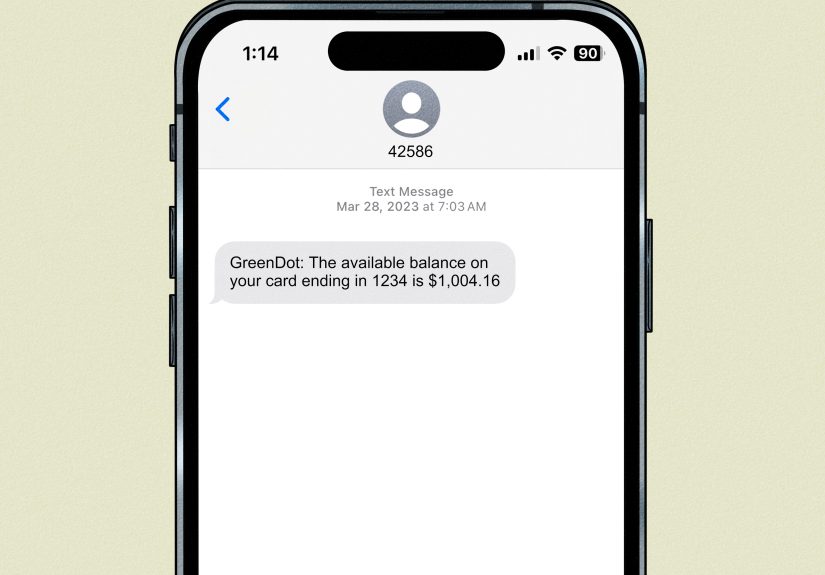
3) Text Your Balance to Green Dot (Quick SMS Method)
Need a balance check while you’re on the move? Green Dot supports a text message option, which is perfect when your internet is slow, your app is acting dramatic, or you just want a quick answer.
Green Dot SMS balance check format:
- Text BAL Last4 to 42586
- (Replace Last4 with the last 4 digits of your card)
Example: If your card ends in 1234, text BAL 1234 to 42586.
You can also check transactions by texting:
- HIST Last4 to 42586
Important note: Green Dot says it doesn’t charge customers to receive a text message, but your mobile carrier’s message and data rates may still apply.
This is one of the easiest Green Dot balance check methods because it’s quick, low-effort, and works without opening the app.
4) Call the Automated Customer Service Line
Yes, phone systems still exist, and honestly, they’re not always a bad thing. If you prefer a voice prompt over tapping around an app, the automated phone system is a solid way to check your balance.
How to do it:
- Call the number on the back of your Green Dot card (or Green Dot customer service)
- Follow the automated prompts
- Verify your identity (you may need card/account details)
- Listen for your current balance and recent transactions
For prepaid cards in general, automated balance checks by phone are often free (or at least one of the lower-cost options), which is one reason many people still use them.
This is a great backup option if you’re locked out of your app or having login issues online.
5) Call a Live Green Dot Customer Service Agent
Sometimes you don’t just need the number you need an explanation. Maybe a deposit hasn’t shown up yet, a charge looks unfamiliar, or your available balance doesn’t match what you expected. That’s when a live agent can help.
Green Dot lists a customer support number and also notes that you can call the number on the back of your card. A live representative may be able to help you check your balance and review account activity in more detail.
When this is the best option:
- You suspect fraud or an unauthorized transaction
- You need help understanding fees
- You’re having trouble with text/app login
- You want support beyond a simple balance number
Heads-up: On prepaid cards generally, some providers may charge a fee for live-agent balance checks. Green Dot card fees can vary by card type, so check your cardholder agreement to confirm what applies to your specific card.
6) Use an ATM Balance Inquiry (Best for Cash Access Moments)
If you’re already at an ATM and want to know your balance before withdrawing cash, an ATM balance inquiry is another easy option.
How to do it:
- Insert or tap your Green Dot card at an ATM
- Enter your PIN
- Select the option for Balance Inquiry
- Review your balance on screen (and print a receipt if offered)
The big thing to know here: ATM balance inquiries can cost money depending on whether the ATM is in-network or out-of-network. Green Dot card agreements commonly list in-network balance inquiries as free and out-of-network balance inquiries with a fee (for some cards, $0.50), and the ATM owner may also charge an extra fee.
Smart move: Use the Green Dot app or official tools to find free or in-network ATM locations whenever possible.
Which Green Dot Balance Check Method Is Best?
Here’s the quick ranking for most people:
- Mobile app best overall for convenience and transaction details
- Online account login best for desktop users
- Text message (BAL/HIST) best for speed
- Automated phone system best backup when internet isn’t available
- Live agent best for troubleshooting
- ATM balance inquiry useful in a pinch, but watch the fees
If your goal is to check your Green Dot card balance for free, start with the app, website, or text option before heading to an ATM or live support call.
Tips to Avoid Fees When Checking Your Balance
Prepaid cards can be super helpful, but fees are where people get caught off guard. Here are a few easy ways to avoid “Where did my money go?” moments:
Use free methods first
App, website, and text options are typically the best first stop. They’re quick and often free from the card provider side (carrier text charges may apply).
Use in-network ATMs
If you must use an ATM, try to use an in-network location. Out-of-network ATM balance checks and withdrawals often cost more.
Read your cardholder agreement
Not every Green Dot card has the exact same fee schedule. Some cards waive certain fees, while others charge for out-of-network balance inquiries or live-agent support.
Review transaction history regularly
Checking your transaction list helps you catch duplicate charges, refunds, or pending items before they become a mystery later.
What If You Can’t Access Your Green Dot Balance?
If your balance check isn’t working, don’t panic. Here are the most common fixes:
Problem: App login won’t work
- Double-check your User ID and password
- Use the “Forgot User ID/Password” option
- Try the website login if the app is glitchy
Problem: Text balance check doesn’t respond
- Make sure your phone number is registered to your Green Dot account
- Confirm you used the correct format (BAL + last 4 digits)
- Check for carrier message delays or blocks
Problem: ATM balance looks wrong
- Check your app/online transaction history for recent purchases
- Verify whether a withdrawal fee or ATM owner fee was charged
- Contact customer service if a transaction looks suspicious
Problem: Card not registered yet
Registration matters for account access and protections. Green Dot and federal consumer guidance both emphasize registration, and FDIC insurance eligibility for prepaid funds also depends on the card being registered and other requirements being met.
Security Tips When Checking Your Green Dot Card Balance
A quick balance check should be simple but don’t skip the basics:
- Use official channels only: the Green Dot app, GreenDot.com, the number on the back of your card, or approved ATM networks
- Never text your full card number: Green Dot’s text command uses only the last 4 digits
- Avoid public Wi-Fi for account logins: use secure data or a trusted network
- Set alerts in the app: balance and transaction alerts can help you catch problems fast
- Check often: small suspicious charges are easier to catch early
Final Thoughts
If you’re wondering how to check the balance on a Green Dot card, the good news is you’ve got options and most of them are quick. For everyday use, the Green Dot mobile app and online login are your best bets. If you need speed, the BAL/HIST text commands are incredibly handy. And if you’re dealing with a weird charge or a deposit question, a phone call to customer service can save the day.
The only method to use carefully is the ATM balance inquiry, because fees can sneak in depending on the ATM network. When in doubt, start with the app or text message and keep your cardholder agreement handy for fee details.
Bottom line: checking your Green Dot balance doesn’t have to be a chore. Once you pick the method that matches your routine, it becomes a 30-second habit that keeps your spending smooth and your stress level low.
Real-Life Experiences and Scenarios (Extended Guide)
Let’s make this practical. Here are a few everyday experiences that show how people actually use these Green Dot balance check methods and which one tends to work best in real life.
Experience #1: The “Checkout Line Panic” Moment
You’re at the grocery store, your cart is full, and suddenly you realize you’re not 100% sure how much is left on your card. This is where the text method shines. Instead of stepping out of line to log in somewhere, you can text BAL + last 4 digits and get your balance quickly. It’s the fastest option for “I need the number right now” moments. A lot of users prefer this because it feels less clunky than calling a phone line when they’re in public.
Experience #2: The “Did My Refund Hit Yet?” Check
If you’re waiting on a refund from a store or a transfer from another account, the mobile app is usually the easiest route. Why? Because you’re not only checking the balance you’re checking the transaction history too. You can see whether the money posted, when it posted, and sometimes spot a merchant name faster than you can by phone. This also helps when your balance looks “off” and you realize, “Oh right, that subscription renewed today.” Mystery solved.
Experience #3: The “App Won’t Load and I Have Bills” Problem
Tech is great until it decides not to be. If the app stalls, won’t log in, or your phone storage is screaming for mercy, the web login is a lifesaver. Many people forget the desktop option exists, but it’s often easier to troubleshoot on a laptop. Bigger screen, easier password reset flow, and less thumb-typing rage. If you’re trying to confirm enough funds before paying a bill online, the website is ideal.
Experience #4: The “I Need Cash, But Which ATM?” Situation
This one gets expensive if you’re not careful. Let’s say you go to the closest ATM, check your balance, and then withdraw cash. If it’s out-of-network, you may get hit with both a Green Dot fee and an ATM operator fee. That’s why experienced prepaid card users often check the app first for balance and then use the app’s ATM location tools to find a lower-cost option. One small habit change can save a surprising amount over a few months.
Experience #5: The “Something Looks Weird” Call
Sometimes a balance check turns into a bigger question: a charge you don’t recognize, a direct deposit that seems delayed, or a transaction amount that doesn’t match your receipt. This is where calling support helps, especially if you need context, not just a balance number. The automated system is good for quick info; a live agent is better when you need an explanation. It’s not the fastest route, but it’s often the right one when money looks missing.
Experience #6: The “Budgeting Routine” That Actually Works
One of the best habits prepaid card users build is a simple checking routine: app in the morning, text check before shopping, and transaction review once a week. It sounds basic, but it works. It helps you catch fees, stay on budget, and avoid accidental overspending. If you use your Green Dot card for groceries, gas, or subscriptions, this kind of rhythm makes the card way more useful and way less stressful.
The big takeaway from all these experiences? The “best” Green Dot balance check method depends on the moment. If you need speed, text. If you need detail, app or website. If you need clarity, call support. And if you’re using an ATM, always think about fees before pressing that balance inquiry button. A little strategy goes a long way.