Table of Contents >> Show >> Hide
- What Google Lens and Multisearch Actually Do (Without the Hype)
- What’s New: The Expansion of AI-Driven Visual Search
- How Lens and Multisearch Work (Conceptually) and Why It Matters
- Real-World Examples: When Visual + Text Search Beats Typing
- What This Means for SEO (Yes, Visual Search Has SEO Consequences)
- Privacy and Control: The Trade-Off Behind “Search Everything”
- Where This Is Headed: Multimodal Search as the New Default
- of “Experience”: What Using Lens + Multisearch Feels Like in Real Life
- Conclusion
Google Search has always been a little bit like that friend who knows a guy who knows a guy. But lately,
it’s evolving into something closer to a helpful detective with a camera, a notepad, and a suspiciously
good memory for products, places, and “what on Earth is that thing?”
The big shift is visual and multimodal: instead of describing the world with words and hoping you picked
the right ones, you can show Google what you mean. Google Lens lets you search what you see.
Multisearch lets you combine an image with textbecause sometimes the picture is worth a thousand
words, but you still need, like, three more words to make it specific.
In this deep dive, we’ll unpack what Lens and multisearch are, what’s actually “AI-driven” about their
expansion, where it’s going next, and what it means for everyday users and for SEO. Spoiler: the search bar
isn’t dyingit’s just learning to speak fluent “camera.”
What Google Lens and Multisearch Actually Do (Without the Hype)
Google Lens: “Search what you see”
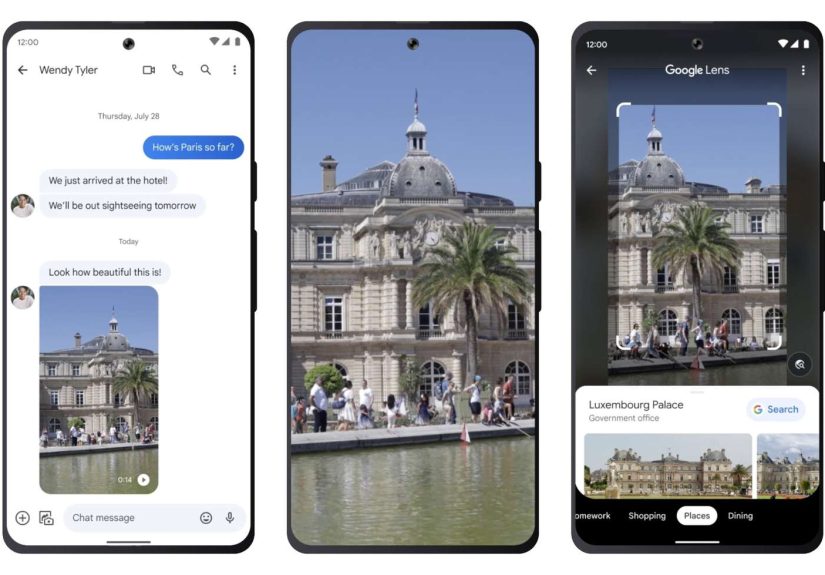
Google Lens is visual search. You point your camera at something (or use a screenshot/image), and Lens tries
to identify what it is and return useful results: a product listing, a knowledge panel, a translation overlay,
a location, a plant name, a math explanation, or something else that makes you feel like your phone is low-key
smarter than you.
Lens works across common “real life” moments: shopping, travel, schoolwork, and translation. It’s also
increasingly integrated into places where you already areyour browser, your apps, and your screensso you
don’t have to copy/paste, swap apps, or pretend you remember the name of that one lamp style (you don’t).
Multisearch: image + text in one query
Multisearch is Lens with a superpower: you start with an image, then add text to refine what you want.
Instead of searching “chair” and getting a billion chairs (some of which look like medieval punishment devices),
you can snap a photo and add “under $150” or “in blue” or “similar but modern.”
This combo is the heart of multimodal search: using multiple types of inputvisual plus languageto express
intent more naturally. Humans do this all the time (“that thing, but smaller, and not the weird expensive version”),
and Google is trying to make Search understand it too.
What’s New: The Expansion of AI-Driven Visual Search
When people say Google is “expanding AI-driven search” with Lens and multisearch, they generally mean three things:
(1) Lens is becoming more available in more places (like screens and browsers), (2) multisearch is getting more
capable (including local intent), and (3) the underlying AI is getting better at understanding scenes, context,
and relationshipsnot just recognizing a single object.
1) “Search your screen” and on-screen visual search
A major usability upgrade is searching content that isn’t in front of your cameralike a video you’re watching,
an image on social media, or a screenshot someone sent you. Instead of saving the image, opening a new app,
then uploading it (three steps too many), Google is pushing Lens-style search closer to the moment of curiosity.
This is part of a broader trend: search moves from a destination (“go to Google”) into a layer you can invoke
anywhere. For users, it feels like the internet is becoming clickable in a new way.
2) Multisearch “near me” and local intent
Multisearch isn’t just about identifying thingsit’s about helping you get things. Adding local intent
(“near me”) turns a cool AI trick into an actually useful shopping and discovery tool.
Example: You’re at a friend’s place and see a candle that smells like a woodland fairy’s personal spa.
You snap a photo, add “near me,” and Search tries to find similar products locallyso you can buy it without
asking, “Hey, where did you get that?” and then pretending you’re not about to copy their entire vibe.
3) More “understanding,” less “matching”
Traditional search is heavily about matching tokens (keywords) and signals. Visual and multimodal search leans
harder on interpretation: recognizing materials, shapes, patterns, brand cues, text in images, and the relationships
between objects in a scene.
That’s where the “AI-driven” claim becomes meaningful. The goal is not only “this looks like a backpack,” but
“this is a hiking backpack with external straps, likely mid-capacity, similar to these models, and the user
is probably shopping for something like it.”
How Lens and Multisearch Work (Conceptually) and Why It Matters
You don’t need to be a machine learning engineer to understand what’s happening under the hood. At a high level,
Lens and multisearch combine:
- Computer vision to detect objects, text, and visual attributes in an image or frame.
- Multimodal models that connect visual features with language meaning.
- Query expansion techniques that generate multiple “sub-questions” to improve results.
- Ranking and retrieval systems that decide which results best answer your intent.
Why it matters: the better Google gets at understanding images, the less you have to translate your real-world
question into search-engine-friendly language. In other words, you stop writing like a robot so the robot can
stop pretending it’s not a robot. Everyone wins.
The “fan-out” idea: one image, many micro-queries
For complex scenes, a single query is often too blunt. Modern systems can break a scene into multiple angles:
object identity, brand hints, context (kitchen vs. office), related items, and user intent. This “ask several
questions at once” approach tends to produce more helpful, more complete answersespecially when paired with
generative summaries or guided exploration.
Real-World Examples: When Visual + Text Search Beats Typing
Shopping: “This, but not expensive”
Multisearch shines in shopping because shopping is basically a never-ending series of constraints:
color, price, size, style, material, availability, and whether it will look good in your apartment lighting.
A photo gives Search the base reference; your text adds the rules.
- Snap a sofa → add “brown velvet” → narrow to similar items in that exact texture family.
- Photo of sneakers → add “women’s size 8” or “with wide toe box.”
- Screenshot of a jacket → add “similar but waterproof” or “under $100.”
Food: “What is this dish and where can I get it?”
Food is notoriously hard to search by description unless you’re the kind of person who says things like
“a rustic Tuscan stew with umami-forward aromatics.” For the rest of us: take a photo, add “near me,” and
let Search try to identify it and surface local options.
Travel and places: instant context
Point Lens at a landmark and you get identification, history snippets, hours, reviews, and related attractions.
When it works well, it feels like having a calm tour guide who doesn’t force you to walk into a gift shop.
School and learning: from “what” to “how”
Visual search also helps when the question isn’t just “what is this?” but “how do I solve it?” Capturing
a math problem or diagram can route you toward explanations, similar problems, and step-by-step breakdowns.
(Pro tip: use this for learning, not just for speed-running homework. Future-you will appreciate it.)
What This Means for SEO (Yes, Visual Search Has SEO Consequences)
If your audience can find things by pointing a camera at them, then visibility isn’t just about keywords anymore.
It’s about whether your content is understandable to systems that interpret images and connect them to intent.
1) Your images can be entry points, not decorations
Lens and multisearch increase the value of having clear, high-quality images that represent real products, places,
or concepts. For ecommerce and local businesses, the image may become the “query,” and your page becomes the answer.
Practical moves:
- Use descriptive image filenames and thoughtful alt text (not spammy, just accurate).
- Include multiple angles for products; show distinguishing features.
- Add context around imagescaptions and nearby text help connect meaning.
2) Structured data matters more when intent is complex
Multisearch often implies constraints (“near me,” color, style, model, availability). Marking up product details,
reviews, pricing, and local business info makes it easier for Search to connect a visual match with a “best next step.”
3) Local SEO gets pulled into the multisearch era
“Near me” doesn’t just apply to typed searches. Visual queries can become local queries, which means:
accurate business listings, up-to-date hours, and strong local signals matter even when the user starts with a photo.
4) Expect more zero-click-ish behavior
As Search offers richer previewsespecially with AI summariessome users will get what they need without clicking.
That doesn’t mean SEO is doomed; it means SEO has to optimize for brand recognition and the “next action,” not only the click.
Privacy and Control: The Trade-Off Behind “Search Everything”
Making search more visual and more “everywhere” naturally raises questions. When you search your screen, share a photo,
or use location-based multisearch, you’re providing extra context. That context can improve resultsbut it’s still context.
Common-sense ways to stay in control:
- Check camera and location permissions for the Google app (and revoke what you don’t need).
- Use Lens on screenshots when you don’t want to capture live surroundings.
- Remember that “near me” implies location signalsuse it intentionally.
The upside is convenience. The cost is that your searches become more ambient: less like a single typed query,
more like a stream of contextual asks.
Where This Is Headed: Multimodal Search as the New Default
Google’s direction is consistent: let users search in the most natural way for the momenttext, voice, image,
screen selection, or some combination. Lens and multisearch are stepping stones toward a world where “search” is
a feature of perception, not a box on a homepage.
If you zoom out, the storyline looks like this:
- From typing → to speaking and snapping photos.
- From single queries → to multimodal, constraint-based intent.
- From links → to guided answers, previews, and “do the next step” actions.
The practical takeaway: the more Search understands the physical world and what’s on your screen, the more it can
act like an assistanthelping you decide, compare, translate, locate, and buy.
of “Experience”: What Using Lens + Multisearch Feels Like in Real Life
The most noticeable “experience” shift with Google Lens and multisearch isn’t that Search got smarterit’s that
you get to be lazier in a delightful way. Not lazy like “never learn anything,” but lazy like “stop doing
unnecessary paperwork for your own curiosity.”
Here’s a common pattern: you see something interesting, but your brain refuses to produce the right words.
Maybe it’s a plant in a café (green, leafy, thrivingunlike your last three houseplants). Maybe it’s a lamp in a
video (modern, warm, vaguely Scandinavian, definitely priced like it’s made of unicorn bone). The old way is:
guess keywords, scroll, refine, repeat. The new way is: show Lens the thing, then add a short clarifier like
“care instructions” or “similar under $80.”
Shopping is where people often feel the “wow” factor first. You’re in a store holding a product that claims to be
“premium,” which is marketing code for “we think you won’t check.” Lens changes the vibe: snap, scan, and suddenly
you’re looking at reviews, prices, and comparable items. The experience feels empowering, like you’ve unlocked a
side quest called “Informed Consumer.” Even when you don’t buy, you walk away with contextand sometimes that’s
the real win.
Multisearch is especially satisfying when you want this exact style but with constraints. Think:
“these shoes but in black,” “this chair but ergonomic,” “this dish but near me,” or “this backpack but carry-on compliant.”
It feels like you’re finally allowed to communicate like a normal human: point first, explain second.
Another everyday experience: social media scrolling. You spot a jacket, a sofa, a poster, a book cover, a weirdly
perfect kitchen organizer. You don’t want to comment “link?” (because dignity), and you don’t want to DM a stranger
(because also dignity). On-screen search features and Lens integrations turn curiosity into a quiet, private action.
The emotional experience is basically: “I can satisfy my curiosity without being perceived.” Introverts, rejoice.
Of course, it’s not magic. Sometimes Lens guesses wrong, especially with lookalike products, niche items, or tricky
lighting. And sometimes multisearch results feel like “close enough” rather than “exact match.” But even then, the
experience is faster than starting from scratch, because it gives you a strong first draft of the queryand drafts
are easier to edit than blank pages (true for writing and for shopping carts).
The most important experience shift is that searching becomes a habit you can do in motion: while walking, watching,
browsing, or shopping. Search becomes less of a separate task and more like an instant reaction to curiositytap, snap,
ask, done. And if that sounds slightly addictive… well, curiosity always has been. Google just made it more convenient.