Table of Contents >> Show >> Hide
- What Is the Epson WorkForce 545 Wireless All-in-One?
- Key Features That Made the WorkForce 545 Popular
- Print Quality and Everyday Performance
- Setup, Connectivity, and Ease of Use
- Ink Costs, Cartridges, and Long-Term Ownership
- What Still Holds Up Well
- Where the WorkForce 545 Feels Dated
- Who Should Consider the Epson WorkForce 545 Today?
- Real-World Experience With the Epson WorkForce 545 Wireless All-in-One
- Final Verdict
The Epson WorkForce 545 Wireless All-in-One is one of those printers that clearly understood the assignment: help a small office or busy home office print, scan, copy, and fax without acting like a diva every time someone asks it to do real work. In its day, it was positioned as a business-friendly all-in-one inkjet with wireless networking, a practical automatic document feeder, mobile printing support, and enough paper capacity to keep you from doing the sad little “refill the tray again” shuffle every hour.
Today, the Epson WorkForce 545 is a discontinued model, so it no longer competes head-to-head with newer EcoTank machines or modern office printers loaded with giant touchscreens and refillable reservoirs. Still, that does not make it irrelevant. Plenty of people continue to search for it because they already own one, found one secondhand, need help setting it up on Wi-Fi, want to know whether the ink is still available, or simply wonder whether this once-popular wireless all-in-one printer is still worth using in 2026. Fair question. Printers, like old coffee makers and family recipes, tend to stick around much longer than anyone expected.
This guide takes a close look at the Epson WorkForce 545 Wireless All-in-One from a practical, real-world angle. We will cover its standout features, everyday strengths, drawbacks, ink costs, print quality, setup experience, and who this machine still makes sense for. The goal is not to treat it like a museum artifact with a paper tray. The goal is to help readers understand exactly what this Epson printer does well, where it feels dated, and how it fits into a home office workflow today.
What Is the Epson WorkForce 545 Wireless All-in-One?
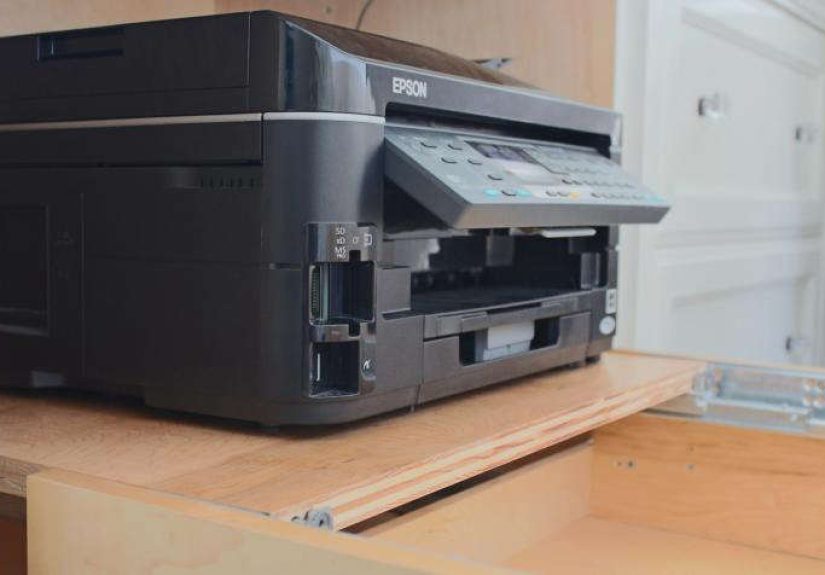
At its core, the Epson WorkForce 545 is a 4-in-1 inkjet printer designed for print, copy, scan, and fax tasks. It was built for users who wanted business features without stepping up to a bulky enterprise machine or a more expensive laser multifunction device. That means it combines office-friendly extras such as a 30-sheet automatic document feeder, Ethernet and Wi-Fi connectivity, a 250-sheet input tray, PC fax support, and mobile printing options in a compact desktop footprint.
In plain English, this is not a “cute little printer for occasional birthday invitations.” It is a serious home office printer with enough muscle for invoices, school packets, tax documents, recipes, contracts, scanned forms, and the occasional “please fax this today” request from a company that apparently still lives in 2009.
The machine uses four individual ink cartridges rather than a tri-color tank setup. That is convenient because you only replace the color that runs out. It also uses Epson DURABrite Ultra pigment ink, which helps documents resist smudging, water, and fading better than bargain-basement ink systems. For business users printing reports, forms, letters, and hand-marked pages, that matters more than flashy marketing language ever will.
Key Features That Made the WorkForce 545 Popular
Wireless and wired networking
One of the biggest selling points of the Epson WorkForce 545 Wireless All-in-One was flexibility. It supports both Wi-Fi and wired Ethernet, which means it can live wherever it makes the most sense in your workspace. Put it near the router, in a shared office corner, or on that one side table everyone swore was “temporary” three years ago. Either way, multiple users can connect without turning the printer into a USB hostage situation.
30-sheet automatic document feeder
The 30-sheet ADF is a genuine productivity feature, not decoration. If you regularly scan multipage packets, copy signed documents, or fax forms, the feeder saves time and patience. Feeding pages one by one on the flatbed is the kind of task that makes a person question all of their life choices. The WorkForce 545 wisely avoids that.
250-sheet paper capacity
The 250-sheet tray is another reason this Epson printer landed well with home office users. For everyday document work, that capacity is comfortable. It lets you handle a decent print load before refilling paper, which is far more useful than it sounds until you have lived with a tiny tray that empties after one spirited afternoon.
Print, copy, scan, and fax in one machine
The all-in-one design keeps your desk from looking like an office supply aisle exploded. The Epson WorkForce 545 can print documents, scan to a PC or PDF, copy in color or black and white, and send faxes directly from the machine or from a connected computer. For freelancers, remote workers, real estate agents, accountants, and families managing piles of paperwork, that versatility is a real advantage.
Mobile printing and memory card convenience
Epson positioned this model as mobile-friendly, with Epson Connect support and compatibility with common mobile printing workflows from its era. It also includes a memory card reader and a front USB feature for easier file handling. That may sound charmingly old-school today, but for users printing photos, forms, or saved scans without wanting to boot up a computer, it was genuinely useful.
Print Quality and Everyday Performance
For standard office use, the Epson WorkForce 545 performs exactly where it should. Text comes out crisp, dark, and readable, which is the first thing a business printer must get right. A machine can have every bell and whistle in the world, but if a spreadsheet looks like it was printed through a raincloud, nobody cares.
The printer’s stated speeds of up to 15 ISO pages per minute in black and 7.2 ISO pages per minute in color made it fast for its class when released, especially for a home office inkjet. In real life, output speed depends on page complexity, print mode, network conditions, and whether you are printing a two-line invoice or a color-heavy presentation that looks like it was designed by someone in a very emotional relationship with gradients.
Where the WorkForce 545 shines is document printing. Its pigment ink is well-suited to reports, contracts, schedules, school forms, and color charts. Highlights do not smear as easily, and pages feel more businesslike than what you typically get from cheaper photo-leaning consumer printers. Color graphics are lively enough for handouts and everyday visuals, while photo output is perfectly respectable for casual use, though it is not the main reason to buy this machine.
Scanning is similarly practical. The flatbed is handy for IDs, books, and receipts, while the ADF handles loose stacks with much less fuss. Optical scan resolution is solid for office and general household needs, and scan destinations such as PDF and email make the workflow simple for users who just want the file where it needs to go without taking a course in printer mysticism.
Setup, Connectivity, and Ease of Use
One of the best things about the Epson WorkForce 545 is that it was clearly designed for shared use. It supports wireless setup from the control panel, Ethernet for stable network placement, and USB for direct connection if you prefer the old reliable route. That flexibility matters because printers tend to become household diplomats: they need to work with laptops, desktops, and at least one person who refuses to update anything.
The 2.5-inch LCD is not luxurious by current standards, but it is functional. It gives users enough control to navigate menus, check settings, copy, fax, and manage basic workflows without too much guesswork. No, it is not a giant touch display with smartphone-level polish. Yes, it is still useful. Sometimes a sensible screen and clear buttons beat an overdesigned interface that looks cool and behaves like a confused toaster.
The biggest modern caveat is that some of its cloud-era features are now legacy features. For example, Google Cloud Print was part of the original selling story, but that service has been discontinued. That does not make the printer useless, but it does mean buyers should think in terms of basic wireless printing, Epson utilities, Ethernet, AirPrint-era compatibility, and manual network setup rather than expecting every old ecosystem feature to still behave exactly as it did when this model launched.
Ink Costs, Cartridges, and Long-Term Ownership
This is where the conversation gets more interesting. The Epson WorkForce 545 uses 126 high-capacity and 127 extra high-capacity cartridges. The good news is that replacement ink is still widely available from office supply retailers and online sellers. The better news is that individual cartridge replacement is much more efficient than dumping an entire tri-color cartridge because one shade decided to retire early.
The less cheerful part is simple: cartridge-based printers from this era can become expensive over time if you print heavily. If your weekly routine includes constant forms, shipping labels, school material, client packets, and color reports, a modern refillable tank printer may beat the WorkForce 545 on long-term running cost. The WorkForce 545 still makes sense for moderate document printing, especially if print quality and office features matter more to you than rock-bottom cost per page.
For lighter or moderate usage, the ink setup is manageable. Epson’s DURABrite Ultra inks remain a strong point because they dry quickly and produce durable documents. That makes the WorkForce 545 particularly comfortable in offices where papers are handled often, highlighted, filed, mailed, or stacked while still fresh from the tray. In other words, this is a document workhorse first and a hobby photo printer second.
What Still Holds Up Well
Several things about the Epson WorkForce 545 age surprisingly well. First, the feature mix is sensible. Wireless printing, Ethernet, scan/copy/fax, a decent paper tray, and an ADF still form the backbone of what many people want in a home office printer today. Second, the document output remains a strength because pigment ink was always a smart choice for business paperwork. Third, the machine’s overall design is practical rather than gimmicky.
It also helps that Epson still maintains support documentation for the model. Manuals, setup guidance, and user instructions are still available, which is excellent news for owners who need to reconnect the printer, change network settings, troubleshoot fax setup, or simply remember how to do that one task they only perform twice a year and immediately forget again.
Where the WorkForce 545 Feels Dated
Let us be honest: this printer is not fresh off the runway. It is an older model, and that shows in a few ways. It uses cartridges rather than refillable tanks, its interface feels more practical than modern, and some originally advertised cloud features belong to a previous tech chapter. It also relies on manual two-sided printing rather than automatic duplexing, which may be a drawback for users who print lengthy double-sided documents every week.
Compared with many newer all-in-one printers, the WorkForce 545 is less about flashy convenience and more about sturdy, straightforward office function. That can be either a weakness or a strength depending on the user. If you want a current-gen printer with ultra-low ink costs, bigger touch controls, and broader modern app support, there are better options. If you want a reliable legacy machine that still handles classic office jobs well, the WorkForce 545 makes a respectable case for itself.
Who Should Consider the Epson WorkForce 545 Today?
The best fit is someone who already owns the printer and wants to keep using it, or a buyer finding one in good condition at a reasonable price for moderate home office duty. It works well for document-focused users who value fax support, scanning with an ADF, wired and wireless networking, and solid black text quality. It can also suit households with occasional school, legal, tax, or administrative paperwork where a multifunction device is far more useful than a basic print-only machine.
It is less ideal for high-volume printing on a tight budget. In that case, a modern EcoTank or comparable supertank model will usually be cheaper to run over time. Likewise, users who need the latest app ecosystem, seamless cloud integration, or advanced automatic duplex workflows may find the WorkForce 545 more “vintage capable” than future-ready.
Still, for the right user, this Epson WorkForce 545 Wireless All-in-One remains a practical, competent, and surprisingly well-rounded machine. It may be discontinued, but it is not irrelevant. Some printers vanish the moment their retail pages go dark. This one continues to show up in searches because it solved real problems well, and many of those problems have not changed nearly as much as the printer market has.
Real-World Experience With the Epson WorkForce 545 Wireless All-in-One
Living with the Epson WorkForce 545 feels a lot like owning a dependable office assistant who is not flashy but usually shows up ready to work. You do not buy this machine for drama, and thankfully it does not seem interested in providing any. Once it is set up on a network, it settles into daily life nicely. In a home office, that means you can print a shipping label from a laptop in one room, scan a signed document from the feeder in another, and make a quick copy before a meeting without feeling like you need to negotiate with the hardware every step of the way.
A lot of users appreciate the simple fact that it behaves like a real office printer. The 250-sheet tray means you can load paper and forget about it for a while. The automatic document feeder saves time when you are working through forms, insurance paperwork, school packets, or a stack of documents that all mysteriously became urgent five minutes ago. The fax function, while almost comically retro, still matters in certain industries. Medical, legal, government, and real estate workflows have a way of keeping old technologies alive long after the rest of us have emotionally moved on.
Day to day, the best experience comes from document printing. Black text looks crisp, and color graphics hold up well enough for presentations, charts, schedules, and handouts. It is especially nice when pages come out dry enough to handle quickly. That sounds minor until you use a printer that produces fresh pages with the personality of wet sidewalk chalk. Epson’s pigment ink gives the WorkForce 545 a more confident office feel.
The less glamorous side of ownership is ink management. Like many cartridge-based printers from its generation, the WorkForce 545 is most comfortable when used regularly but not wastefully. Moderate users often get along with it just fine. Heavy users may start eyeing ink prices the way people look at airline baggage fees: with suspicion, annoyance, and a calculator. That does not make the printer bad. It just means the experience depends a lot on your print habits.
There is also a certain comfort in the printer’s straightforward controls. The screen is not enormous, the menus are not glamorous, and nobody is going to call it futuristic. But it gets the job done. For many owners, that is the whole point. The Epson WorkForce 545 is not trying to reinvent office printing. It is trying to help you print, scan, copy, and fax with as little nonsense as possible. On most days, that mission still holds up very well.
Final Verdict
The Epson WorkForce 545 Wireless All-in-One remains an appealing legacy printer for users who prioritize document quality, office-style features, and flexible connectivity. It was thoughtfully designed for productivity, and that still shows. Its 30-sheet ADF, 250-sheet tray, fax support, Ethernet and Wi-Fi, and durable pigment ink output make it more capable than many cheap all-in-one printers built purely for occasional home use.
The main trade-off is long-term ink economics and age. This is not the best option for everyone in 2026, but it is still a smart, serviceable one for the right household or small office. If your work is mostly document-based and you want a dependable wireless all-in-one printer with real office chops, the Epson WorkForce 545 deserves more respect than its discontinued status might suggest.