Table of Contents >> Show >> Hide
- Quick take: what it is (and why people still care)
- Core specs and features
- Design and placement: the “put it where you actually need it” advantage
- Video quality: sharp enough, wide enough, honest about physics
- Alerts, “Day Brief,” and why Logitech’s software still stands out
- Cloud storage and subscriptions: what’s free vs. what’s extra
- Smart home compatibility: Alexa, Google, and the HomeKit gotcha
- Battery life: “up to” is doing a lot of work here
- Privacy and security: what you can control
- What it’s missing (and why that matters)
- Buying advice: who should get it (and who should skip it)
- Alternatives worth considering
- FAQ
- Conclusion: the Circle Wireless is a coverage-first camera with a genuinely useful recap superpower
- Real-world experiences and tips (extended)
- 1) The wide view is both a blessing and a personality
- 2) Day Brief becomes your daily ritual (in a good way)
- 3) Battery life depends on your home’s “chaos level”
- 4) Wi-Fi strength is the hidden “spec” nobody brags about (but should)
- 5) Two-way talk is more useful than you expect
- 6) The subscription decision tends to happen after the first “I missed it” moment
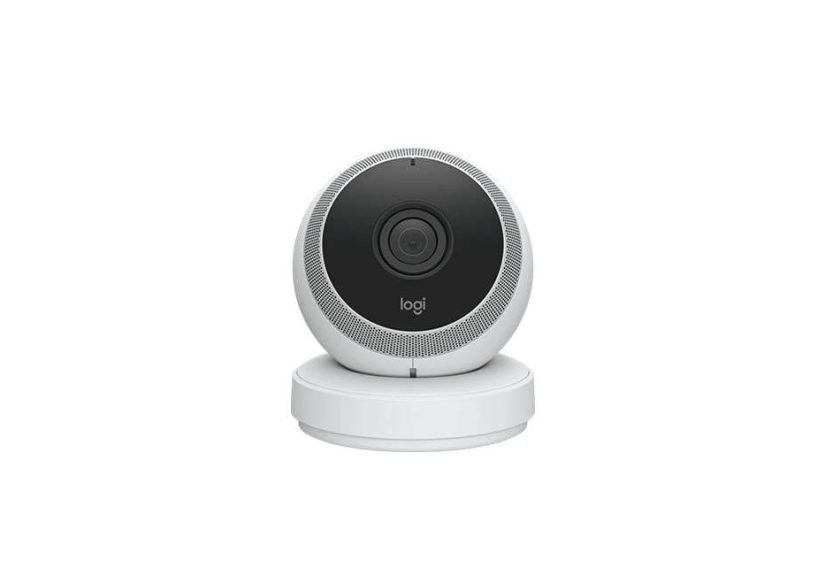
If home security cameras were pets, most of them would be needy: “Feed me Wi-Fi, walk me to an outlet, and please don’t move me or I’ll forget who you are.” The Logitech Circle Wireless 1080p battery-powered security camera (best known as the Logitech Circle 2 Wire-Free) tries to be the chill, low-maintenance one: set it up fast, stick it almost anywhere, and get a huge view of what’s happeningwithout turning your home into a modern-art exhibit of dangling power cables.
In this deep dive, we’ll break down what the Circle Wireless does well (spoiler: that ultra-wide view and “Day Brief” recap are genuinely handy), where it feels dated today (spoiler: no local storage, and subscriptions still exist on planet Earth), and how to decide whether it’s the right pickespecially since the Circle 2 line has been discontinued and largely lives on through remaining stock and the secondhand market.
Quick take: what it is (and why people still care)
The Circle Wireless is a 1080p indoor/outdoor Wi-Fi camera with night vision, two-way audio, and a super-wide ~180° field of view. The wire-free model runs on a rechargeable battery and is designed for flexible placement. Logitech’s software leans into convenience: instead of forcing you to scrub through endless clips, it highlights motion events and can generate a “Day Brief” time-lapse recap that summarizes the past 24 hours in seconds.
Core specs and features
What you get in plain English
- 1080p HD video (clear enough for faces up close and general activity across a room or patio)
- Ultra-wide coverage (about 180° diagonal, meaning fewer “second camera” moments)
- Infrared night vision (good for rooms, entryways, porchesbest results depend on placement and distance)
- Two-way talk (speak to a delivery driver, a dog, or a teenager who “didn’t hear the doorbell”)
- Motion-based recording to the cloud (not continuous 24/7 recording)
- Battery-powered flexibility (place it where outlets don’t exist or where you don’t want to run cables)
At-a-glance table
| Category | What to know | Why it matters |
|---|---|---|
| Video | 1080p HD | Solid clarity for general monitoring; zooming in reduces usable detail |
| Field of view | ~180° ultra-wide | Captures a lot in one frame, but can introduce fisheye distortion |
| Night vision | Infrared | Works well for typical indoor/outdoor distances; placement matters |
| Audio | Two-way talk | Useful for deliveries, visitors, family check-ins |
| Storage | Cloud clips (no local storage) | Relies on internet and service availability |
| Power | Rechargeable battery (wire-free model) | Flexible placement; you’ll recharge based on activity and settings |
| Smart home | Works with major ecosystems (details vary by configuration) | Voice assistants can be convenient, but don’t replace a strong Wi-Fi signal |
Design and placement: the “put it where you actually need it” advantage
The Circle’s look is friendly (almost suspiciously friendlylike it’s about to ask you to rate your experience with triangles). But the real win is how the hardware and accessories were designed around placement: shelves, walls, near outlets, and even creative spots like windows where you want an inside camera looking out.
Mounting options that solve real problems
- Standard wall/shelf setup: good for living rooms, nurseries, garagesanywhere you want a stable wide view.
- Window viewing: Circle accessories and settings can reduce reflections by adjusting lighting behavior so you can monitor outside without putting the camera outdoors.
- Outlet-based mounting: when you want “powered” without the power cord aesthetic.
- Wire-free freedom: ideal for patios, detached garages, back gates, rentals, or “I refuse to drill into that” situations.
Practical example: If your front entry is widedoor, porch, driveway edgethe Circle’s ultra-wide view can cover most of it from one mounting point. That can save money compared to narrow-view cameras that force you into a second unit just to see the side angle where packages mysteriously develop legs.
Video quality: sharp enough, wide enough, honest about physics
In good lighting, 1080p looks crisp for day-to-day monitoring: who walked in, which door opened, whether a car pulled into the driveway, and whether your cat is launching another unauthorized countertop expedition.
Wide-angle trade-offs (aka “why your hallway looks like a funhouse”)
That huge ~180° view is the Circle’s signature. It’s also the reason you may notice fisheye distortion, especially near the edges. Most owners accept this as the price of seeing more. But if you need tight detaillike identifying a face far from the cameraultra-wide lenses are not magic. Zooming can help, but digital zoom on 1080p quickly runs into “enhance… enhance…” territory.
Night vision: good, not supernatural
Infrared night vision is effective for typical home distances. You’ll get the best results when the camera isn’t aimed at reflective surfaces and when the most important action zone (door handle, steps, walkway) is within a reasonable distance. If you’re trying to cover a large backyard from one corner, expectations should be set accordingly.
Alerts, “Day Brief,” and why Logitech’s software still stands out
Many cameras can record motion clips. The Circle Wireless stands out in how it helps you review what happened without turning your evening into a full-time job. Two features matter most:
1) Smart Alerts
Alerts can be tuned so you’re not notified every time a curtain moves or a shadow has a dramatic personal journey across your floor. You can adjust sensitivity and frequency, and you can set behavior that fits your life (for example, fewer alerts during the day, more at night).
2) Day Brief (the “24 hours in 30 seconds” concept)
Day Brief is basically a highlight reel: a short time-lapse summary of motion activity across the past day. If you’re the kind of person who thinks, “I just want to know if anything weird happened,” this is a killer feature. It’s also a genuinely good fit for families: you can quickly confirm when kids got home, when a package arrived, or whether the dog walker came bywithout scrubbing through dozens of clips.
Cloud storage and subscriptions: what’s free vs. what’s extra
Logitech’s Circle Safe service is structured around a free tier plus paid options. The big headline: you get a limited window of free cloud history (good for “what happened today?”), and you pay if you want deeper history and more advanced detection features.
Typical plan structure
- Free: short cloud history window, unlimited live streaming and downloads, plus core features like Day Brief and smart alerts.
- Basic: longer cloud history (think “two-week rewind” range) and multi-camera value options.
- Premium: longest cloud history (think “month rewind” range) plus features like person detection and motion zones (helpful if you only care about the porch, not the street traffic).
The real-world value of paid plans depends on your household. If you only need “today’s footage,” free may be enough. If you travel often, manage multiple cameras, or want fewer false alerts via person detection and zones, the premium tier makes more sense.
Smart home compatibility: Alexa, Google, and the HomeKit gotcha
The Circle 2 family earned attention for being unusually flexible with smart home ecosystems. That said, configuration matters: some platform features (especially Apple HomeKit support) are typically tied to running the camera in a powered/wired setup rather than fully wire-free.
What to do if Apple HomeKit is your priority
If your dream is controlling everything from Apple’s Home app, double-check the exact model and how you plan to power it. A safe rule: HomeKit support is most reliable when the Circle 2 is used in a wired configuration. If you need true wire-free placement and Apple-first integration, you may be happier with a different ecosystem approach.
Battery life: “up to” is doing a lot of work here
The wire-free Circle is often marketed around a multi-month battery rhythm, and many listings describe it as roughly a “three-month” type of camera. In practice, battery life depends on:
- How busy the scene is: a quiet backyard lasts longer than a high-traffic front porch.
- Alert sensitivity: more triggers means more recordings means more battery use.
- Cold weather: batteries generally dislike winter more than you do.
- Wi-Fi strength: weak signals can increase power use and frustration levels simultaneously.
Translation: plan for recharging on a schedule that matches your home’s activity. If you place it where motion happens constantly, you’ll charge it more often. If you place it in a calmer zone, you’ll enjoy the “why did I ever run wires?” lifestyle.
Privacy and security: what you can control
Cameras inside and around the home deserve “privacy by design,” not “privacy by wishful thinking.” The Circle ecosystem includes common, practical controls:
- Toggle camera on/off (useful when you’re home and don’t want to be perceived by your own devices)
- Control microphone and speaker behavior (mute, reduce sensitivity, or disable as needed)
- Adjust indicator lights (so you can be discreet without being creepy)
- Cloud account protection (strong password + modern account hygiene recommended)
If privacy is your #1 concern, also consider how much you want to rely on a manufacturer-specific cloud and app long-term, especially for a product line that has been discontinued.
What it’s missing (and why that matters)
No local storage
The Circle Wireless leans heavily on cloud recording and your internet connection. If your Wi-Fi drops or your service goes down, the camera’s usefulness can drop with it. Some buyers strongly prefer cameras that can also record locally to a microSD card or hub.
Not a “forever product” in the traditional sense
Logitech has moved on from the Circle 2 line and positioned newer products (like Circle View) as replacements. That doesn’t mean your Circle instantly stops working, but it does mean you should think carefully about long-term support, especially if you’re building a whole-home system.
Buying advice: who should get it (and who should skip it)
Buy it if…
- You want a wide-angle 1080p camera that covers a big area with one device.
- You value fast review (Day Brief + smart clip browsing) over endless timeline scrubbing.
- You need wire-free placement for a porch, patio, gate, rental, or detached space.
- You’re okay with cloud-first recording and understand subscription trade-offs.
Skip it if…
- You require local storage as a must-have.
- You want a current-generation camera with ongoing hardware releases and fresh ecosystem investment.
- You need tight, long-distance identification (ultra-wide cameras are coverage champions, not zoom snipers).
- You want Apple-first integration and true wire-free operation without careful model/config checks.
Alternatives worth considering
If you love the idea of Circle but want a more current approach, newer HomeKit-focused models (including Logitech’s Circle View line) or competing battery ecosystems may fit better. The “best” alternative depends on what you value most: local storage, advanced AI detection, hub-based reliability, or tight integration with Apple/Google/Amazon.
FAQ
Is the Logitech Circle Wireless camera still sold new?
The Circle 2 line has been discontinued and replaced in Logitech’s lineup. You may still find new-old stock, refurbs, or secondhand units depending on the retailer.
Does it record 24/7?
It’s designed around motion-based recording and cloud clip history, not nonstop continuous recording like some wired systems.
How hard is setup?
Setup is generally app-guided and quick: connect the camera, join Wi-Fi, name your camera/location, tune alerts. The most common “setup problems” are really Wi-Fi problemsespecially weak signal where you mount the camera.
Conclusion: the Circle Wireless is a coverage-first camera with a genuinely useful recap superpower
The Logitech Circle Wireless 1080p battery-powered security camera is at its best when you want maximum coverage with minimal fuss. The ~180° view can reduce the need for multiple cameras, the Day Brief recap makes daily review painless, and wire-free placement solves real-world problemslike “there is no outlet there and I refuse to pretend otherwise.”
The trade-offs are equally real: cloud dependence, subscription gates for premium features, and the reality that the Circle 2 family is discontinued. But if you’re buying with eyes open (and with a strong Wi-Fi signal), it remains a smart, user-friendly optionespecially for people who prioritize “show me what happened today” over “give me a 12-hour timeline to scroll through while dinner burns.”
Real-world experiences and tips (extended)
The most helpful way to understand the Circle Wireless isn’t a spec sheetit’s how it behaves in everyday life. Based on common patterns from reviews, retailer feedback, and owner discussions, here are the experiences people tend to have (the good, the quirky, and the “why is my camera judging me?”).
1) The wide view is both a blessing and a personality
In real homes, the ~180° field of view often becomes the reason people keep the Circle. One camera can cover a living room plus hallway entrance, or a front door plus most of the porch. That’s a practical advantage: fewer devices to manage, fewer notifications to configure, and fewer chargers to hunt down. The flip side shows up the first time you try to zoom in on something near the edge of the frame and realize you’re basically asking a wide-angle lens to become a telescope. The Circle is fantastic at answering “what happened?” and just okay at answering “what is the license plate of a car halfway down the street?”
2) Day Brief becomes your daily ritual (in a good way)
Many cameras record clips, but few make reviewing them feel effortless. Owners who actually stick with security cameras long-term often mention that Day Brief is the feature that keeps them engaged: you open the app, tap a button, and the last day becomes a short highlight reel. It’s especially useful for high-traffic areas where you’d otherwise accumulate a mountain of clipsfront porches, apartment hallways, playrooms, or anywhere pets have strong opinions about the mail carrier.
3) Battery life depends on your home’s “chaos level”
The wire-free Circle can feel like magic in a calm spot: a side yard gate that rarely opens, a shed that mostly just exists, or a quiet back patio. In those areas, the camera may go a long time between charges. But mount it facing a busy sidewalk, a swaying tree that triggers motion, or a driveway where cars come and go constantly, and you’ll recharge more often. One practical trick people use is to aim the camera so the most important area is centered (front door, gate latch, stair landing) and to reduce unnecessary motion triggers by adjusting sensitivity or, if you subscribe, drawing motion zones that exclude the street.
4) Wi-Fi strength is the hidden “spec” nobody brags about (but should)
Real-world satisfaction often tracks directly with Wi-Fi signal quality where the camera sits. When the connection is strong, live view loads quickly and alerts arrive promptly. When the signal is weakespecially outdoors through multiple wallsusers report longer load times, occasional dropouts, or delayed live viewing. The fix isn’t glamorous, but it’s effective: consider a mesh Wi-Fi node nearer the camera location, or choose mounting spots that reduce the number of walls between camera and router. A camera can’t be “smart” if it’s constantly asking, “Hello? Can you hear me now?”
5) Two-way talk is more useful than you expect
People often buy security cameras for recording, then end up using two-way talk for everyday life: telling a delivery driver where to leave a package, checking in on pets, or reminding family members to lock the door. The audio experience is usually “good enough to be useful,” especially at close range. It’s not a studio microphone, but it’s not trying to be. It’s trying to help you say, “Yes, put the box behind the planterthanks!” without sprinting to the door in socks.
6) The subscription decision tends to happen after the first “I missed it” moment
A common pattern: people start on the free tier, love the camera, then have one event they want to reviewonly to realize it happened outside the free history window or they want smarter filtering. That’s when Basic or Premium becomes attractive. Premium is especially appealing if you’re tired of false alerts (like motion from shadows) and want features like person detection and motion zones. The best approach is to run free for a week, learn what triggers your camera, and only pay if the premium features solve an actual annoyance you experience.
Bottom line from real-world usage: the Circle Wireless is at its best when you treat it like a flexible, coverage-first camera that rewards good placement, solid Wi-Fi, and realistic expectations. Get those right, and it feels surprisingly moderndespite its agebecause it helps you do the one thing most people want: quickly understand what happened without turning home security into homework.