Table of Contents >> Show >> Hide
- Before You Unfollow: A 30-Second Reality Check
- How to Unfollow Someone on Instagram (Mobile App)
- How to Unfollow Someone on Instagram (Desktop / Web)
- What Happens When You Unfollow Someone?
- If You Want Less Drama: Better Options Than Unfollow
- Cleaning Up Your Following List Without Getting Your Account Flagged
- Troubleshooting: Why You Can’t Unfollow Someone (And What to Do)
- Etiquette & Mental Health: The Unfollow Button Isn’t a Moral Failing
- Quick Examples: When Each Option Makes Sense
- Experiences & Lessons People Commonly Run Into (500+ Words)
- Conclusion
Unfollowing on Instagram is one of those tiny taps that can feel weirdly dramaticlike you’re defusing a bomb with a thumbnail.
The good news: the mechanics are simple, you have options that are even quieter than unfollowing, and you can clean up your feed
without turning your social life into a season finale.
This guide walks you through exactly how to unfollow someone on Instagram (mobile and desktop), what actually happens afterward,
and the “less drama” alternatives (mute, restrict, remove follower, block). We’ll also cover smart ways to unfollow multiple accounts
without getting hit with action limits or accidentally inviting sketchy third-party apps into your account.
Before You Unfollow: A 30-Second Reality Check
Unfollow vs. Mute vs. Restrict vs. Remove Follower vs. Block
-
Unfollow = You stop seeing their posts in your feed. You can still visit their profile.
If your account is public, they can still see your posts (unless you block them). -
Mute = You keep following them, but their posts and/or Stories stop showing up in your feed.
It’s the social equivalent of turning down the volume, not leaving the concert. -
Restrict = A stealthier boundary: it limits how they interact with you (especially comments and messaging behavior),
without the loud “you’re blocked” energy. -
Remove follower = You force someone to stop following you without blocking them.
Helpful if you want privacy without starting World War III in the group chat. - Block = Hard stop. They can’t see or interact with your profile in the normal way, and the connection is severed.
If your goal is simply: “I don’t want to see their stuff,” unfollow or mute will usually do it.
If your goal is: “I don’t want them to see my stuff,” you’re looking at remove follower, going private, or blocking.
How to Unfollow Someone on Instagram (Mobile App)
The steps are basically the same on iPhone and Android. The menu labels can shift slightly with updates,
but the unfollow button always lives in the same neighborhood.
Method 1: Unfollow from Their Profile (Most Direct)
- Open Instagram and search for the person (or tap their name from a post, Story, or DM).
- Go to their profile page.
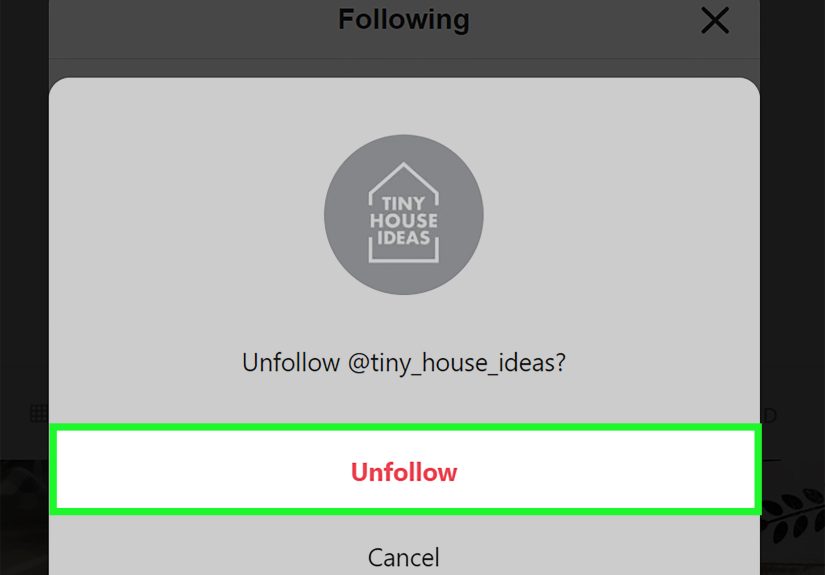
- Tap Following (or the person icon that indicates you’re following).
- Tap Unfollow and confirm if prompted.
Tip: If you’re second-guessing yourself, pause for one breath. If you still want to unfollow after the breath,
your nervous system has voted and the motion carries.
Method 2: Unfollow from Your “Following” List (Fast for Multiple Accounts)
- Go to your profile (tap your profile icon).
- Tap Following.
- Use the search bar to find the account quickly.
- Tap the Following button next to their name.
- Select Unfollow.
Bonus: On many accounts, Instagram gives you a “decision-assist” area inside your Following listlike categories
such as Least Interacted With or Most Shown in Feed, plus sorting options (for example, by when you followed).
If you’re cleaning house, those tools are basically your “closet cleanout” montage music.
Method 3: Unfollow from Your Feed (When Their Post Pops Up)
If you see their post while scrolling and you’re thinking, “Ah yes, another 47-slide carousel about oat milk…,” you can often act right there:
- Tap the three dots (⋯) near the top of their post.
- Look for Unfollow. If you don’t see it, choose Mute or Hide options instead.
- Confirm if prompted.
Note: Instagram’s menus can vary by region, account type, and app version. If “Unfollow” isn’t visible from the feed menu,
use Method 1 or 2it’s always available from the profile or your Following list.
How to Unfollow Someone on Instagram (Desktop / Web)
Yes, you can unfollow people on a computer. The web version is especially handy when you’re doing a bigger cleanup
and your thumbs would like to file a formal complaint.
Option A: Unfollow from Their Profile on Instagram.com
- Go to Instagram.com and log in.
- Search for the person and open their profile.
- Click Following.
- Click Unfollow to confirm.
Option B: Unfollow from Your Following List on the Web
- Click your profile in the left menu (or top right, depending on layout).
- Click Following.
- Use the list search and click Following next to an account.
- Choose Unfollow.
What Happens When You Unfollow Someone?
They usually won’t get a notificationbut they might notice
Instagram generally doesn’t send a big “BREAKING NEWS: you’ve been unfollowed” alert. However, people can still notice
(for example, if they check their follower count obsessively, or use analytics tools for professional accounts).
In other words: no siren, but the evidence is available to anyone looking for it.
Your feed changes immediately (most of the time)
Once you unfollow, their new posts should stop appearing in your feed. If you still see them briefly,
it may be cached content or a delayed refreshclosing and reopening the app usually helps.
If your account is private, unfollowing can change their access to you
- If you are private and they follow you, unfollowing them does not automatically remove them as your follower.
- If you want them to stop seeing your content, you’ll need to remove them as a follower (or block them).
Can they still DM you?
Unfollowing doesn’t automatically prevent messages. If you need stronger boundaries, consider restricting, blocking,
or adjusting your message settings.
If You Want Less Drama: Better Options Than Unfollow
1) Mute: Keep the connection, lose the noise
Muting is perfect when you like the person in real life but their content makes your brain feel like it’s buffering.
You still follow them, but their posts/Stories don’t show in your feed. They aren’t notified.
2) Restrict: Quietly limit interaction
Restrict is useful when someone’s comments, DMs, or general vibes need a gentle fence. It’s designed to reduce unwanted interaction
without escalating conflict.
3) Remove follower: “You can’t watch me, but we don’t have to fight”
If someone follows you and you want them off your audience listwithout the nuclear optionremove them as a follower:
- Go to your profile.
- Tap Followers.
- Find the person and tap Remove (or the X/Remove control next to their name, depending on your version).
- Confirm.
They typically aren’t notified, though they can realize they no longer follow you if they check.
4) Block: For when “no thanks” needs a lock
Blocking is appropriate for harassment, unwanted contact, impersonation concerns, or when you just need the situation to end.
It’s not petty; it’s a boundary with a deadbolt.
Cleaning Up Your Following List Without Getting Your Account Flagged
Instagram is not a fan of automation that looks spammy. Tools that mass-unfollow, scripts, or browser extensions that automate
actions can put your account at risk. Even if a tool claims it’s “safe” or “human-like,” it’s still automationand platforms
regularly act against that behavior.
A safer, practical approach
- Unfollow in small batches (spread over hours/days, not “speed-run your entire Following list”).
- Use Instagram’s built-in organization (like least-interacted lists or sorting) to make better choices faster.
- Avoid giving your password to third-party unfollow apps. If it can log in as you, it can also be a security risk.
- If you get temporarily blocked from actions, stop, wait, and try again later. Pushing through usually makes it worse.
If you’re managing a brand or creator account, consider “mute” and “remove follower” as strategic tools too.
A clean audience and a calmer feed often beats a giant follow/unfollow spreadsheet that steals your weekend.
Troubleshooting: Why You Can’t Unfollow Someone (And What to Do)
1) You’re action-blocked
If Instagram thinks you’re doing too many actions too fast, it may temporarily prevent actions like unfollowing.
The fix is unsexy but effective: pause, wait, and try later (often after a few hours).
2) App glitch or cached data
- Close and reopen Instagram.
- Update the app.
- Log out and back in (if you can).
- Try unfollowing from the web version if the app is being stubborn.
3) Connection issues
If you’re on unstable Wi-Fi, Instagram may show the unfollow action but not complete it immediately. Try again on a stable connection.
Etiquette & Mental Health: The Unfollow Button Isn’t a Moral Failing
People unfollow for a thousand normal reasons: the content changed, the relationship changed, the feed is too crowded,
or you’re trying to stop doomscrolling your way into existential dread.
If you’re worried about awkwardness, consider the “soft options” first: mute, hide Stories, restrict, or remove follower.
And if you do unfollow? You don’t owe a PowerPoint presentation titled Reasons I Curated My Feed.
(Unless you want tothen at least add animations.)
Quick Examples: When Each Option Makes Sense
Example 1: The Friend Who Posts 30 Stories a Day
You like them. You cannot emotionally survive their 8 a.m. matcha monologues. Mute is your hero.
Example 2: The Ex Who’s Suddenly “Thriving” Every Hour
You’re healing. Their content is not helping. Unfollow (or mute if you’re not ready). If you need full peace, block.
Example 3: A Random Account You Followed in 2017 for One Meme
It’s now 98% ads and 2% chaos. Unfollow with confidence.
Example 4: A Person Who Won’t Stop Leaving Weird Comments
Consider restrict if you want a quieter boundary, or block if the behavior is ongoing.
Example 5: Someone You Don’t Want Viewing Your Content
Remove follower (and consider going private), or block if privacy is urgent.
Experiences & Lessons People Commonly Run Into (500+ Words)
Unfollowing sounds like a basic featurebecause it isbut people’s experiences around it can be surprisingly emotional.
One common story starts with a perfectly innocent goal: “I just want my feed to feel better.” Maybe you open Instagram,
scroll for two minutes, and realize your mood dropped like a phone in a swimming pool. You’re not even mad at anyone; your brain
is simply overstimulated. That’s usually the moment people discover they’ve been treating their Following list like a junk drawer:
receipts (random brands), mystery keys (accounts you don’t recognize), and a tiny screwdriver (your cousin’s boyfriend’s dog account).
A typical “cleanup session” begins optimistically. You tell yourself you’ll unfollow “a few accounts.” Then you tap Following and
see a number that makes you whisper, “How is this even possible?” The most helpful mindset shift here is treating it like spring cleaning,
not a referendum on your character. People often feel guilty, especially if the account belongs to a coworker, a distant relative,
or a friend-of-a-friend you met at exactly one birthday party in 2019. In those situations, many users discover mute is the VIP feature:
you keep the social tie, but you stop getting daily content that you didn’t order.
Another common experience: the “unfollow boomerang.” You unfollow someone quietly, then a week later they show up in your DMs like,
“Heyyy haven’t talked in forever.” Your brain immediately suspects Instagram is running a soap opera. Usually it’s just coincidenceor the
person noticed you unfollowed and decided to “check the temperature.” If you’re trying to avoid awkwardness, it helps to remember that
you’re allowed to curate your attention. If someone confronts you, you can keep it simple: “I’m doing a feed cleanup” or “I’m taking a
break from scrolling.” You don’t need to litigate every post you’ve ever disliked.
There’s also the “I unfollowed and nothing happened” experience, which is both comforting and anticlimactic. Many people expect fireworks.
In reality, the world keeps spinning, your coffee still tastes the same, and the only major change is you stop seeing content that wasn’t
serving you. That’s a win. On the flip side, some people run into a technical hiccup: they unfollow rapidly, then Instagram starts refusing
actions. The lesson users tend to learn the hard way is that speed-cleaning your Following list like you’re in a competitive sport can trigger
limits. The smoother approach is gradual: a few unfollows, take a break, repeat later.
Finally, a big one: the temptation of third-party unfollow apps. People often search for “who doesn’t follow me back” or “mass unfollow”
after realizing their Following list is bloated. The experience many report is that these apps either don’t work well (because of platform
restrictions), demand sensitive access, or create new headaches. A safer “grown-up” pattern is sticking to built-in tools:
use your Following list organization, unfollow in small batches, and lean on mute/restrict/remove follower when the situation is more about
boundaries than content.
The most consistent takeaway people share is simple: Instagram feels better when you treat your feed like your home screen.
You don’t have to delete every app, but you also don’t have to keep seven flashlight apps from 2014. Curate it. Protect your attention.
And remember: unfollowing is a feature, not a feud.
Conclusion
To unfollow someone on Instagram, the fastest route is either their profile (tap Following → Unfollow)
or your own Following list (search → tap Following → Unfollow). On desktop, it’s the same ideajust more
screen space and less thumb work.
If your goal is peace, not conflict, you’ve got options: mute when you want quiet, restrict when you want
a subtle boundary, remove follower when you want privacy, and block when you need a hard stop.
Your feed is your attention budgetspend it like you mean it.