Table of Contents >> Show >> Hide
- Quick Cheat Sheet: Which Sharing Option Should You Use?
- Before You Share: Two Rules That Save You Drama
- Method 1: Share a TikTok Video Directly (DM, Text, or Other Apps)
- Method 2: Copy a TikTok Link (So You Can Paste It Anywhere)
- Method 3: Download a TikTok Video (Save Video / Save Photo)
- Method 4: Repost a TikTok Video (TikTok’s Built-In “Boost This” Button)
- Method 5: “Repost” Outside TikTok (Ethical Options That Won’t Burn Bridges)
- Common Problems (and Fixes) When Sharing TikTok Videos
- Privacy and Safety Tips When Sharing
- Conclusion: Share Like a Pro (Not Like a Chaos Gremlin)
- Extra: Real-World Sharing Experiences (500+ Words)
- Scenario 1: The group chat demands a link… and then nobody can open it
- Scenario 2: You want to “repost” a creator’s clip, but you also don’t want to be That Account
- Scenario 3: You want to save a TikTok for later, but downloads are off
- Scenario 4: You’re sharing your own drafts and you don’t trust your phone (fair)
TikTok is basically the internet’s group chatexcept the group chat is 1.1 billion people and the “friend who won’t stop sending videos”
is… all of us. Whether you’re trying to share a hilarious dog video, a “wait, this actually fixed my back pain” stretch, or a recipe that
absolutely will not survive being screenshotted, TikTok gives you multiple ways to share.
The trick is picking the right kind of share: do you want to send the video to someone, copy a link, save it for later, or repost it so your
followers see it? This guide breaks down each option (with the “why,” not just the “tap here”), plus a few etiquette and troubleshooting tips so you
don’t accidentally become That Person who reposts without credit.
Quick Cheat Sheet: Which Sharing Option Should You Use?
- Send to a friend fast: Use the Share button → pick a DM/contact/app.
- Post the link somewhere (text, email, Discord, blog): Copy link.
- Save the video to your phone: Save video (only if the creator allows downloads).
- Boost it to your followers inside TikTok: Repost (TikTok’s “retweet-style” share).
- React or add your take: Duet or Stitch for built-in attribution.
Before You Share: Two Rules That Save You Drama
1) If you didn’t make it, assume it’s not yours to re-upload
Sending a link or using TikTok’s built-in Repost, Duet, or Stitch features is usually the safest
route because attribution stays attached. Downloading someone else’s video and uploading it elsewhere can cross into copyright/permission problems
(and can also annoy creators who rely on original posts for views).
2) Expect buttons to disappear sometimes
If you don’t see Save video or Repost, it’s often not your phone being weirdit’s a permission setting, an account
type, or a feature rollout. Translation: you’re not cursed, TikTok is just TikTok-ing.
Method 1: Share a TikTok Video Directly (DM, Text, or Other Apps)
This is the classic “send this immediately, I’m crying” method.
How to share from the TikTok app
- Open the video you want to share.
- Tap the Share button (the arrow).
- Choose where it’s going:
- TikTok DM (to a friend inside TikTok)
- Messages / SMS / iMessage
- WhatsApp, Instagram, Snapchat, etc. (options vary by device)
- Copy link (more on that next)
- Follow the prompts for the app you selected (add text, pick a contact, hit send).
Pro tip: Add context so you don’t look like a chaotic algorithm
Instead of sending a random link like a carrier pigeon with Wi-Fi, add a line:
“Start at 0:17this is the part that took me out,” or “This is exactly your cat.”
People love a guided tour.
Bonus: You can share more than just videos
TikTok also lets you share profiles, sounds, and hashtags using similar share menus. This is handy when you’re recommending a creator
(“Follow this account, trust me”) or saving a sound for later (“This audio will be everywhere by Tuesday”).
Method 2: Copy a TikTok Link (So You Can Paste It Anywhere)
Copy link is the most flexible share method. It works for texting, email, Discord, notes apps, project docs, blog posts, and any place where a URL
won’t get you politely escorted out.
How to copy a TikTok video link on mobile
- Open the video.
- Tap Share.
- Tap Copy link.
- Paste it wherever you want (long-press → Paste).
How to copy a TikTok link on desktop
- Open TikTok in a web browser and load the video page.
- Copy the URL from the address bar, or use the site’s share options if shown.
- Paste it where you need it.
Why links sometimes “work for you” but not for your friend
- The account is private: If the creator’s account is private, people who don’t follow them generally can’t view the video.
- The video has age/region restrictions: Some content is limited based on location or age settings.
- Your friend is viewing in a browser: Some TikTok links behave better when opened in the app.
- The video was deleted or made friends-only: The link still exists, but the content doesn’t.
Quick fix: tell your friend to open the link and choose “Open in TikTok” if prompted. If it’s private content, you’ll need to share it another way
(or your friend needs permission to view it).
Method 3: Download a TikTok Video (Save Video / Save Photo)
Downloading is perfect for offline viewing, personal reference, or saving your own content. But downloads depend on the creator’s settings.
If TikTok doesn’t offer Save video, that’s usually intentional.
How to download someone else’s TikTok (when allowed)
- Open the video.
- Tap Share.
- Tap Save video (or Save photo for photo posts).
- Check your camera roll/gallery.
If you don’t see “Save video,” the creator may have downloads turned offor TikTok may limit downloading for that specific post.
How to control downloads for your own videos
TikTok has a privacy setting that lets creators allow or prevent other people from downloading their videos. If you want your audience to share your
content beyond TikTok, enabling downloads can help. If you’d rather keep your content from being saved and reposted elsewhere, turning downloads off
is the move.
How to save your own TikTok drafts to your camera roll (common workaround)
TikTok drafts live inside the app by default, which is great until your phone decides it’s time for a surprise storage cleanse. Many creators use
a simple method: set the audience to Only me, enable Save to device, then postso the video saves to the phone
without being public.
The exact menu labels can vary by device and version, but the idea is consistent: you’re exporting your own video file in a way that keeps it private.
Always double-check that the visibility is set correctly before posting.
The watermark question (and the “please don’t be shady” answer)
Built-in TikTok downloads typically include a watermark. That watermark is doing an important job: it helps preserve credit when videos travel.
If you’re repurposing your own content across platforms, consider exporting from your original editor (or keeping the original file) so you
have a clean version. If it’s someone else’s content, the best practice is to share via link, repost, or get permissionrather than trying to strip
attribution.
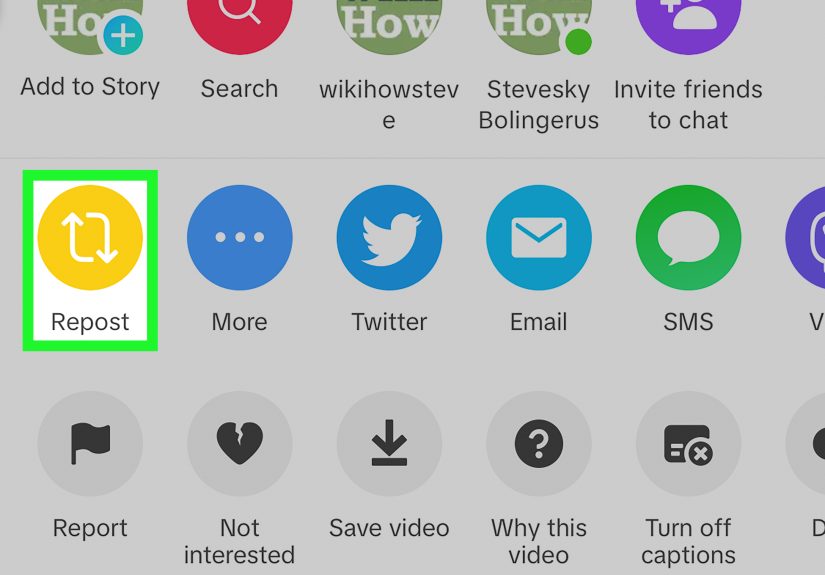
Method 4: Repost a TikTok Video (TikTok’s Built-In “Boost This” Button)
TikTok’s Repost feature is designed for sharing someone else’s video to your followers inside TikTokwithout pretending you
made it. Think “retweet,” not “re-upload.”
How to repost on TikTok
- Open the video you want to repost.
- Tap Share.
- Tap Repost (if available).
How to remove/undo a repost
Changed your mind? Same. To undo it, go back to the video and look for Remove repost (often found in the same Share menu or via a
press-and-hold menu). TikTok makes this pretty quick once you know where to look.
Should you add commentary?
If TikTok lets you add a note or comment with your repost (feature availability varies), use it. A repost with context performs better than a repost
that feels like you accidentally sat on your phone.
Method 5: “Repost” Outside TikTok (Ethical Options That Won’t Burn Bridges)
People say “repost” when they really mean “share this on Instagram/YouTube Shorts/Facebook/Group Chat/Carrier Pigeon.” Here are the smart options.
Option A: Share the link instead of re-uploading
If your goal is “I want people to see this,” a link is often best. It keeps the video connected to the creator, keeps comments/likes in one place,
and avoids copyright headaches.
Option B: Embed TikTok on a website (clean, official, and surprisingly easy)
If you run a blog or website, embedding is a great way to include a TikTok without downloading anything. TikTok provides an embed option from the web
interface, giving you code you can paste into your site.
Option C: Use Duet or Stitch for built-in attribution
If you want to respond, react, or add information, Duet and Stitch are designed for that. The original content is
clearly shown and credited.
- Duet: side-by-side format (your video plays alongside the original).
- Stitch: the original clip plays first, then your video continues the conversation.
If you don’t see Duet/Stitch as options, the creator may have those features disabled for that video.
Option D: Get permission (especially for brands and business accounts)
If you’re a business, creator, or page admin reposting content as marketing, permission matters even more. A quick DM like
“Hey! Can we repost this on our Instagram? We’ll credit you and link back.” prevents misunderstandings and keeps relationships healthy.
Common Problems (and Fixes) When Sharing TikTok Videos
“Copy link” is missing
- The video may be restricted, private, or limited to certain viewers.
- The app may be glitchingtry closing and reopening TikTok, or updating it.
- Some sharing options change depending on region/device/account type.
“Save video” is missing
- The creator likely disabled downloads.
- Some posts (or some accounts) may have download restrictions.
- Try saving to Favorites instead (tap and hold → add to Favorites), if available.
The link opens, but the video won’t play
- Have the viewer open it in the TikTok app (not just a browser).
- Check whether the video was deleted or set to friends-only/private.
- If it’s age-restricted, the viewer may need to adjust account settings or verify age (where applicable).
You want to share a video you found earlier (but it vanished into the algorithm fog)
Try checking your Watch History (if available in your settings), your Favorites, or your saved collections.
When you find something you love, favoriting it is like leaving breadcrumbs for your future self.
Privacy and Safety Tips When Sharing
- Think before you share publicly: A repost can push a video to your followersmake sure you’re comfortable being associated with it.
- Be mindful of personal info: If a video includes faces, kids, addresses, or private details, avoid spreading it outside the intended context.
- Use official features when possible: They’re built for attribution, and they reduce “where did this come from?” confusion.
Conclusion: Share Like a Pro (Not Like a Chaos Gremlin)
Sharing TikToks is easy. Sharing TikToks well is the secret sauce. Use the Share menu for quick sends, copy links when you need flexibility,
download only when it’s allowed (and when it’s yours), and use Repost/Duet/Stitch to keep credit attached. If a button is missing, it’s usually a
permission settingnot a personal attack from the app.
Most importantly: if you want to repost content outside TikTok, choose options that respect creators. Your future self (and your audience) will thank you.
Extra: Real-World Sharing Experiences (500+ Words)
Below are a few “this happens all the time” scenariosbecause sharing TikToks in the real world is rarely as simple as “tap Share and ascend into the clouds.”
These are the moments where people usually get stuck, accidentally spam their friends, or learn a lesson the hard way.
Scenario 1: The group chat demands a link… and then nobody can open it
You paste the TikTok link into a group chat. Instantly, three people respond with: “It says video unavailable.” One person says it works for them.
Another sends a screenshot of an error like they’re submitting evidence to the court.
What’s usually happening? The creator’s account is private, the video is friends-only, or the viewer is trying to open it in a browser that refuses to cooperate.
The fix is often hilariously low-tech: ask them to open it in the TikTok app. If the content is private, the only real fix is permissions
(they need access), not a different link. This is why, when you share something important, it helps to add a tiny note like:
“If it doesn’t open, try ‘Open in TikTok.’” It makes you look like the competent adult in the chat. Briefly.
Scenario 2: You want to “repost” a creator’s clip, but you also don’t want to be That Account
A common temptation: you see a perfect clip that matches your nichesay, a quick cleaning hack or a home DIY tipand you want it on your Instagram or Facebook page.
The smart move is to link or use TikTok’s Repost inside the app. If you truly need it on another platform, a permission DM is the difference
between collaboration and conflict.
A good DM is short, respectful, and clear: what you want to post, where you’ll post it, and how you’ll credit them. Something like,
“Hey! Love this videocan we repost it on our Instagram Stories? We’ll tag you and link back.”
Most creators appreciate being asked. Some will say no. Either way, you’re building a reputation as someone who doesn’t swipe content like it’s free samples at Costco.
Scenario 3: You want to save a TikTok for later, but downloads are off
This is where people go off-road and start searching for “download without watermark” like it’s a treasure map. But there’s a cleaner workflow:
use Favorites and organize collections (if your app version supports it). Add a note in your own system (like a notes app or a project board)
with the link and why it mattered: “Tile grout trick,” “kitchen cabinet hinge fix,” “the sourdough method I swear I’ll try.”
If you need the content for a legitimate reason (like a classroom example, a presentation, or a work project), consider embedding the TikTok instead of downloading it.
You get the content, the creator gets the view, and nobody has to pretend a watermark never existed.
Scenario 4: You’re sharing your own drafts and you don’t trust your phone (fair)
Creators often learn this one after a painful moment: drafts can disappear if you delete the app, switch phones, or run into storage issues.
A practical habit is exporting your own videos intentionallysaving to device when possible, keeping originals from your editor, and posting drafts privately if you
need a camera-roll version. It’s not paranoia; it’s a backup plan.
The best part? Once you get into the rhythm, sharing becomes frictionless: link for friends, repost for followers, download for your own backups, and Duet/Stitch
when you want to add commentary. That’s how you stay helpful without turning into an accidental content thiefor the person who sends eight TikToks in a row with
zero explanation. (Add captions. Be kind. Your friends have jobs.)