Table of Contents >> Show >> Hide
- The Quick Answer
- Why So Many Players Miss This
- How to Exit Power Armor on Each Platform
- Step-by-Step: The Safest Way to Exit Power Armor
- What to Do Right After You Exit
- Why the Game Says “You Cannot Exit Your Power Armor Here”
- Common Mistakes Players Make
- How Exiting Power Armor Fits Into Smart Gameplay
- Troubleshooting: What If You Still Cannot Get Out?
- Player Experiences: What This Looks Like in Real Play
- Final Thoughts
- SEO Tags
Power Armor in Fallout 4 is one of those features that makes you feel like the mayor of destruction. You stomp around the Commonwealth like a walking tank, bullets bounce off, raiders panic, and suddenly every problem looks solvable with louder footsteps. Then, five minutes later, you’re standing in Sanctuary asking the universe a very serious question: How do I get out of this thing?
If that sounds familiar, relax. Exiting Power Armor in Fallout 4 is simple once you know the trick, but the game does a spectacularly casual job of explaining it. This guide covers the exact controls for PC, Xbox, and PlayStation, why the game sometimes refuses to let you leave the suit, and what you should do right after stepping out so your expensive metal pajamas do not get borrowed by a settler, companion, or random wasteland gremlin.
The Quick Answer
To exit Power Armor in Fallout 4, press and hold the correct button for your platform while standing still:
| Platform | Button to Exit Power Armor |
|---|---|
| PC | Hold E |
| Xbox | Hold A |
| PlayStation | Hold X |
That is the core answer. Not tap. Not mash. Not glare at the keyboard like it betrayed you. Hold the button for a moment and your character will climb out.
Why So Many Players Miss This
You have to hold the button, not press it once
This is the number one reason new players get stuck. In most games, one quick press handles an interaction. In Fallout 4, exiting Power Armor uses a hold input instead. If you tap the button once and nothing happens, the game is not broken. It is just being annoyingly literal.
You need enough space to get out
The exit animation needs room. If your Power Armor is jammed against a wall, wedged into a doorway, parked too close to furniture, or pressed awkwardly near a Power Armor station, the game may refuse to let you exit. This is when players get that classic “you cannot exit your power armor here” headache.
The game is practical, but not always graceful
Fallout 4 is brilliant at making Power Armor feel heavy and physical. It is less brilliant at explaining small mechanics cleanly. The result is simple: once you know the rule, it feels obvious. Before you know it, it feels like the suit has legally adopted you.
How to Exit Power Armor on Each Platform
PC
If you are playing with keyboard and mouse, hold E. Stay still for a second and let the exit animation finish. If you are moving, turning, or clipping into an object, the animation may not start.
Xbox
On Xbox, hold A. A quick tap usually will not do the job. Think of it as confirming, “Yes, I would like to stop being a portable refrigerator with shoulder cannons.”
PlayStation
On PlayStation, hold X. As with the other platforms, do it while standing still and make sure there is enough room around the armor frame.
One useful rule to remember
If you forget the specific control, think of the exit command as the game’s main interaction input. In practice, the important part is this: hold the interaction button for your platform, not just press it once.
Step-by-Step: The Safest Way to Exit Power Armor
- Stop moving completely.
- Make sure you are not pressed against a wall, terminal, car, or workstation.
- Hold the correct button: E, A, or X.
- Wait for the exit animation to finish.
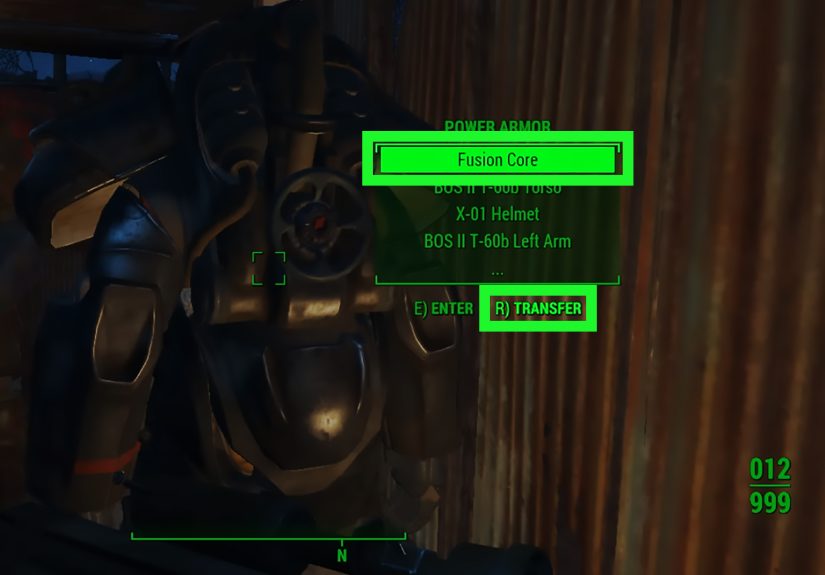
- After stepping out, check the armor frame and consider removing the fusion core.
That last step matters more than many players realize. Exiting the suit is easy. Keeping it safe afterward is the real Commonwealth endgame.
What to Do Right After You Exit
Remove the fusion core
If you leave the fusion core inside the suit, NPCs can potentially use the frame. In plain English, leaving the core installed is like parking your car, leaving the engine running, and hanging a sign on it that says, “Please commit a minor inconvenience.”
To avoid that, interact with the frame and transfer the fusion core out when you park the armor. Many experienced players do this every single time because it is the easiest way to stop unwanted joyrides.
Park it somewhere sensible
A flat, open area is best. Settlements work well, especially near crafting resources, but do not wedge the armor into a cluttered corner where the game struggles with exit and station placement. You want enough room to walk around it, interact with it, and use a Power Armor station without starting a small mechanical argument.
Use a Power Armor station correctly
If you want to repair or modify your suit, place it near the station with enough room to step out and interact with the frame. The process is easier when the suit is aligned well rather than parked at a weird angle like it just lost a fight with geometry.
Why the Game Says “You Cannot Exit Your Power Armor Here”
This error usually happens because the game cannot find enough clean space for your character to step out of the frame. Common causes include:
- Standing too close to a wall or object
- Parking too close to a Power Armor station
- Trying to exit in a narrow hallway or doorway
- Being positioned near furniture, clutter, or uneven terrain
- Still moving when you attempt the exit
How to fix it fast
Take a few steps forward or backward, rotate slightly, then try again. Sometimes moving just a small distance solves everything. If that fails, relocate to a more open patch of ground and repeat the hold command.
In other words, the solution is not usually dramatic. You do not need a secret perk, a hidden menu, or a doctorate in robot etiquette. You just need space.
Common Mistakes Players Make
Tapping instead of holding
This is the classic mistake. If the suit feels “stuck,” double-check that you are holding the button long enough.
Trying to exit while in a bad spot
If you squeezed the armor into a cramped area, the exit animation may fail. Back out into open ground first.
Leaving the fusion core installed
This is how players end up telling tragic campfire stories about settlers, companions, or enemies wearing their favorite suit. Remove the core when you are done.
Ignoring fusion core drain
Power Armor is powerful, but it is not free. Sprinting around in it drains fusion cores faster, so some players prefer to use it for difficult fights, dangerous zones, or specific missions instead of every casual jog to a mailbox.
How Exiting Power Armor Fits Into Smart Gameplay
Knowing how to exit Power Armor is not just a beginner control tip. It actually affects how you manage resources and play efficiently.
Use it when the situation calls for it
Power Armor shines in heavy combat, radiation-heavy areas, and dangerous exploration. Outside of those moments, some players step out to save fusion core charge, move more casually, or avoid burning resources during simple settlement tasks.
Exit before repairs and upgrades
To repair or mod the suit, you will usually be stepping out near a Power Armor station anyway. That means learning proper placement saves time and frustration.
Think of the suit like premium equipment
Yes, it feels awesome. Yes, it makes you look like a walking war crime. But it is still gear that needs maintenance, fuel, and smart parking habits. The better you manage entry and exit, the smoother the entire Power Armor experience becomes.
Troubleshooting: What If You Still Cannot Get Out?
Move to open ground
This fixes most cases. Step away from walls, station frames, debris piles, or furniture.
Stop all movement
Do not run, turn wildly, jump, or try to do three things at once. Stand still and hold the exit button.
Reposition near the station
If you are trying to repair the suit, adjust the frame so you can step out cleanly and still interact with the station after exiting.
Try again calmly
Yes, this sounds obvious. But half of Power Armor frustration comes from players getting impatient and repeating the same bad input in the same cramped spot. Move first. Then try again.
Player Experiences: What This Looks Like in Real Play
For many players, the first real Power Armor experience comes early and feels unforgettable. You climb into the suit, grab the minigun, square up against a Deathclaw, and suddenly Fallout 4 transforms from “post-apocalyptic scavenger simulator” into “metal album cover with side quests.” It is a fantastic moment. It also creates one of the funniest beginner problems in the game: afterward, plenty of people have no idea how to get out.
A common experience goes like this: you limp back to Sanctuary or Red Rocket in your battered suit, ready to stash it somewhere safe, and then you press every button except the one you actually need to hold. You crouch. You open menus. You accidentally interact with something nearby. You maybe even wonder if the suit is now permanent and your character’s future includes showering in hydraulic fluid. Then somebody tells you, “Just hold the button,” and suddenly the mystery ends in the least dramatic way possible.
Another very real experience happens when players discover the spacing issue. They park the suit too close to a wall, try to exit, and get blocked. So they shuffle two inches to the left, try again, fail, rotate, step backward, fail again, and eventually discover that the problem was not skill, stats, or level. It was parking. Fallout 4 quietly turns you into someone who understands the importance of leaving enough room around industrial equipment.
Then there is the fusion core lesson, which tends to arrive the hard way. Many players leave the suit sitting proudly in a settlement with the core still inside, assuming everything will be fine. Later, they come back to find someone else climbing around in it, or they hear horror stories and decide never to risk it again. That moment changes behavior fast. Once a player learns to remove the fusion core after exiting, it becomes ritual. Fight, return home, step out, remove core, admire armor, continue wasteland life.
Repair sessions create their own little routine too. Experienced players often line the suit up near a station, step out carefully, then start swapping parts, repairing damage, and upgrading pieces like a pit crew servicing a very angry refrigerator. It feels practical, satisfying, and weirdly personal. Over time, players stop thinking of Power Armor as a temporary gimmick and start treating it like prized equipment with habits, rules, and parking etiquette.
That is why this topic matters more than it first appears. Learning how to exit Power Armor in Fallout 4 is not just about escaping the suit. It is part of learning how to use it well. Once the controls click, the whole system becomes easier: combat choices make more sense, fusion cores last longer, repairs are smoother, and your armor is less likely to wander off with someone who definitely did not pay for it.
Final Thoughts
If you only remember one thing from this guide, remember this: hold the exit button while standing still. On PC that is E, on Xbox it is A, and on PlayStation it is X. If the game refuses, move to a more open area and try again.
After that, build good habits. Park the suit in a smart spot. Remove the fusion core. Use Power Armor stations properly. Treat the frame like valuable gear instead of a shopping cart with legs. Do that, and you will spend less time fighting menus and more time doing what Fallout 4 does best: wandering the wasteland, making messy decisions, and looking ridiculously cool while doing it.