Table of Contents >> Show >> Hide
- The Short Answer
- Why iPad Storage Matters More Than It Used To
- Current iPad Storage Options at a Glance
- What Actually Eats iPad Storage?
- How Much Storage Is Right for Your Type of Use?
- Cloud Storage Can Help, but It Does Not Solve Everything
- External Storage Helps More Than It Used To
- How to Figure Out Your Ideal Storage in Five Minutes
- Common Mistakes People Make
- The Best Value Recommendation
- Experience: What People Usually Learn After Living With Their iPad
- Conclusion
Buying an iPad should feel exciting. You pick a screen size, decide whether you want a keyboard, imagine yourself becoming wildly productive, and then Apple hits you with the question that ruins your peaceful afternoon: How much storage do you need?
Suddenly, you are not buying a tablet. You are staring into the digital abyss, trying to predict your future behavior. Will you mostly stream Netflix and read PDFs? Will you download giant games, hoard photos, edit video, sketch in Procreate, and treat your iPad like a tiny laptop with commitment issues? Storage matters because it affects both price and daily usability. Choose too little, and you may spend the next three years deleting apps like a stressed-out submarine captain tossing cargo overboard. Choose too much, and you may pay for space you never use.
The good news is that this decision is easier than it looks. For most people, there is a sweet spot. For some, there is a clear “don’t cheap out” warning. And for a small group of power users, there is a perfectly valid reason to go big and never apologize for it.
The Short Answer
- 128GB is enough for light users who mostly stream, browse, take notes, and rely on cloud storage.
- 256GB is the best choice for most people because it leaves breathing room for apps, photos, downloads, and a few surprises.
- 512GB makes sense for creatives, heavy travelers, gamers, and people who keep a lot of files offline.
- 1TB or 2TB is for serious professional work, large media libraries, or buyers who want maximum longevity and hate ever thinking about storage again.
If you want the plainest possible recommendation, here it is: buy 256GB if your budget allows it. It is the storage equivalent of ordering fries for the table. Almost nobody regrets it.
Why iPad Storage Matters More Than It Used To
Years ago, a smaller storage tier could be surprisingly manageable. Today, not so much. Apps are bigger, games are chunkier, photos and videos from modern phones are heavier, and creative workflows are way more common. Plenty of people now use an iPad for school, travel, business, drawing, editing, or as a secondary computer. That means local storage disappears faster than you expect.
There is also one sneaky detail many buyers forget: you never get the full advertised number. A 128GB iPad does not hand you a perfect, empty 128GB playground. The system itself takes space, and formatted usable capacity is always lower than the number on the box. So when you buy 128GB, you are really buying “128GB minus reality.”
That does not mean smaller capacities are bad. It just means you should buy with your real habits in mind, not the version of yourself who suddenly becomes an ultra-disciplined cloud minimalist the moment the iPad arrives.
Current iPad Storage Options at a Glance
| iPad Model | Current Storage Options | Best Fit |
|---|---|---|
| iPad | 128GB, 256GB, 512GB | Everyday users, families, students |
| iPad mini | 128GB, 256GB, 512GB | Readers, travelers, pilots, note-takers |
| iPad Air | 128GB, 256GB, 512GB, 1TB | Students, professionals, creatives |
| iPad Pro | 256GB, 512GB, 1TB, 2TB | Power users, editors, artists, pro workflows |
This lineup tells you something important right away: Apple itself is nudging buyers upward. The base iPad now starts at 128GB, and the Pro starts at 256GB. That is not an accident. It reflects how much local storage modern tablet use actually demands.
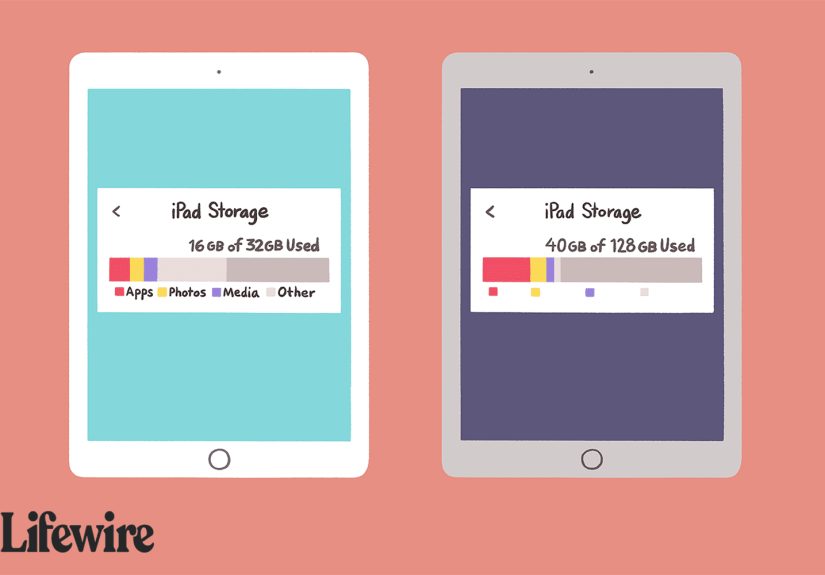
What Actually Eats iPad Storage?
Apps and Games
Basic apps do not seem scary on their own, but storage disappears through accumulation. Messaging apps, productivity suites, note apps, browsers, and social apps all build caches and downloaded data over time. Then add a few large games, and your storage starts sweating.
Photos and Videos
If your iPad syncs with iCloud Photos, you can reduce local storage use with optimization settings. That helps a lot. Still, photos and especially video remain major storage hogs. Downloaded originals, shared media, screen recordings, and 4K clips can turn a comfortable storage plan into a crowded closet.
Offline Downloads
This is where people fool themselves. Streaming is efficient. Downloading is not. A few movies for a flight, several TV seasons for a long trip, offline maps, podcasts, textbooks, and music libraries can quietly gobble up tens of gigabytes. It feels harmless because every download is small in isolation. Then suddenly your iPad says, “No more room,” and now you are negotiating with it.
Creative Work
If you use Procreate, Lightroom, video editors, audio tools, or design apps, do not shop like a casual user. Creative files multiply fast. Procreate files are stored locally on the iPad by default, which is convenient until you have dozens or hundreds of canvases. Video editing is even more demanding. Large projects, exported files, assets, and duplicates can turn a modest iPad into a storage crime scene.
System Files and Updates
Operating systems need room to breathe. Temporary files, cached data, downloads, updates, and app leftovers all take up space. The more crowded your iPad becomes, the more annoying storage management gets. You are not just buying capacity for files. You are buying convenience.
How Much Storage Is Right for Your Type of Use?
128GB: Fine for Light Users
Choose 128GB if your iPad is mainly for browsing, email, note-taking, reading, streaming, Zoom calls, and a normal number of apps. It also works well if you store documents in the cloud, stream most media instead of downloading it, and do not keep giant photo or video libraries locally.
Who should buy 128GB?
- Students using web apps and note-taking tools
- Parents buying a family iPad for general use
- People who mostly stream content
- Readers and travelers who keep downloads modest
Who should not buy 128GB? Anyone who says, “I like having everything downloaded just in case.” That sentence is storage doom wrapped in optimism.
256GB: The Best Choice for Most People
If you want one answer for the widest number of buyers, it is 256GB. This capacity is roomy enough for large apps, a decent photo library, offline entertainment, school or work files, and some creative projects. It feels flexible instead of fragile.
256GB is especially smart if you plan to keep the iPad for several years. Your needs rarely shrink over time. Apps get heavier. Media libraries grow. New hobbies appear. One day you are taking notes in class, and the next day you are editing drone footage because apparently this is your life now.
512GB: Great for Heavy Use and Creative Work
Move up to 512GB if your iPad is a serious daily device, not just a couch companion. This tier is ideal for artists with lots of canvases, travelers who keep big offline libraries, gamers with multiple large titles installed, and professionals who manage bulky files.
It is also a good fit if you hate micromanaging storage. Some people enjoy curating digital space. Others would rather pay once and never think about it again. If that sounds like you, 512GB can be a sanity purchase.
1TB or 2TB: Only If You Know Exactly Why
These capacities are not ridiculous, but they are specialized. They make sense for professional video editing, heavy music production, huge design libraries, complex file workflows, or people replacing a laptop with an iPad-centric setup. On current iPad Pro models, higher storage tiers can also change the memory and processor configuration, so extra storage may come with extra performance benefits.
That said, buying 1TB “just to be safe” is a bit like purchasing a walk-in freezer because you occasionally enjoy ice cream. If you do not work with large local files, it is probably overkill.
Cloud Storage Can Help, but It Does Not Solve Everything
iCloud Photos and cloud file services absolutely change the math. If your photos are optimized, your documents live online, and you stream most of your content, you can get away with less internal storage. Apple also gives you storage-management tools like device storage recommendations and Offload Unused Apps, which can rescue a cramped iPad.
But cloud storage is not magic. It depends on internet access, sync settings, patience, and your willingness to trust the cloud with your life. If you travel often, work offline, or hate waiting for files to re-download, local storage still matters a lot.
External Storage Helps More Than It Used To
Modern iPads work much better with external drives than older models did. That is useful for moving large files, storing project assets, and reducing clutter. Some pro workflows, including newer Final Cut Pro project options, benefit from external storage support.
Still, external drives are a helper, not a full substitute. They are fantastic for archives, imports, exports, and cold storage. They are less wonderful when you just want your iPad to feel easy, self-contained, and ready to go at all times. Most people do not want to carry a dongle ecosystem just to avoid buying enough internal storage in the first place.
How to Figure Out Your Ideal Storage in Five Minutes
- Check your current device storage. Look at your phone, old iPad, or laptop and see what categories use the most space.
- Count your offline habits. Do you download movies, playlists, games, maps, or class files?
- Think two or three years ahead. Buy for future-you, not just present-you.
- Ask whether this iPad will be casual or central. A side device can be smaller. A daily workhorse should be roomier.
- Be honest about cloud dependence. If you love offline access, buy more local storage.
If you are stuck between two sizes, the bigger one is usually the safer long-term move. Not always, but usually. Nobody sits at a coffee shop whispering, “I wish I had less storage.”
Common Mistakes People Make
- Buying for today instead of the life of the device.
- Assuming streaming means they will never download anything.
- Forgetting that photos, caches, and app data grow over time.
- Using a creative workflow on an entry-level storage tier.
- Paying for a giant capacity without having a real use case.
The Best Value Recommendation
Here is the recommendation I would give most buyers without dramatic hand waving:
- Buy 128GB if you are budget-conscious and your usage is light.
- Buy 256GB if you want the best balance of price, flexibility, and longevity.
- Buy 512GB if you create, travel, download heavily, or simply hate storage anxiety.
- Buy 1TB or 2TB only if your workflow clearly demands it.
For the average person, 256GB is the sweet spot. It gives you room to grow without making your wallet file a formal complaint. If money is tight, 128GB can still be perfectly good. If your iPad is going to become your sketchbook, media vault, editing station, and backup laptop, 512GB starts looking very reasonable very quickly.
Experience: What People Usually Learn After Living With Their iPad
Here is the part buyers rarely hear before checkout: your storage decision does not reveal itself on day one. It reveals itself six months later, during a trip, a deadline, a semester, or a random Sunday when the iPad suddenly refuses to install an update.
The light user who buys 128GB is often thrilled at first. Everything feels fast, clean, and surprisingly spacious. They install a few streaming apps, save some notes, use Safari, maybe download a handful of movies for a flight, and life is good. For this kind of person, 128GB was absolutely the right move. They never filled it because they never tried to turn the iPad into a digital attic. This is the happy ending Apple commercials never mention because it is too calm to be cinematic.
Then there is the buyer who also picks 128GB, but casually starts doing more. A few big games. A growing photo library. Several downloaded shows. A PDF app full of textbooks. Some files from work. Maybe a sketch app because drawing looked fun. Suddenly, storage becomes a weekly puzzle. They are not in disaster mode, but they are always “just managing.” This person usually says the same thing later: “I should have bought 256GB.” Not because 128GB was unusable, but because it made ownership more annoying than it needed to be.
The 256GB crowd tends to be the least dramatic group of all. They download what they want, keep a fair amount offline, ignore storage most of the time, and move on with their lives. This is why 256GB gets recommended so often. It is not flashy. It is simply the capacity most likely to stay out of your way. It is the sensible pair of shoes that somehow ends up being your favorite pair.
People who buy 512GB usually know themselves pretty well. They create things. They travel. They keep large project folders. They do not want to juggle storage during a client edit, a long flight, or a school term. Their experience is usually not “Wow, I used every gigabyte immediately.” It is more like, “Wow, I never had to think about it.” That lack of friction is the entire point.
The 1TB and 2TB buyers are a different species, and I say that with respect. These are the people editing serious video, managing big audio libraries, storing production assets, or using an iPad Pro in ways that make the rest of us feel underdressed. For them, big storage is not luxury. It is workflow insurance. They are not asking whether the tier is too much. They are asking whether it is enough.
The most common regret overall is not buying “too much.” It is buying a little too little and then spending years compensating with deletions, cloud juggling, and external-drive gymnastics. The most satisfied buyers tend to be the ones who matched storage to their real habits instead of their most optimistic fantasy. In other words, buy the iPad for the person you already are, plus a little room for the person you are about to become.
Conclusion
So, how much iPad storage do you need? Enough for your real life, not just your budget spreadsheet. If your iPad will mostly be a browsing, reading, streaming, and note-taking machine, 128GB can work just fine. If you want the safest, smartest all-around choice, go with 256GB. If your iPad is going to carry creative apps, offline media, games, and large projects, 512GB is money well spent. And if you are deep into professional work, 1TB or 2TB can be completely justified.
The smartest purchase is not the cheapest option or the biggest number. It is the one that lets you use your iPad naturally without constantly cleaning it up like a tiny digital garage. Buy enough storage once, and your future self will have one less thing to complain about. That alone is worth something.