Table of Contents >> Show >> Hide
- Quick Answer: Does Instagram Notify When You Screenshot a DM?
- What Counts as a Regular Instagram DM?
- When Does Instagram Tell Someone You Took a Screenshot?
- Does Instagram Notify When You Screenshot a Story?
- Does Instagram Notify When You Screenshot a Post, Reel, or Profile?
- How to Tell If a DM Is Safe to Screenshot
- What Does the Screenshot Notification Look Like?
- Can You Screenshot Instagram DMs Without Being Detected?
- Can Third-Party Apps Tell You Who Screenshotted Your Instagram?
- Why Instagram Handles Screenshot Notifications This Way
- Privacy Tips Before You Send Sensitive DMs
- What Businesses and Creators Should Know
- Common Myths About Instagram Screenshot Notifications
- FAQ: Instagram DM Screenshot Notifications
- Does Instagram tell when you screenshot a regular DM?
- Does Instagram tell when you screenshot a disappearing photo?
- Does Instagram tell when you screenshot Vanish Mode?
- Does Instagram tell when you screenshot a Reel sent in DMs?
- Does Instagram tell when you screenshot a photo from someone’s camera roll?
- Can someone see if I screenshot their profile?
- Real-World Experiences: What Screenshot Anxiety Feels Like on Instagram
- Conclusion: So, Does Instagram Tell When You Screenshot a DM?
Few tiny phone moments create more panic than taking a screenshot inside Instagram DMs. One second you are saving a funny message, a recipe, a business address, or a “Did they really just say that?” receipt. The next second, your soul leaves your body as you wonder: Does Instagram tell when you screenshot a DM?
The honest answer is: usually no, but sometimes yes. Instagram does not normally notify someone when you screenshot a regular direct message conversation. That means ordinary text chats, shared Reels, posts, links, stickers, reactions, and most media sent like a normal message can usually be screenshotted without sending an alert. But Instagram treats certain private, temporary content differently. If the message is a disappearing photo, a disappearing video, or part of a disappearing-message feature such as Vanish Mode, Instagram may notify the sender or restrict the screenshot entirely.
In other words, Instagram screenshot notifications are less like a security camera and more like a picky bouncer. It ignores most screenshots, but it pays attention when content was designed to vanish.
Quick Answer: Does Instagram Notify When You Screenshot a DM?
No, Instagram does not notify users when you screenshot a regular DM. If you take a screenshot of a normal text conversation, a shared post, a shared Reel, a meme, a link, or a regular photo sent from someone’s camera roll, the other person generally will not receive a screenshot notification.
Yes, Instagram can notify users when you screenshot certain disappearing content in DMs. This includes disappearing photos or videos sent through Instagram’s in-chat camera, “View Once” style media, “Allow Replay” temporary media, and messages sent in disappearing-message environments such as Vanish Mode. In some rollouts, Instagram may also block screenshots or screen recordings of certain disappearing images instead of simply notifying the sender.
What Counts as a Regular Instagram DM?
A regular Instagram DM is the everyday message most people send without thinking about it. It is the “LOL,” the shared Reel, the voice note, the post from a favorite creator, the restaurant address, the link to a sale, or the photo pulled from a phone gallery and dropped into the chat.
For these normal messages, Instagram does not usually alert the other person when you screenshot. If your friend sends you a funny message and you capture it to show your group chat, Instagram is not going to pop up like a hall monitor and announce your behavior. Whether that group chat should see it is another question, and your conscience can handle that meeting.
Examples of DMs Instagram Usually Does Not Notify About
- Screenshotting normal text messages
- Screenshotting shared feed posts
- Screenshotting shared Reels
- Screenshotting profile links or usernames sent in chat
- Screenshotting regular photos or videos sent from the camera roll
- Screenshotting stickers, GIFs, emojis, and reactions
- Screenshotting ordinary group chats
This is the rule that most users are looking for: if the Instagram DM is part of a normal chat thread and not designed to disappear, a screenshot generally stays private.
When Does Instagram Tell Someone You Took a Screenshot?
Instagram’s screenshot alerts mainly appear around temporary, disappearing, or privacy-sensitive DM content. These features were built with the expectation that the content will not stay visible forever. Because of that, Instagram adds extra protection.
1. Disappearing Photos and Videos
If someone sends you a photo or video using Instagram’s in-chat camera and chooses a disappearing option, that media is treated differently from a normal image attachment. It may be labeled with viewing options such as “View Once” or “Allow Replay.” If you screenshot that disappearing photo or video, Instagram may show the sender that a screenshot was taken.
This is the most important exception. A photo sent from someone’s gallery is usually just a normal DM. A photo taken through the Instagram DM camera and sent as temporary media is the one that can trigger a screenshot alert.
2. Vanish Mode and Disappearing Messages
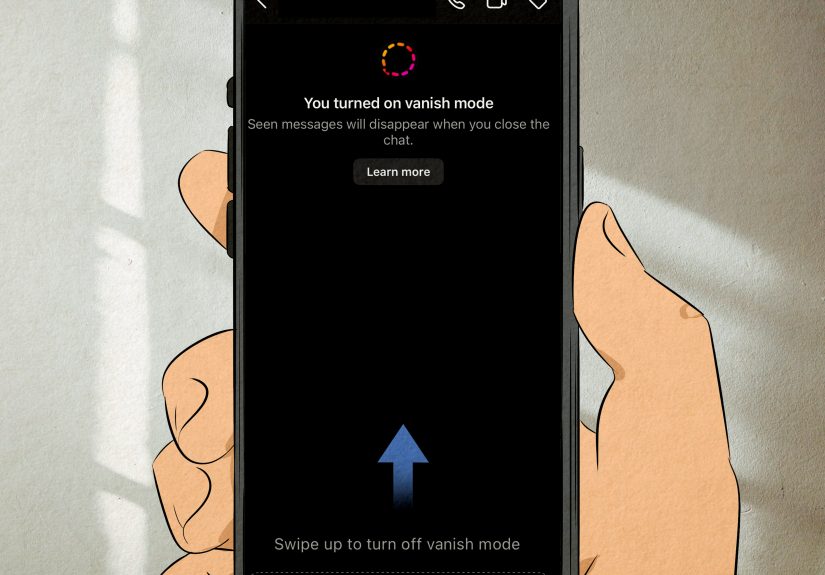
Vanish Mode is designed for messages that disappear after they have been seen and the chat is closed. Because the entire point is temporary conversation, Instagram can notify the other person when someone screenshots or screen records the chat.
Think of Vanish Mode as Instagram’s “this conversation is wearing sunglasses and a trench coat” setting. It is meant to feel private and temporary, so capturing it may not stay invisible.
3. Certain Screen Recordings
Screen recording often follows a similar logic to screenshots. Instagram generally does not notify someone if you screen record a regular Story, Reel, post, or normal DM. However, if you screen record disappearing DM content or messages in a disappearing-message feature, Instagram may detect it, notify the sender, or block the recording depending on your app version, phone, and feature rollout.
Does Instagram Notify When You Screenshot a Story?
No, Instagram generally does not notify users when you screenshot a Story. This includes regular Stories, Close Friends Stories, and Story Highlights. Instagram tested Story screenshot notifications years ago, but that test did not become a permanent feature.
That does not mean Stories are truly private. A person may not get a screenshot alert, but anything posted to a Story can still be saved, screen recorded, photographed with another device, or reshared outside Instagram. The internet has a very long memory and apparently never needs a nap.
Does Instagram Notify When You Screenshot a Post, Reel, or Profile?
No. Instagram does not generally send notifications when you screenshot feed posts, carousel posts, Reels, profile pages, usernames, bios, profile photos, captions, comments, or Highlights. The creator will not receive a “someone screenshotted your post” alert.
If you want to save public content for later, Instagram’s built-in Save feature is often cleaner than filling your camera roll with 800 screenshots named “IMG_9284” and then never finding them again. But if you do screenshot a public post or Reel, Instagram typically does not notify the creator.
How to Tell If a DM Is Safe to Screenshot
Before you screenshot, ask one simple question: Was this message meant to disappear?
If the message is a normal text, shared post, shared Reel, link, or regular uploaded image, Instagram usually will not notify. If the message is a View Once photo, an Allow Replay photo, a disappearing video, or part of Vanish Mode, assume the other person may be notified.
A Simple Screenshot Rule
Normal DM = usually no notification.
Disappearing DM = possible notification or screenshot restriction.
That one rule covers most Instagram screenshot confusion. If you remember nothing else, remember that “temporary” is the danger zone.
What Does the Screenshot Notification Look Like?
When Instagram detects a screenshot of disappearing DM content, the sender may see an icon, note, or in-chat alert indicating that a screenshot was taken. The exact appearance can vary by app version and device. Sometimes the alert appears beside the disappearing photo or video. In Vanish Mode, it may appear inline in the conversation.
Because Instagram frequently tests and adjusts features, the notification may not look identical for everyone. Some users may see a small symbol, while others may see a text-style notice. The key point is that disappearing content can leave a trail.
Can You Screenshot Instagram DMs Without Being Detected?
For regular DMs, there is usually nothing to “avoid” because Instagram does not typically notify the other person in the first place. For disappearing DMs, people often search for tricks involving airplane mode, desktop browsers, second phones, or app switching. These methods are unreliable, can stop working without warning, and may violate someone’s trust.
More importantly, just because something can be captured does not mean it should be captured. If the content is sensitive, personal, intimate, or sent with the expectation that it will disappear, the safest and most respectful choice is not to save it without permission.
Can Third-Party Apps Tell You Who Screenshotted Your Instagram?
No trustworthy third-party app can reliably tell you who screenshotted your Instagram Stories, posts, Reels, regular DMs, or profile. Apps that promise secret screenshot tracking are usually outdated, misleading, or risky. Some may ask for your login details, scrape your data, or expose your account to security problems.
If an app says, “Install me and I will reveal everyone who screenshots your Instagram,” treat it the way you would treat a stranger offering free sushi from a backpack. Technically possible? Maybe in a cartoon. Good idea? Absolutely not.
Why Instagram Handles Screenshot Notifications This Way
Instagram has to balance privacy, convenience, safety, and the reality that screenshots are part of modern phone behavior. Users screenshot things for harmless reasons all the time: saving event details, documenting customer service issues, keeping addresses, remembering product names, or collecting design inspiration.
If Instagram notified every screenshot everywhere, the app would become awkward fast. Imagine someone getting an alert every time you saved a cake recipe, a couch idea, or a friend’s chaotic typo. Nobody wants that much transparency before coffee.
At the same time, disappearing messages carry a different expectation. When someone sends a View Once photo or uses Vanish Mode, they are choosing a feature built around temporary visibility. That is why Instagram adds screenshot alerts or restrictions in those spaces.
Privacy Tips Before You Send Sensitive DMs
Screenshot notifications can help, but they are not a magic force field. A person can still photograph a screen with another device. They can describe what they saw. They can copy text manually. They can show the phone to someone sitting nearby. So if something would hurt you, your work, your relationship, or your reputation if it escaped the chat, do not rely on Instagram’s disappearing features as complete protection.
Use These Safer Habits
- Share sensitive information only with people you trust.
- Avoid sending private documents, passwords, or financial details through DMs.
- Use disappearing features for casual privacy, not absolute security.
- Keep your Instagram app updated so you have the latest safety controls.
- Make your account private if you want more control over who sees your content.
- Block and report users who pressure you to send personal or intimate media.
What Businesses and Creators Should Know
For creators, social media managers, influencers, and small businesses, screenshots are part of daily workflow. You may screenshot customer questions, brand mentions, influencer agreements, content inspiration, or feedback. Regular Instagram DMs can usually be captured without notifying the other party, but professional courtesy still matters.
If you plan to use a DM as a testimonial, case study, training example, or public post, ask for permission first. Even if Instagram does not send a screenshot alert, publishing someone’s private words without consent can damage trust. A screenshot may be technically silent, but reputational consequences can be very loud.
Common Myths About Instagram Screenshot Notifications
Myth 1: Instagram Notifies Every DM Screenshot
False. Regular DM screenshots generally do not trigger a notification. The alert system mainly applies to disappearing content and disappearing-message features.
Myth 2: Instagram Notifies Story Screenshots
False in normal use. Instagram does not generally notify users when someone screenshots their Story, including Close Friends Stories.
Myth 3: Private Accounts Can See Screenshots
False. A private account limits who can view posts and Stories, but it does not give the account owner a screenshot viewer list.
Myth 4: Screenshot Detector Apps Work
False. Third-party screenshot tracking apps are not reliable and may create account security risks.
FAQ: Instagram DM Screenshot Notifications
Does Instagram tell when you screenshot a regular DM?
No. Instagram generally does not notify someone when you screenshot a regular direct message conversation.
Does Instagram tell when you screenshot a disappearing photo?
Yes, it can. If the photo was sent as disappearing media through Instagram DMs, the sender may receive a screenshot notification or see an indicator in the chat.
Does Instagram tell when you screenshot Vanish Mode?
Yes, Instagram can notify the other person when you screenshot or screen record messages in Vanish Mode.
Does Instagram tell when you screenshot a Reel sent in DMs?
No. A shared Reel sent through DMs is usually treated like normal shared content, not disappearing media.
Does Instagram tell when you screenshot a photo from someone’s camera roll?
Usually no. If someone sends a regular image from their gallery as a normal DM, Instagram generally does not send a screenshot notification.
Can someone see if I screenshot their profile?
No. Instagram does not generally notify users when someone screenshots their profile, bio, posts, or Highlights.
Real-World Experiences: What Screenshot Anxiety Feels Like on Instagram
In everyday Instagram use, screenshot anxiety usually comes from uncertainty, not actual alerts. One common experience is saving a normal DM for practical reasons. Maybe a friend sends the address of a new taco place, and you screenshot it because switching between Google Maps and Instagram feels like a tiny obstacle course. In that situation, Instagram typically does not notify the friend. The screenshot is simply your shortcut, not a public announcement.
Another common situation is the “receipt” screenshot. Someone says something important, confusing, funny, or slightly suspicious, and you want a record. Maybe it is a client confirming a price, a seller agreeing to delivery terms, or a friend changing plans for the fourth time. Screenshotting a regular DM can be useful for memory and accountability. Instagram generally does not tell the other person, but it is still smart to use good judgment. A private message may be easy to save, but sharing it widely can turn a simple screenshot into drama with Wi-Fi.
Disappearing DMs feel different. Users often describe that moment as a small panic button: the content appears, the timer runs, and the urge to save it arrives like a raccoon in a kitchen. If you screenshot a View Once photo, an Allow Replay video, or a Vanish Mode chat, Instagram may notify the sender. That is why disappearing features should be treated as a social signal. The sender is saying, “This is not meant to live forever.” Ignoring that signal may not only trigger an alert; it can also break trust.
For creators and business owners, the experience is more practical. Many use screenshots to track customer questions, collect user-generated content ideas, save influencer messages, or document spam. In normal DMs, this is usually quiet. Still, businesses should avoid using private screenshots in public marketing unless they have permission. A happy customer message can make a great testimonial, but only when the customer agrees to be featured.
Parents and younger users may experience this topic differently. For teens, disappearing messages can create a false sense of safety. A notification or screenshot block helps, but it does not guarantee privacy. Someone can still use another phone to photograph the screen. The best advice is simple and old-fashioned: do not send anything you would be devastated to see outside the chat. That may sound dramatic, but the internet has a talent for turning tiny decisions into permanent artifacts.
The best Instagram habit is to pause before capturing or sending. If it is a normal message with harmless information, a screenshot is usually no big deal. If it is disappearing, sensitive, intimate, or emotionally loaded, slow down. Ask permission, save only what you truly need, and remember that digital trust is much easier to keep than repair.
Conclusion: So, Does Instagram Tell When You Screenshot a DM?
Instagram does not usually tell someone when you screenshot a regular DM. Normal text chats, shared posts, Reels, links, regular photos, and everyday conversation screenshots generally do not trigger alerts. The big exception is disappearing content. If you screenshot disappearing photos, disappearing videos, View Once media, Allow Replay media, or messages in Vanish Mode, Instagram may notify the sender or restrict the capture.
The safest way to remember it is simple: regular DMs are usually silent; disappearing DMs are not guaranteed to be silent. Use screenshots responsibly, avoid sketchy third-party tracking apps, and do not rely on disappearing messages as bulletproof privacy. Instagram can help protect temporary content, but good judgment is still the strongest privacy setting you have.