Table of Contents >> Show >> Hide
- What “Mute” Means on Snapchat (And What It Doesn’t)
- The Quick Cheat Sheet: Your “Peace & Quiet” Options
- Method 1: Mute Someone’s Story (Quietly, Kindly, Effectively)
- Method 2: Mute Chats and Calls (AKA “Stop Buzzing, I’m Trying to Live”)
- Method 3: Silence a Group Chat (Without Leaving Like a Dramatic Exit)
- Method 4: Turn Off Story Notifications (So Their Story Doesn’t Page You Like a Doctor)
- Method 5: Hide Your Story From Someone (When You Want Privacy Without a Breakup)
- Method 6: Device-Level Silence (Because Sometimes Snapchat is the Problem)
- “Without Them Knowing”: The Truth About Read Receipts
- Troubleshooting: If You Can’t Find the Mute / DND Options
- How to Mute Someone Without Being a Villain
- Experiences and Scenarios: What Muting Looks Like in Real Life (500+ Words)
- Conclusion
Snapchat is like a party where everyone brought a megaphone. Most of the time, it’s fun. Sometimes,
it’s a coworker’s 47-part “my lunch” saga, an ex who discovered inspirational quotes, or a group chat
that treats your phone like a vibrating chair at a comedy club.
The good news: you don’t have to unfriend, block, or start a digital cold war. Snapchat gives you
multiple ways to mute someone quietlymeaning you see less, you hear less,
and they don’t get a notification announcing, “Congratulations! You’ve been muted.”
(Because honestly, that would be chaos.)
What “Mute” Means on Snapchat (And What It Doesn’t)
In Snapchat-land, “muting” usually means one of two things:
-
Muting their Story: Their Story won’t get shoved to the top when you’re watching Stories,
and it becomes much easier to ignore without the guilt spiral. -
Muting chat/call notifications (sometimes labeled like “Do Not Disturb”): You still receive
their Snaps and messages, but your phone stops throwing a parade every time they type “lol.”
What muting does not do: it doesn’t remove them, block them, or stop them from messaging you.
Think of it as turning the volume downnot bricking the speaker.
The Quick Cheat Sheet: Your “Peace & Quiet” Options
Pick your level of calm:
- Mute their Story (you won’t see it pushed to the top).
- Turn off Story notifications from them (their new Story won’t ping you).
- Mute chat and call notifications from them (no banners, no buzzing).
- Silence a group chat (Mentions Only or Silent).
- Hide your Story from them (you post freely; they don’t see it).
- Device-level silencing (iPhone/Android notification settings if Snapchat is still too loud).
Method 1: Mute Someone’s Story (Quietly, Kindly, Effectively)
If someone posts nonstop but you still want to stay friends, muting their Story is the cleanest move.
You’re not blocking themyou’re just refusing to be recruited into their daily documentary series.
Option A: Mute from the Chat Screen
- Open Snapchat and go to the Chat screen (the conversations list).
- Press and hold the person’s name (or their conversation).
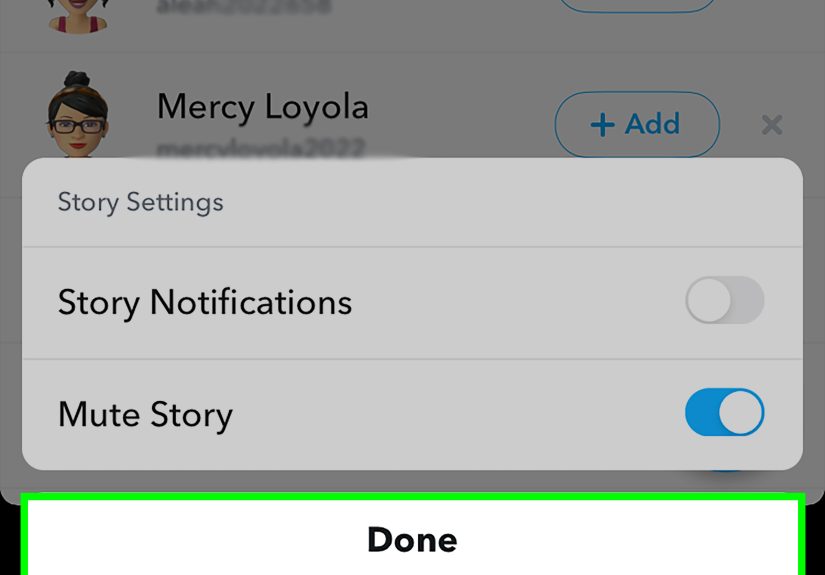
- Tap Story Settings.
- Toggle Mute Story on.
Option B: Mute from Their Profile
- Tap their name/profile from chat or search.
- Tap the three dots (more options) in the corner.
- Look for Story Settings and switch on Mute Story.
Will they know? Not directly. Snapchat doesn’t pop up a message to them saying you muted
their Story. From their perspective, everything looks normalunless they’re the type to run analytics
on who watched their Story at 2:07 p.m. (In which case… good luck.)
Method 2: Mute Chats and Calls (AKA “Stop Buzzing, I’m Trying to Live”)
This is the “I still like you, but I don’t need your notifications as a lifestyle” setting. You can
silence chat alerts and even call notifications from a specific person.
How to Mute Chat/Call Notifications for One Person
- Go to the Chat screen.
- Press and hold their name/conversation.
- Tap Chat and Notification Settings.
- Tap Notification Settings.
- Toggle on Mute Chats and/or Mute Calls.
In some versions or older guides, this is described as turning on “Do Not Disturb” for that
person or group. The concept is the same: their messages still arrive, but your phone stops
acting like it’s paid per alert.
Method 3: Silence a Group Chat (Without Leaving Like a Dramatic Exit)
Group chats can be wonderful. They can also be 19 people yelling “WHERE ARE WE EATING” for six hours.
Instead of leaving (and becoming that person), just quiet it down.
Turn Down Group Chat Notifications
- Go to the Chat screen.
- Press and hold on the group chat.
- Tap Chat Settings.
- Tap Message Notifications.
- Select All Messages, Mentions Only, or Silent.
Pro tip: “Mentions Only” is the sweet spot if you still want to be reachable when someone
specifically tags youbut you don’t need a notification for every “😂😂😂”.
Method 4: Turn Off Story Notifications (So Their Story Doesn’t Page You Like a Doctor)
Muting a Story helps reduce what you see. Turning off Story notifications reduces what you’re alerted
about. They work beautifully together if someone posts often and you enabled Story alerts back in
the “this is exciting!” honeymoon phase.
Turn Off Story Notifications for a Specific Friend
- Go to the Chat screen.
- Press and hold the friend’s chat.
- Tap Story Settings.
- Toggle Story Notifications off.
If you want to manage Story alerts more broadly, Snapchat also offers notification controls inside
the app’s settings (helpful if your notification strategy is currently: “panic”).
Method 5: Hide Your Story From Someone (When You Want Privacy Without a Breakup)
Sometimes you don’t want to mute them. You want to protect you. Maybe it’s an ex, a nosy coworker,
or the friend-of-a-friend who somehow became a daily viewer of your “I’m just trying to vibe” Story.
Hiding your Story isn’t the same as muting. It’s more like drawing the blinds: you can still post,
but that person won’t see your Story (depending on your settings). Snapchat doesn’t send them an alert
saying you hid your Story, but they may notice if they go looking and it’s suddenly not there.
Change Who Can See Your Story
- Tap your profile icon.
- Tap the gear (Settings).
- Find Who Can See My Story (often under privacy options).
- Choose My Friends or Custom.
-
If you select Custom, choose either:
- Friends, Except… (exclude specific people), or
- Only These Friends (a smaller, curated list).
This is the cleanest way to post freely without feeling watched. It’s not pettyit’s privacy with manners.
Method 6: Device-Level Silence (Because Sometimes Snapchat is the Problem)
If Snapchat notifications are still breaking through like a raccoon in a trash can, go one level up:
your phone’s notification settings. This won’t just mute one person; it affects Snapchat as an app.
On iPhone (iOS)
- Open Settings.
- Go to Apps (or search for Snapchat), then tap Snapchat.
- Tap Notifications.
- Toggle Allow Notifications off (or adjust banners, sounds, and alerts).
On Android
- Open your phone’s Settings.
- Tap Notifications (or Apps → Snapchat → Notifications).
- Open App notifications and find Snapchat.
- Turn notifications off, or set them to Silent depending on your device.
Use this approach if you’re overwhelmed across the board, or if you’re in a season of life where you’d
like to receive fewer pings and more peace.
“Without Them Knowing”: The Truth About Read Receipts
Muting is discreet. Reading messages is trickier. Snapchat is built around signals like “Opened,”
“Delivered,” and “Screenshot,” and it generally wants the other person to know when you’ve seen something.
What’s safe to assume
- If you don’t open a Snap or chat thread, it typically stays on Delivered.
- If you open it, it can show Opened.
The “half-swipe” peek (use with caution)
Some users “half-swipe” chats to preview messages without fully opening the conversation. However,
Snapchat features evolve, and in some cases premium features may even signal that someone is peeking.
Bottom line: treat this as a “maybe,” not a guaranteed invisibility cloak.
If your goal is simply less stress and fewer interruptions, muting notifications is the
healthier and more reliable route than playing spy games with read receipts.
Troubleshooting: If You Can’t Find the Mute / DND Options
1) Your menu labels look different
Snapchat updates UI often. If you don’t see “Do Not Disturb,” look for:
Chat and Notification Settings → Notification Settings → Mute Chats/Mute Calls.
2) You’re still getting notifications
- Check your phone settings: Snapchat may still be allowed to send alerts at the device level.
- Check Snapchat’s in-app notification toggles (Settings → Notifications).
- For group chats, make sure you set the group to Mentions Only or Silent.
3) You want “quiet” without losing your streaks
Muting notifications won’t break streaks. Not responding might. If streaks matter, set aside a small
“Snap time” window once a daymute everything else, then batch-reply like you’re clearing your inbox.
Efficient. Emotionally safer. Less thumb strain.
How to Mute Someone Without Being a Villain
A gentle reminder: muting isn’t “fake.” It’s boundaries. It’s the digital equivalent of putting your
phone face-down during dinner. Most people do it. The kindest version is when you mute for your sanity
and still show up when it matters.
- Mute the Story if their content is too much.
- Mute chats/calls if the notifications are too much.
- Hide your Story if your privacy needs are changing.
- Remove or block if safety or harassment is involved (you don’t owe access to anyone).
Experiences and Scenarios: What Muting Looks Like in Real Life (500+ Words)
Let’s make this practical. Below are common “mute moments” people run intoplus what tends to work best.
Think of these as the Snapchat equivalent of relationship advice, except it’s mostly about notifications
and only slightly about feelings.
1) The Friend Who Treats Snapchat Like a 24/7 Reality Show
You love them. You truly do. But their Story has become a long-running series with multiple spin-offs:
“Breakfast Thoughts,” “Gym Mirror Chronicles,” and “This Cloud Looks Like a Dog (Part 12).”
You start skipping Stories entirely, then feel guilty because you’re missing everyone else’s updates too.
The fix that usually feels the least dramatic is muting their Story. You stay friends, you keep
the peace, and you regain control of what shows up first. If you’re still getting pinged about their Stories,
turn off Story notifications for them specifically. The relationship stays intact; your attention span
stops being held hostage.
2) The Group Chat That Wakes Up at 2:00 a.m.
Group chats have a magical ability to become most active exactly when you’re trying to sleep. Someone sends a meme,
another person responds with “I’M SCREAMING,” and suddenly you’re being notified about a conversation you didn’t consent
to attend at midnight. If leaving feels too harsh (or you’d like to avoid the “why did you leave?” interrogation),
switch the group to Mentions Only or Silent. You’ll still be in the chat, still included,
still able to scroll when you wantwithout being involuntarily recruited into the night shift.
3) The Coworker Who’s Friendly… Too Friendly
Coworkers on Snapchat can be greatuntil your phone buzzes during a meeting because they sent a Snap of their keyboard,
their coffee, and the office plant (which, to be fair, is thriving). You don’t want to be rude. You do want to look like
a functional adult who can complete tasks. This is where muting chats and calls shines. Messages still arrive,
so you can reply later when you’re off the clock or mentally available. It’s like turning their enthusiastic tapping into
a polite email that waits in your inbox.
4) The Ex (or Almost-Ex) Situation
This is the one people tiptoe around, so let’s be direct: sometimes you don’t want to see their Story, and you also don’t want
them tracking yours. Not because you’re plotting revengebecause you’re trying to heal without an audience. A surprisingly calm
option is hiding your Story from them while also muting theirs. You reduce emotional “drive-bys” in both directions.
Will they get a notification? No. Could they notice if they go looking and don’t see your Story anymore? Possibly. But that’s not
you being mean; that’s you choosing privacy. The key is picking the lowest-drama option that gives you actual peace.
The big takeaway from all these scenarios is simple: muting is a tool, not a statement. It doesn’t have to mean
you dislike someone. It can mean you’re busy, overwhelmed, protecting your mental bandwidth, or just trying to stop your phone from
sounding like a pinball machine. If you want to stay connected on your terms, muting is one of the most useful “soft boundary”
features Snapchat offers.
Conclusion
If you want to mute someone on Snapchat without them knowing, you’ve got optionsand they’re refreshingly non-dramatic.
Start with the most targeted fix: mute their Story or mute chat/call notifications. If the chaos is coming from a group,
switch it to Mentions Only or Silent. And if you need privacy, hide your Story from specific people.
You don’t have to choose between “be available 24/7” and “block everyone and move to the woods.” Muting lets you keep your
social life while protecting your focusquietly, politely, and with your sanity intact.