Table of Contents >> Show >> Hide
- What Are Roblox Groups, Exactly?
- Before You Join a Roblox Group
- How to Join Groups in Roblox on Desktop
- How to Join Groups in Roblox on Mobile
- What Happens After You Join?
- Why the Join Button Might Not Work
- How to Leave a Group if You Change Your Mind
- Safety Tips Before Joining Roblox Groups
- Best Reasons to Join Roblox Groups
- Quick Recap: Roblox Group Joining Steps
- Real-World Player Experiences With Joining Roblox Groups
- Conclusion
- SEO Tags
If you have ever opened Roblox, spotted a cool fan club, a roleplay faction, a creator hub, or a game community promising exclusive perks, and thought, “Okay, how do I actually join this thing?” you are in exactly the right place. Roblox makes joining groups pretty simple, but like many things on the internet, “simple” can become “why am I clicking in circles?” surprisingly fast.
That is especially true now that Roblox often uses the word Communities in its interface instead of Groups. Same general idea, slightly updated label, same potential for confusion. A classic Roblox move: make a social feature easy, then season it with just enough menu mystery to keep life interesting.
Note: In this article, “Roblox groups” and “Roblox communities” mean the same feature. Many players still search for “how to join groups in Roblox,” even though the platform now often labels them as Communities.
What Are Roblox Groups, Exactly?
Roblox groups are social spaces where players gather around a shared interest. Some groups are centered on a game, a creator, a roleplay world, a development team, or a fandom. Others function like clubs, studios, training centers, or update hubs. Joining one can help you stay informed, meet people, follow announcements, access group ranks, and sometimes unlock in-game benefits tied to that community.
In plain English, a Roblox group is like joining a digital clubhouse. Sometimes it is a casual hangout. Sometimes it is a serious organization with ranks, rules, and enough internal structure to make a small town jealous.
Before You Join a Roblox Group
Before jumping into the step-by-step instructions, make sure you have the basics covered:
1. You Need a Roblox Account
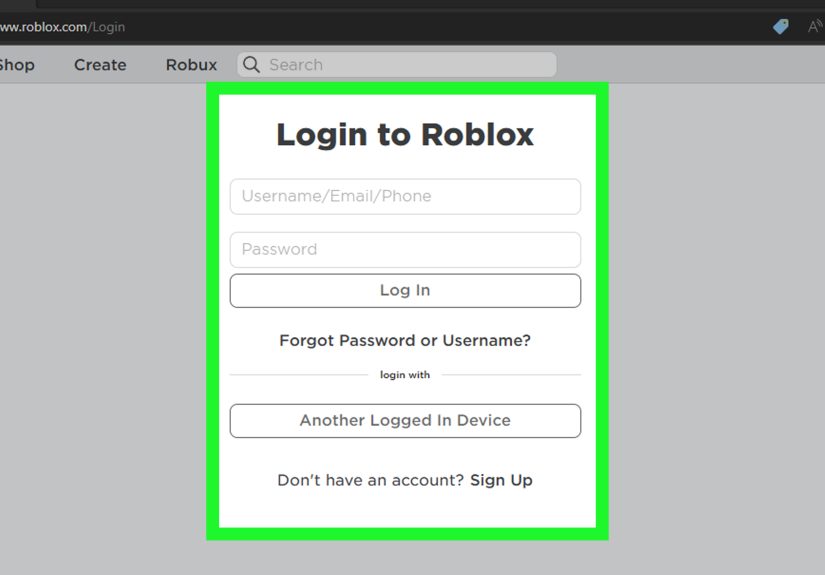
You must be logged into your Roblox account before you can join a group. If you are browsing while signed out, you may see the group page, but you will not be able to complete the join process.
2. Know That Roblox Calls Them “Communities” Now
If you are searching inside the app or website and do not see a “Groups” tab, do not panic. You are not cursed. Look for Communities.
3. Some Groups Have Join Requirements
Not every group is open to instant entry. Some communities require manual approval. Others may require account verification, such as phone verification, email verification, or in some cases ID-based verification, depending on how the owner has configured the group.
4. There Is a Limit
Roblox places a cap on how many communities an account can join. So if your account is already stacked with dozens of anime clans, simulator guilds, fan clubs, and roleplay governments, you may need to leave one before joining another.
How to Join Groups in Roblox on Desktop
If you are using the Roblox website on a laptop or desktop, follow these steps:
- Log in to your Roblox account.
Head to the Roblox website and sign in with your username and password. - Find the Communities section.
On the left-hand navigation menu, click Communities. - Browse or search for the group you want.
You can look through communities you find interesting or search by name if you already know which one you want. - Open the community page.
Click the group you want to join to view its profile, description, rules, member info, and any requirements. - Click the Join Community button.
If the group is open, you may join immediately. If it uses manual approval, your request will be sent to the owner or moderators for review. - Wait for approval if required.
Some groups let you in instantly. Others make you wait. That is not a bug. It is just moderation with a clipboard.
Desktop Tip
Before you click Join, read the group description. Many Roblox communities explain their rules, age expectations, verification requirements, or links to related experiences right on the main page. This can save you from joining a group only to realize it is for competitive military roleplay when you were just trying to find a cozy obby fan club.
How to Join Groups in Roblox on Mobile
If you are playing on iPhone, iPad, or Android, the process is similar, but the menu path is a little different.
- Open the Roblox app and log in.
Make sure you are signed into the correct account. - Tap the More button.
Look for the three dots (…) at the bottom of the screen, or use the left-side navigation depending on your device. - Tap Communities.
This takes you to the section where you can view, search, and manage communities. - Search for the group name.
Use the search bar to find the specific community you want to join. - Select the group.
Open the community page to review its details. - Tap Join Community.
If the group is open, you will join immediately. If it requires approval, your join request will be submitted.
That is it. No ancient ritual. No secret badge. No dramatic Roblox thunderstorm. Just a few taps and hopefully less confusion than five minutes ago.
What Happens After You Join?
Once you join a Roblox group, a few things may happen depending on how that community is set up:
- You are added as a regular member by default.
- You may be able to see posts, updates, or activity tied to the group.
- You may gain access to community spaces or social features.
- You may qualify for game-related perks if that experience checks group membership.
- You may later receive a different rank if the group uses a ranking system.
Some communities also use forums and structured discussions. Keep in mind that forum participation can have additional age-related access rules, so not every member will see the exact same options.
Why the Join Button Might Not Work
If you cannot join a Roblox group, do not immediately assume the app is haunted. There are several common reasons:
You Already Hit the Community Limit
If your account has reached the maximum number of joined communities, Roblox may stop you from joining another until you leave one.
The Group Requires Approval
You may have submitted a request instead of joining instantly. In that case, you simply need to wait for the owner or moderators to approve it.
You Do Not Meet Verification Requirements
Some communities require verified account information before joining. If your account does not meet the chosen verification level, the join process may be blocked.
You Are Looking at the Wrong Feature
Roblox also has Party features for grouping up with connections to play together. That is not the same as a community. If you are trying to join a friend session, you may need Party or direct invites instead of a group page.
Your App or Browser Is Acting Up
If the button is unresponsive, try refreshing the page, reopening the app, signing out and back in, or updating Roblox. Classic tech support? Yes. Still effective? Also yes.
How to Leave a Group if You Change Your Mind
Joining a community is not a lifetime oath sworn under moonlight. If the group is inactive, too noisy, or not what you expected, you can leave it from the community page. This is especially useful if you need to free up a slot to join another group.
A smart habit is to review your joined communities every once in a while. If half of them are dead fan clubs from games you stopped playing two years ago, it may be time for a little digital spring cleaning.
Safety Tips Before Joining Roblox Groups
Because Roblox is social by design, it is worth being a little careful before joining communities, especially for younger players.
Read the Group Description and Rules
A well-run community usually explains what it is about, who it is for, and how members should behave. If the page feels shady, vague, or chaotic, trust your instincts.
Do Not Share Personal Information
Never hand out your password, real-world contact details, or sensitive account information. If a group, website, or user claims you must do that to get Robux, ranks, or rewards, back away like you just stepped on a virtual rake.
Use Roblox Privacy and Parental Settings
Roblox includes privacy and communication controls that can limit who can contact a player, who can invite them, and how they interact on the platform. For younger users, parents should review these settings regularly and not assume “default” always means “ideal.”
Report Suspicious Behavior
If a group or member behaves inappropriately, uses scams, or pushes people toward suspicious links, report it through Roblox tools and leave the community if necessary.
Best Reasons to Join Roblox Groups
Joining a Roblox group is not just about clicking a button and collecting another badge-like membership. Done right, it can improve your whole experience on the platform.
- Follow favorite creators: Many studios and creators post updates through their communities.
- Meet other players: Communities help players connect around common interests.
- Get game news faster: New events, updates, and announcements often appear there first.
- Participate in organized play: Roleplay groups, training groups, and competitive communities can make Roblox much more social.
- Unlock community-based experiences: Some games reward players for being members of the official group.
Quick Recap: Roblox Group Joining Steps
On Desktop
- Log in to Roblox
- Click Communities in the left menu
- Search for the group
- Open the community page
- Click Join Community
- Wait for approval if needed
On Mobile
- Open the Roblox app
- Tap More (…)
- Tap Communities
- Search for the group
- Select the community
- Tap Join Community
Real-World Player Experiences With Joining Roblox Groups
For many players, the first Roblox group they join is not chosen with great strategy. It is usually something like, “This game gave me a sword if I joined,” or “This creator made me laugh once, so now I live here.” And honestly, that is part of the charm. Roblox communities can start as tiny side quests and turn into a major part of how people use the platform.
A brand-new player might join a game’s official group because they want update news, event alerts, or group-only perks. At first, the group feels like an extra tab they barely notice. But over time, it becomes the easiest way to keep track of game patches, special announcements, and community events. Instead of feeling lost every time the experience changes, they suddenly know what is going on. That alone can make Roblox feel more welcoming.
Another common experience is joining a roleplay or faction-based group. These communities often have ranks, rules, uniforms, or internal systems that make players feel like they are part of something bigger than a random public server. For some players, that structure is exciting. It turns Roblox from “just a game” into a social hobby. For others, it is a little intense. You join thinking you are here for fun, and ten minutes later somebody is asking whether you completed officer training. Surprise.
Then there are creator and development communities. These are especially useful for players who are starting to build experiences, experiment with design, or learn more about the platform. Joining the right group can expose you to better discussions, feedback, and inspiration. It is one thing to play Roblox. It is another thing to join a space where people are actively talking about making things inside Roblox. That is where casual interest sometimes grows into real creative momentum.
Some players also learn through trial and error that not every group is worth staying in. Maybe the community is inactive. Maybe the wall or forum is full of spam. Maybe the promised “exclusive rewards” turn out to be dramatically less exciting than advertised. That is a normal part of the experience. Joining a community is easy; finding a good one takes a little judgment. The best groups usually have clear rules, active moderation, useful updates, and members who act like actual humans instead of chaos generators.
For younger players and parents, the experience is often less about perks and more about safety and comfort. A well-managed group can help a player feel connected in a positive way. A poorly managed one can create confusion or expose them to behavior that feels off. That is why it helps to review descriptions, use privacy settings, and talk openly about what kinds of communities feel appropriate. Roblox can be social in a fun way, but “social” works best when it also includes boundaries.
In the end, joining Roblox groups is one of those small platform features that can have a big impact. It can help players follow their favorite games, meet people with similar interests, stay updated, and feel more connected to the platform. Or it can simply help them collect one very specific in-game item and then wander off into the sunset. Both are valid. The point is that once you understand where the Communities menu lives and how the join system works, Roblox becomes a lot easier to navigate.
Conclusion
If you want to join groups in Roblox, the process is straightforward once you know that Roblox now often calls them Communities. On desktop, go through the left-side menu. On mobile, use the More button and open Communities. From there, search for the group, open its page, and hit Join Community.
The only real complications come from approval queues, verification requirements, account limits, or confusion between Communities and Party features. Once you know the difference, you can join the right spaces faster, avoid the wrong ones, and make your Roblox experience feel a lot more connected.
In other words: fewer menu misadventures, more actual fun.