Table of Contents >> Show >> Hide
- What Is Empower Personal Capital?
- Why Free Wealth Management Tools Matter
- Main Free Tools Available Through Empower Personal Capital
- Who Should Use Empower Personal Capital’s Free Tools?
- Pros and Cons of Empower Personal Capital Free Tools
- How to Get the Most Value From Empower Personal Capital
- Is Empower Personal Capital Really Free?
- Empower Personal Capital vs. Basic Budgeting Apps
- Practical Examples of Using Empower’s Free Tools
- Common Mistakes to Avoid
- Experience Section: What It Feels Like to Use Free Wealth Management Tools By Empower Personal Capital
- Final Verdict: Are Empower Personal Capital’s Free Tools Worth It?
Managing money used to require three things: a spreadsheet, a calculator, and the emotional strength of someone assembling furniture without instructions. Today, free wealth management tools by Empower Personal Capital make the process much less painful. Empower, formerly known as Personal Capital, offers a digital dashboard that helps users track net worth, monitor spending, review investments, analyze fees, and plan for retirement without needing to wear a navy blazer or say “asset allocation” at brunch.
The big appeal is simple: Empower Personal Dashboard brings many parts of your financial life into one place. Bank accounts, credit cards, mortgages, retirement accounts, brokerage accounts, loans, and manual assets can be connected or tracked so users can see the larger picture. Instead of checking five apps and pretending the numbers will magically cooperate, you can use one dashboard to understand where your money is, where it is going, and whether it is quietly sneaking out the back door through fees, overspending, or poor diversification.
This article breaks down the best free Empower Personal Capital tools, how they work, who they are best for, and where they may fall short. It is written for readers who want useful, real-world financial organization without needing a finance degree, a monocle, or a personal economist named Gerald.
What Is Empower Personal Capital?
Empower Personal Capital is the modern version of the platform many users originally knew as Personal Capital. The tools are now part of Empower, a major retirement and financial services company. The free dashboard remains focused on helping individuals understand their complete financial picture, especially net worth and investments.
The platform is not only a budgeting app. In fact, its strongest features lean more toward wealth tracking, retirement planning, and investment analysis. Budgeting is included, but Empower shines brightest when users want to answer bigger financial questions such as: Am I building wealth? Are my investments balanced? How much am I paying in fund fees? Will my retirement plan survive reality, inflation, and my future desire to take vacations that do not involve sleeping in a rental car?
Empower also offers paid advisory and wealth management services, but the dashboard tools can be used for free. That distinction matters. The free tools are designed for do-it-yourself tracking and planning, while the paid services involve professional investment management and financial advisor support. For many users, the free tools are enough to get organized, identify weaknesses, and make smarter money decisions.
Why Free Wealth Management Tools Matter
Wealth management sounds fancy, but at its core, it means organizing your money so it supports your life. You do not need to be wealthy to use wealth management principles. You only need money moving in, money moving out, goals you care about, and a desire not to discover at age 62 that your “retirement plan” was actually just vibes.
Free tools matter because many people delay financial planning when they think it requires expensive software or an advisor. Empower Personal Capital lowers that barrier. It gives users a way to see their financial life in one dashboard, which can be surprisingly powerful. When your checking account, 401(k), IRA, credit cards, mortgage, brokerage account, and savings goals are scattered across different platforms, your money can feel like a badly organized group project. Empower puts the group project into one room and makes everyone introduce themselves.
The result is clarity. And clarity often leads to action. Users may notice unused subscriptions, high investment fees, too much cash sitting idle, weak emergency savings, or an investment portfolio that is accidentally more chaotic than a toddler with finger paint.
Main Free Tools Available Through Empower Personal Capital
Empower’s free financial dashboard includes several tools that work together. Some are simple trackers. Others provide deeper analysis. The best way to understand the platform is to look at each major feature and how it fits into everyday money management.
1. Net Worth Tracker
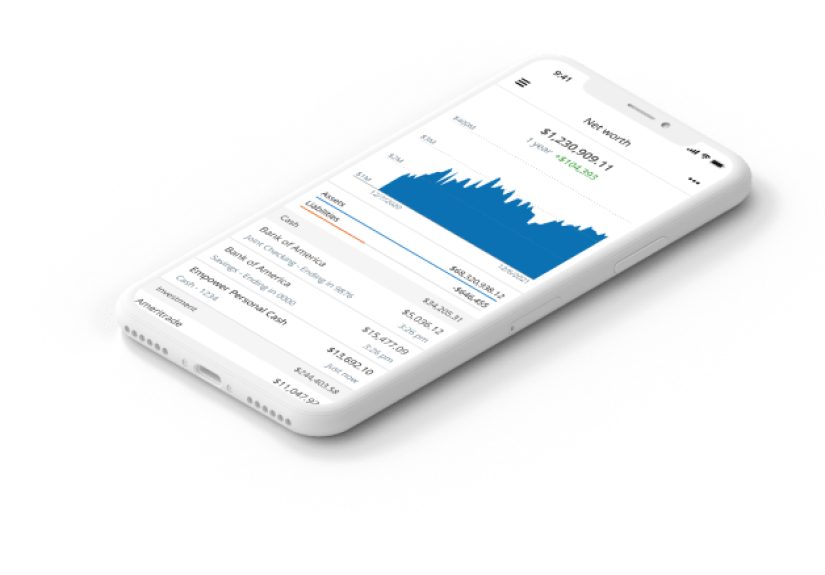
The net worth tracker is one of Empower Personal Capital’s signature features. Net worth is calculated by subtracting what you owe from what you own. Assets may include checking accounts, savings accounts, investment accounts, retirement accounts, real estate, vehicles, and other valuables. Liabilities may include credit card balances, student loans, auto loans, personal loans, and mortgages.
Why does this matter? Because income alone does not tell the full story. Someone can earn a high salary and still be financially stuck if debt, lifestyle creep, and poor planning eat every dollar. On the other hand, someone with a moderate income may be building strong net worth through consistent saving, smart investing, and controlled spending.
Empower helps users see net worth as a financial “vital sign.” Watching the number change over time can be motivating. Paying down debt, increasing retirement contributions, building emergency savings, or investing regularly can all move the trend in the right direction. The dashboard turns progress into something visible, which is helpful because financial growth often feels slow while it is happening.
2. Budgeting and Cash Flow Planner
Budgeting is where many finance apps compete aggressively, usually with cheerful charts that quietly judge your coffee spending. Empower’s budgeting and cash flow tools help users track income, expenses, categories, and monthly spending patterns. The cash flow view is especially useful for seeing how much money comes in and how much goes out over time.
This tool can help users identify spending leaks. Maybe restaurants are taking a bigger bite than expected. Maybe subscriptions have multiplied like digital rabbits. Maybe “quick online purchase” has become a full-time hobby with free shipping. By reviewing categorized transactions, users can spot patterns and adjust without guessing.
Empower may not be the most detailed budgeting system for users who want envelope budgeting, zero-based budgeting, or intense category customization. However, for people who want a clean overview of spending and cash movement, it does the job well. It is especially helpful when paired with the net worth tracker because users can connect daily spending habits to long-term financial progress.
3. Retirement Planner
The retirement planner is one of Empower’s most valuable free tools. Rather than offering a basic calculator that asks for three numbers and then confidently predicts the future like a fortune cookie in a suit, the retirement planner lets users test different scenarios.
Users can model retirement goals, income, savings, expenses, expected retirement age, future large purchases, and other assumptions. The purpose is not to create a perfect prediction. No retirement calculator can know future market returns, tax law changes, inflation, healthcare costs, or whether your future self develops an expensive passion for restoring vintage boats. The value is in scenario planning.
For example, a user might compare retiring at 62 versus 67, increasing monthly contributions, adjusting expected spending, or adding a future home purchase. Seeing how those changes affect retirement readiness can help users make better decisions now. The tool encourages long-term thinking, which is where many money decisions become clearer.
4. Portfolio Analysis
Empower’s portfolio analysis tools help users understand how their investments are allocated across asset classes, sectors, and accounts. This is important because many people own investments in multiple places: a 401(k) from work, an IRA, a brokerage account, maybe an old retirement account sitting around like a forgotten suitcase in the attic.
When accounts are viewed separately, the portfolio may look fine. When combined, the picture can be very different. A user may discover they are heavily concentrated in U.S. large-cap stocks, underexposed to bonds, overexposed to one company, or holding overlapping funds that all do basically the same thing while wearing different fund names.
Portfolio analysis helps users understand risk and diversification. This does not mean the tool tells everyone to invest the same way. A younger investor, a near-retiree, and someone saving for a house may all need different strategies. But seeing the full allocation is a major first step. You cannot adjust what you cannot see.
5. Investment Checkup
The Investment Checkup tool is designed to assess portfolio risk, past performance, and possible alternative allocations. It can help users compare their current investment mix with a more balanced target based on their profile and goals.
This is useful because many investors build portfolios one decision at a time. They choose a fund in a workplace retirement plan, open an IRA, buy a few ETFs, add a brokerage account, and years later realize their “strategy” was actually a scrapbook. Investment Checkup brings structure to that collection.
For example, if a portfolio is too aggressive for a user’s timeline, the tool can highlight risk. If it is too conservative for long-term growth goals, that may also become clear. The point is not to panic and rearrange everything after one dashboard review. The point is to understand whether the portfolio matches the user’s goals, time horizon, and comfort with volatility.
6. Fee Analyzer
Investment fees are sneaky. They do not kick down your door wearing a villain cape. They quietly subtract from returns year after year. Empower’s fee analysis tools help users review expense ratios and investment costs, especially inside retirement and investment accounts.
This matters because small fee differences can become meaningful over decades. A fund charging 1.00% annually may not sound dramatically different from one charging 0.10%, but over a long investing timeline, the gap can add up. The Fee Analyzer can help users identify expensive funds and understand how costs may affect long-term retirement income.
Of course, low fees are not the only factor in choosing investments. Strategy, diversification, tax situation, risk, and goals also matter. But fees are one of the few things investors can often control. Empower makes those fees easier to see, which is helpful because hidden costs are the financial equivalent of termites: small, quiet, and deeply annoying once discovered.
7. Savings, Debt, and Emergency Fund Planning
Empower’s broader financial tools also support savings planning, debt paydown, and emergency fund goals. These features connect short-term financial stability with long-term wealth building.
An emergency fund is not glamorous. No one brags at a party, “Guess who has three months of expenses in a high-yield savings account?” Actually, maybe they should. Emergency savings can prevent a surprise expense from becoming credit card debt. Debt tracking can also help users see balances, monitor payoff progress, and prioritize financial cleanup.
These tools are practical because they bring everyday financial habits into the same dashboard as investments and retirement. Wealth management is not only about portfolios. It is also about cash flow, debt, risk, and preparation.
Who Should Use Empower Personal Capital’s Free Tools?
Empower Personal Capital is a strong fit for users who want a full financial dashboard with excellent net worth and investment tracking. It is especially useful for people with multiple financial accounts, retirement savings, brokerage accounts, or a desire to understand long-term planning.
It may be a good match for people who ask questions like:
- What is my real net worth?
- How are my investments allocated?
- Am I paying too much in fund fees?
- Can I retire on my current savings path?
- Where is my money going each month?
- How do my short-term habits affect long-term goals?
The platform may be less ideal for users who want extremely detailed budgeting, heavy manual category control, or a pure budgeting app with envelope-style planning. For that, other dedicated budgeting platforms may feel more customizable. But for wealth tracking and investment visibility, Empower remains one of the strongest free options available.
Pros and Cons of Empower Personal Capital Free Tools
Pros
The biggest advantage is the complete financial view. Seeing accounts together can change how users think about money. Empower is also strong for investment tracking, retirement scenario planning, fee awareness, and net worth monitoring. The fact that the dashboard is free gives it a major advantage over paid tools, especially for users who want analysis without another monthly subscription.
The interface is also built for people who care about wealth building, not just monthly spending. That makes it helpful for users who are past the “Where did my paycheck go?” stage and ready for the “How do I make my money support future me?” stage.
Cons
No tool is perfect. Account syncing can occasionally be imperfect, especially when banks change security systems or require reauthorization. Budgeting features may feel basic compared with apps built specifically for detailed budgeting. Some users may also receive prompts about Empower’s paid advisory services, which can be useful for some people but unnecessary for others.
Privacy is another factor to consider. Any financial aggregation tool requires users to connect sensitive accounts or manually enter financial information. Users should review security practices, privacy policies, and account permissions before connecting anything. Convenience is great, but it should not replace careful digital hygiene.
How to Get the Most Value From Empower Personal Capital
To use Empower effectively, start by connecting or manually adding the accounts that matter most. This usually includes checking, savings, credit cards, investment accounts, retirement accounts, loans, and mortgage accounts. The more complete the data, the more useful the dashboard becomes.
Next, review net worth. Do not panic if the number is lower than expected. Net worth is not a moral score. It is a starting point. From there, review cash flow and spending categories. Look for obvious leaks before making dramatic changes. Cutting one unused subscription is easy. Declaring war on all joy is not sustainable.
Then move to investments. Review allocation, fees, and retirement projections. Ask whether the current portfolio matches the timeline and goals. For example, someone retiring in five years may need different risk management than someone investing for retirement 30 years away.
Finally, revisit the dashboard regularly. Once a month is enough for many users. Weekly checking can be helpful during a financial reset, but daily checking may turn normal market movement into unnecessary stress. Investments go up and down. The dashboard is a tool, not a mood ring.
Is Empower Personal Capital Really Free?
The core dashboard and financial tools are free to use. Empower also offers paid financial advisory and wealth management services for users who want professional help. The free tools can be valuable on their own, but users should understand the difference between using the dashboard and signing up for managed investment services.
Free does not always mean there is no business model. Companies may offer free tools as a way to introduce users to paid services. That is not automatically bad, but users should be aware of it. The smart approach is simple: use the free tools if they help, ignore paid services unless they fit your needs, and never sign up for anything without understanding fees, account minimums, services, and obligations.
Empower Personal Capital vs. Basic Budgeting Apps
Many budgeting apps focus on monthly spending. Empower focuses more on the full financial picture. That makes it better for wealth tracking but not always better for detailed budgeting.
Think of it this way: a budgeting app may help you decide whether you can afford takeout this Friday. Empower helps you understand whether your entire financial life is moving toward the future you want. Both questions matter. One protects your checking account from spicy noodle enthusiasm. The other protects your retirement plan from neglect.
Users who already have a favorite budgeting app may still benefit from Empower as an investment and net worth dashboard. It does not have to replace every tool. It can serve as the “big picture” platform while another app handles daily budgeting details.
Practical Examples of Using Empower’s Free Tools
Example 1: Finding Hidden Investment Fees
A user links a 401(k), IRA, and taxable brokerage account. The Fee Analyzer shows that one older mutual fund has a high expense ratio. The user researches lower-cost alternatives within the same account and considers whether switching makes sense. Over time, reducing unnecessary fees may improve long-term returns.
Example 2: Checking Retirement Readiness
A couple wants to retire at 65 but is unsure whether they are saving enough. They use the Retirement Planner to test different contribution rates and retirement ages. The tool shows that increasing retirement contributions by a few percentage points may improve their projected outcome. Suddenly, the abstract idea of “save more” becomes a specific action.
Example 3: Seeing the True Net Worth Picture
A user feels behind because their checking account balance is not impressive. After linking retirement accounts, home equity, savings, and debt, they see that their net worth is growing steadily. The dashboard helps them stay motivated and avoid judging their progress by one account balance.
Common Mistakes to Avoid
The first mistake is linking accounts once and never reviewing the insights. A dashboard is only useful if you actually look at it. The second mistake is overreacting to short-term investment changes. Empower can show daily movement, but long-term planning should not be hijacked by one dramatic market Tuesday.
The third mistake is treating automated analysis as personal financial advice. The tools provide information and projections, but they cannot fully understand every personal detail. Taxes, estate planning, insurance needs, family obligations, and major life changes may require professional guidance.
The fourth mistake is ignoring security. Use strong passwords, enable multi-factor authentication where available, and avoid logging in on shared devices. Personal finance tools are powerful, but users should treat access seriously.
Experience Section: What It Feels Like to Use Free Wealth Management Tools By Empower Personal Capital
Using Empower Personal Capital for the first time can feel like turning on the lights in a room you have been walking through with a flashlight. Before using a full dashboard, many people understand pieces of their money but not the whole machine. They know their checking balance. They know their credit card balance if they are brave enough to look. They know they have a retirement account somewhere, probably guarded by a password they created during a lunch break in 2018. But they may not know how everything fits together.
The first experience that stands out is seeing net worth automatically calculated. It can be exciting, uncomfortable, or both. If debt is high, the number may be humbling. If investments have grown quietly over the years, it may be encouraging. Either way, the dashboard replaces guessing with a measurable starting point. That alone can change behavior. People tend to make better decisions when the scoreboard is visible.
The second useful experience is reviewing cash flow. Many users do not need a lecture about spending. They need evidence. When the dashboard shows how much went to dining, shopping, subscriptions, transportation, or travel, the conversation becomes practical. Instead of saying, “I should spend less,” users can say, “I can cut this category by $150 next month.” Specific beats vague every time.
The investment tools may be the most eye-opening part. A person may believe they are diversified because they own several funds. Then they discover those funds overlap heavily. It is like buying five different sandwiches and realizing they are all turkey. Empower’s portfolio analysis can reveal concentration, risk exposure, and allocation gaps that are hard to notice when accounts are viewed separately.
The Fee Analyzer can also create a memorable “wait, I’m paying what?” moment. Investment fees often feel invisible because users do not receive a dramatic monthly bill labeled “Money You Will Never See Again.” Instead, fees are quietly built into fund performance. Seeing those costs estimated in one place can motivate users to research lower-cost options or ask better questions about their retirement plan.
The Retirement Planner feels useful because it turns future planning into a set of experiments. What if you save more? What if you retire later? What if you spend less in retirement? What if you add a major goal, such as buying a home or funding education? The tool lets users test assumptions without committing to anything. That makes retirement planning less intimidating and more like a financial flight simulator. You can crash the imaginary plane as many times as needed before making real-life decisions.
The best way to use Empower is not to obsess over it daily. A monthly review is often enough. Check net worth trends, review spending, look at portfolio allocation, and update goals when life changes. The experience becomes most valuable when it creates small, repeated improvements. One month you cancel unused subscriptions. Another month you increase retirement contributions. Later, you rebalance investments or pay down a debt faster. None of these moves feels dramatic alone, but together they can reshape a financial life.
In short, Empower Personal Capital’s free tools are not magic. They will not make your budget behave, your investments diversify themselves, or your future self stop wanting nice things. But they do something almost as good: they make your money visible. And once you can see the full picture, you can make decisions with more confidence, less confusion, and fewer spreadsheet-induced headaches.
Final Verdict: Are Empower Personal Capital’s Free Tools Worth It?
For users who want strong free wealth management tools, Empower Personal Capital is absolutely worth considering. Its biggest strengths are net worth tracking, investment analysis, retirement planning, and fee visibility. It helps users understand the full financial picture, not just the balance in one account.
It is not perfect for everyone. Detailed budgeters may want a more specialized budgeting app. Users uncomfortable connecting financial accounts may prefer manual spreadsheets. People who dislike occasional prompts for paid advisory services may need to tune out the sales side. But as a free dashboard for tracking wealth, reviewing investments, and planning retirement, Empower remains a strong option.
The best financial tools are the ones that help users take action. Empower does that by making money easier to understand. It turns scattered accounts into a clear dashboard, transforms vague goals into projections, and reveals hidden details like fees and allocation. That is a powerful combination, especially at a price of zero dollars.
And zero dollars, as every budgeter knows, is a very attractive number.