Table of Contents >> Show >> Hide
- What “Paperless Post-It” Actually Means
- Why E-Paper Is the Secret Sauce
- The ESticky Build: Tiny Parts, Big Payoff
- ESticky V1 vs. ESticky V2
- Use Cases That Actually Make Sense
- DIY Reality Check: The Pros and the “Oh Right” Parts
- ESticky vs. Sticky Note Apps
- Practical Tips for Getting the Most Out of a Paperless Sticky Note
- Where This Idea Is Headed
- Conclusion
Your desk has two kinds of people: the ones who “totally have a system,” and the ones whose system is “a colorful avalanche with adhesive.” If you’re in group two (no judgmentsticky notes are basically office confetti), ESticky is a clever alternative: a tiny, always-on e-paper display that behaves like a reusable sticky note, minus the paper pile.
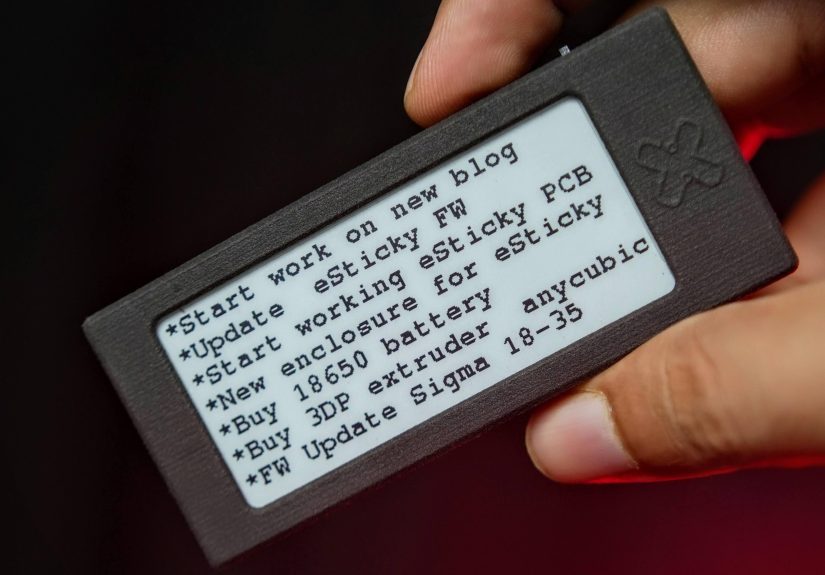
ESticky isn’t the Paperless Post invitation service and it isn’t another notes app begging for notification permissions. It’s a small, DIY-friendly, Wi-Fi-updated e-ink sticky note that sits on your desk (or sticks somewhere nearby) and keeps a short message visible all day without guzzling power.
What “Paperless Post-It” Actually Means
When people call ESticky a “paperless Post-It,” they’re talking about the job sticky notes donot the exact experience of scribbling with a pen. The goal is simple: keep a short reminder in your line of sight, where it can’t get buried under yesterday’s mail or your cat’s opinion of gravity.
Instead of writing directly on paper, ESticky shows text (and potentially small graphics) on an e-paper screen. You update the content over Wi-Fi using a lightweight web interface, then the device holds that image until the next update. Because e-paper displays use power mainly during refresh, the message can stay visible even while the device sleeps.
Why E-Paper Is the Secret Sauce
E-paper (often called e-ink) has a superpower that LCDs don’t: it can hold an image without continuous power. That makes it perfect for “set it and forget it” informationlike a to-do list, a checkout code you’ll forget by lunchtime, or a reminder that your plants are not “self-watering,” no matter how optimistic you are.
Low power, high visibility
E-paper screens are reflective, so they’re easy to read in bright light and don’t need a glowing backlight. For a desk reminder, that’s a win: it looks more like paper, doesn’t scream for attention, and doesn’t need to be plugged in just to display “Call dentist.”
It stays put (the information, at least)
Phones time out. Laptops go to sleep. Traditional sticky notes fall off at the worst possible momentusually right after you finish a brilliant thought and right before you forget it. ESticky’s whole vibe is persistence: the screen keeps your note visible until you decide to change it.
The ESticky Build: Tiny Parts, Big Payoff
The original ESticky concept is refreshingly straightforward: a 2.9-inch e-paper display connected to a compact ESP32-based microcontroller, powered by a battery, all tucked into a 3D-printed enclosure. It’s simple enough that the project feels approachable, but polished enough to look like something you might actually leave on your desk without explaining, “No, it’s not a weird vape.”
Core components (V1-style builds)
- 2.9-inch e-paper display for crisp black-and-white text
- ESP32 microcontroller (often a Seeed Studio XIAO ESP32C3) for Wi-Fi updates
- Battery + power switch so it can live wire-free
- 3D-printed case to keep everything tidy and desk-friendly
On the software side, the device is typically updated via a simple web pagetype your note, hit update, and the screen refreshes. That workflow is the secret weapon: it’s faster than opening a full productivity app and less fragile than trusting your brain to remember something later (your brain is a liar).
Enclosure choices matter more than you’d think
Most builds lean on 3D printing to keep the footprint compact. Some makers go with standard FDM printing for speed and cost, while others experiment with smoother or tougher finishes (like nylon). Either way, the case is what turns “electronics project” into “object you’ll actually use,” because nothing ruins a minimalist desk vibe like exposed wires doing the electric slide.
ESticky V1 vs. ESticky V2
Like many great maker projects, ESticky didn’t stop at “it works.” A newer iteration, often referred to as ESticky V2, takes the original idea and makes it more of a customizable desk reminder display. The headline upgrades are cleaner electronics (including a custom PCB), a different ESP32 module, a larger battery, and a more “finished product” vibewithout losing the DIY spirit.
What V2 adds to the mix
- More flexible layouts (multiple “pages” or screens, depending on the setup)
- Desk display modes like clock/date, countdowns, and status views
- No-code interface options in some builds, making updates friendlier for non-programmers
- More integrated hardware so it’s less “wire spaghetti,” more “tiny appliance”
Some V2 builds lean into a cloud-based, drag-and-drop UI toolchain for designing what appears on the screen. Translation: you can treat the device like a tiny dashboard that happens to be excellent at acting like a digital sticky note.
In other words: V1 is a minimal paperless sticky note. V2 is what happens when you decide your sticky note should also be a micro “ambient display” and you’re not afraid of “just one more feature.”
Use Cases That Actually Make Sense
“Digital sticky note” can sound like a solution in search of a problemuntil you put one where your eyes already go. ESticky shines when you need information to be visible, low-friction, and just persistent enough to be annoying in a helpful way.
1) The one-task focus note
Write one priority on it: “Finish outline,” “Pay tuition,” or “Stop doomscrolling.” It’s surprisingly effective because it replaces vague guilt with a concrete target.
2) A rotating mini checklist
Daily repeats are sticky-note territory: take meds, water plants, charge earbuds, set tomorrow’s clothes. With ESticky, you can update the list without rewriting it every day.
3) Door or desk status
Working from home? Put it near your workspace and flip between “In a meeting,” “Heads down,” and “Come in.” Academic labs and shared offices have used paper notes for this forever; an e-paper sign just makes it cleaner and easier to update.
4) A “don’t forget this number” panel
Not passwords (please), but things like a tracking number, a locker combo you’ll forget by lunchtime, or a short agenda for a call. ESticky’s small screen forces healthy brevity.
5) A tiny motivation board that doesn’t yell
Quotes are cliché until they’re yours. Display a phrase you actually care about“Do the next right thing”and you get a calm reminder instead of a neon poster screaming “HUSTLE.”
DIY Reality Check: The Pros and the “Oh Right” Parts
Pros
- Always visible without staying “awake” like a phone screen
- Minimal distractionit shows one thing, not your entire internet life
- Customizable in hardware and software, especially for makers
- Less paper clutter if sticky notes multiply on your desk
Trade-offs
- You don’t scribble directly on it (unless you add touch input or external tooling). For some people, handwriting is the magic.
- Refresh is slower than an LCD, and frequent updates can cause ghosting or extra battery drain.
- It’s still a device. Batteries need charging, and anything DIY occasionally demands troubleshooting at 11:47 PM.
- It won’t replace your full note system. It’s best as a “front-of-mind” display, not a second brain.
ESticky vs. Sticky Note Apps
Before you sprint to your 3D printer, it’s fair to ask: why not just use an app?
Apps are great at storage
Microsoft Sticky Notes (and similar tools) are fantastic when you need search, sync, and archives across devices. If your notes are more like mini-documentsideas, drafts, referencesapps win. They’re also easier to share and back up.
ESticky is great at visibility
Where apps struggle is the “in your face, in a good way” part. If you have to open an app to see your reminder, you’ve already added friction. ESticky turns a reminder into a physical object in your workspace. You don’t “check notes.” You just see them.
Practical Tips for Getting the Most Out of a Paperless Sticky Note
- Keep it short. One sentence or a micro list beats a paragraph. If it can’t fit, it’s probably a different kind of note.
- Place it where you already look. Beside your monitor, near your keys, or by the coffee machinestrategic annoyance is an art.
- Use a consistent format. Example: “TODAY: ___” or “NEXT: ___” so your brain reads it instantly.
- Limit updates. If you refresh constantly, you lose the low-power advantage and might start ignoring it like a spammy notification.
- Consider mounting. A magnet, a stand, or a clip can make it feel more like a real sticky note you can “place.”
Where This Idea Is Headed
ESticky sits at an interesting intersection: personal productivity, ambient computing, and maker culture. As e-paper gets cheaper and microcontrollers get more power-efficient, these “single-purpose screens” become a realistic alternative to both paper notes and glowing dashboards.
Future-friendly upgrades are easy to imagine: better typography, quick templates (shopping list, meeting status), image upload that “just works,” and physical mounting options so it can truly stick where you need it. Research prototypes and DIY projects already explore ultra-low-power “message tiles” that can run for months, which points to a near future where paper reminders are optional, not inevitable.
Conclusion
ESticky is a delightfully simple idea executed with the right technology: take the humble sticky notefast, visible, low commitmentand rebuild it with e-paper so it stays readable, reusable, and quietly persistent. If you love DIY electronics, it’s a satisfying weekend project. If you love staying organized, it’s a small tool that can punch above its weight by keeping one important thing in view.
Experience Notes: 5 Realistic “ESticky Moments” (About )
1) The Monday reset. Imagine starting the week by updating ESticky with a single sentence: “This week’s goal: ship the draft.” It’s not a massive project planjust a tiny north star. Every time you alt-tab, you catch it in the corner of your vision. By Wednesday, you might be tempted to ignore it, but that’s the point: the device doesn’t argue, it just exists. It’s like a very polite coworker who doesn’t stop you in the hallway, but also refuses to let you “forget” what you said mattered.
2) The household handoff. In shared spaces, sticky notes become a messy group chatexcept everyone leaves the chat on the fridge and never cleans up the thread. A paperless Post-It display works better when the “note” is a small, rotating message: “Trash goes out tonight,” “Package at the door,” “Milk is on the second shelf (no, the other second shelf).” Because it’s easy to update, the message stays current. And because it’s visible, you don’t need to ping everyone’s phone like you’re dispatching an emergency response team for empty paper towels.
3) The student’s micro-schedule. Students often juggle class times, assignments, and the eternal mystery of “when is that quiz again?” A small e-ink sticky note near a study spot can hold a two-line schedule: “2 PM: chem lab” and “7 PM: review notes.” It sounds basic, but it helps in the moments when you’re about to wander into a social media rabbit hole. It’s also more forgiving than planners that require daily maintenancethis is the lightest possible structure that still nudges you back on track.
4) The meeting status sign. Whether you’re in a home office or a shared workspace, the classic paper sign“In a meeting”always seems to appear after someone has already knocked. With a quick update, an e-paper status display can show “On a call until 3:30,” or “Come back at 4.” The best part is that it looks calm. It doesn’t blink. It doesn’t beep. It just communicates. If you’ve ever tried to work while being interrupted every ten minutes, you already know why this tiny bit of clarity feels like a luxury.
5) The gentle habit cue. Habit trackers fail when they turn into homework. A paperless sticky note can keep it dumb and doable: “Water bottle → fill it” or “Stretch: 2 minutes.” Because e-ink is quiet, the reminder doesn’t feel like a notification bossing you around. Over time, the device becomes a spot where you post whatever small action would make today smoother. And if you change your mind, you update it. No erasing, no crossed-out chaosjust a clean slate for tomorrow’s you.