Table of Contents >> Show >> Hide
- What Makes a Cloffice Great (and Not Just “A Desk in a Closet”)
- Step 1: Choose the Right Closet (or “Adopt a Closet Responsibly”)
- Step 2: Decide What Kind of Worker You Are (Gear Drives Design)
- Step 3: Measure Like a Grown-Up (So You Don’t Buy Regret)
- Step 4: Clear It Out and Prep the Space
- Step 5: Power + Internet (Because “Low Battery” Is Not a Workflow)
- Step 6: Build the Desk (Small, Strong, and Actually Comfortable)
- Step 7: Ergonomics in a Tiny Space (Your Neck Will Thank You)
- Step 8: Lighting That Makes You Productive (and Not Spooky)
- Step 9: Ventilation and Temperature (Closets Get Stuffy Fast)
- Step 10: Sound and Privacy (So You Can Work Without Narration)
- Step 11: Storage That Serves Your Work (Not Just “More Shelves”)
- Step 12: Make It Look Good (Because You’ll Actually Use It More)
- Step 13: The Close-Down Routine (The Secret to Loving a Cloffice)
- Budget Examples (So You Don’t Accidentally Build a $2,000 Closet Desk)
- Common Cloffice Mistakes (Learn From Other People’s Pain)
- FAQ: Quick Answers for Cloffice Builders
- of Real-World Cloffice Experiences (What People Learn After Actually Working in One)
- Conclusion
A cloffice (closet + office) is proof that adulthood is just turning random household nooks into “multi-functional zones.”
One minute it’s a linen closet, the next it’s your corporate headquarterscomplete with a spreadsheet empire and a mug that says
“Do Not Perceive Me Before Coffee.”
The best part? A cloffice can give you a dedicated work-from-home setup without stealing your dining table, your couch,
or your sanity. The challenge? Closets were designed for sweaters, not Zoom calls. So you’ll need a plan that covers
ergonomics, lighting, power, ventilation, storage, and a little stylewithout turning your closet into a tiny, hot, cable-filled cave.
Below is a practical, step-by-step guide with specific examples and design choices (plus a longer “real-world experience” section at the end)
to help you build a cloffice that feels intentional, comfortable, and surprisingly fun to work from.
What Makes a Cloffice Great (and Not Just “A Desk in a Closet”)
A cloffice works when it does three things well: it fits your work, fits your body, and fits your life.
That means your setup needs more than a surface for a laptop. It needs:
- Comfort: ergonomic positioning so your neck and wrists don’t file a complaint.
- Function: enough storage and cable control to keep the space usable daily.
- Closure: the ability to “shut down” workliterally, by closing doors or visually, by minimizing clutter.
Step 1: Choose the Right Closet (or “Adopt a Closet Responsibly”)
Not every closet wants to be an office, and that’s okay. Start by scouting options:
Best closet types for a cloffice
- Hall or linen closet: great for laptop work and quick tasks; easy to close and hide.
- Spare bedroom closet: often wider; better for a larger desk or extra storage.
- Under-the-stairs closet: cozy, but measure carefullysloped ceilings can make ergonomics tricky.
- Walk-in closet corner: can be ideal if there’s room for airflow and you’re okay sharing space with clothing.
Quick “will this work?” checklist
- Depth: many reach-in closets are about 24 inches deepfine for a laptop, tighter for a large monitor.
- Width: can you fit a chair comfortably without wedging yourself in like a suitcase?
- Door situation: do you want doors for hiding work, or would removing doors improve comfort and airflow?
- Outlets: if you don’t have power nearby, plan for a safe solution (more on that below).
Step 2: Decide What Kind of Worker You Are (Gear Drives Design)
The fastest way to build the wrong cloffice is to copy a cute photo that doesn’t match your actual work.
Before you buy anything, define your “work profile.” Here are three common ones:
Profile A: Laptop-Only (Calls + Docs)
You can use a shallower desk, minimal storage, and a compact chair. Prioritize good lighting and a clean video-call background.
Profile B: Dual-Screen (Spreadsheets, Editing, Multitasking)
You’ll need a deeper surface or a monitor arm, stronger cable management, and careful ventilation (electronics + closet = heat buildup).
Profile C: Creative/Presenter (Frequent Video, Audio Quality Matters)
You’ll benefit from soft materials for sound, a stable camera angle, and glare-free lighting so you don’t look like you’re broadcasting from a lighthouse.
Step 3: Measure Like a Grown-Up (So You Don’t Buy Regret)
Grab a tape measure and write these down:
- Back wall width: determines desk size and shelf length.
- Side wall depth: limits desk depth and chair clearance.
- Height: matters for shelving, lighting, and monitor placement.
Example: If your closet is 36 inches wide and 24 inches deep, a smart setup might be a 34-inch-wide desk,
about 18–20 inches deep, with shelves above. That leaves room for a chair and your kneestwo things you’ll want to keep.
Step 4: Clear It Out and Prep the Space
This is the unglamorous part, but it’s the reason your cloffice feels new instead of “I moved a laptop onto my old closet shelf.”
Empty the closet, clean thoroughly, patch holes, and consider:
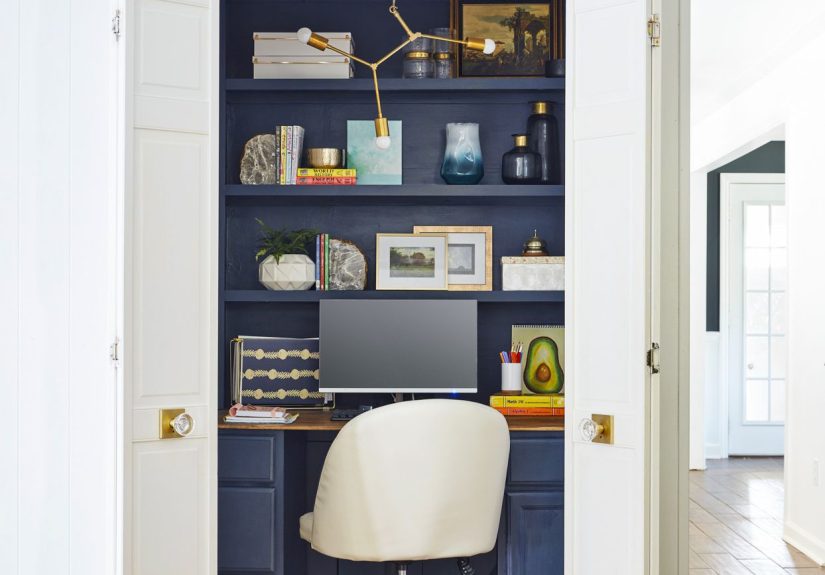
- Paint: lighter colors help small spaces feel bigger; darker colors can feel cozy and intentional.
- Wallpaper or peel-and-stick: adds personality fast (and can create a better video-call backdrop).
- Flooring: a thin rug can reduce echo and make it feel less closet-y.
Step 5: Power + Internet (Because “Low Battery” Is Not a Workflow)
A cloffice typically needs power for a laptop, monitor, phone charger, light, and maybe a printer or router.
Plan this carefullyespecially if the closet wasn’t built with office use in mind.
Power best practices
- Use a surge protector: protect electronics and consolidate plugs.
- Keep cords off the floor: reduces tripping and keeps things tidy.
- Don’t overload outlets: if you’re unsure, reduce devices or consult a licensed electrician.
- Mount a power strip safely: under the desk or on a side wall can keep cords controlled.
Internet reality check
- Best: strong Wi-Fi signal or wired Ethernet if possible.
- Good: mesh Wi-Fi node nearby.
- Backup: a phone hotspot plan for emergencies (because your router will absolutely pick a deadline day to act up).
Step 6: Build the Desk (Small, Strong, and Actually Comfortable)
Your desk is the anchor. In a cloffice, the right desk is usually more important than the “prettiest” desk.
You want stability, knee space, and a depth that fits your work.
Three desk options that work well in closets
- Floating desk: a sturdy top mounted with brackets; great for tight spaces and easy cleaning.
- Built-in wall-to-wall: maximizes space and looks customideal if you’ll keep the cloffice long-term.
- Compact table/desk: easiest for renters; choose something narrow and stable.
Tip: If your closet depth is limited, consider a monitor arm or wall-mounted screen to reclaim desk surface.
This can turn “no room” into “actually pretty workable.”
Step 7: Ergonomics in a Tiny Space (Your Neck Will Thank You)
Ergonomics sounds boring until your shoulders start auditioning for a role as decorative earrings.
Even in a small cloffice, you can set up a healthier workstation.
Monitor placement essentials
- Distance: roughly an arm’s length away (often around 20–40 inches depending on screen size).
- Height: top of the screen at or slightly below eye level; eyes naturally look slightly downward at the middle.
- Glare control: avoid placing lights directly behind or directly in front of the screen.
Keyboard + mouse setup
- Height: aim for about elbow height with relaxed shoulders.
- Wrists: keep neutral (not bent upward); avoid reaching forward constantly.
- Mouse: keep close to the keyboard to reduce shoulder strain.
Chair reality (the most ignored hero of WFH)
If you’ll work more than an hour at a time, prioritize a chair with decent support. In many cloffices,
an armless chair (or adjustable arms) is also practical so it can tuck in and let doors close.
If your feet don’t sit flat, add a footrest (even a sturdy box works).
Step 8: Lighting That Makes You Productive (and Not Spooky)
Closets are not famous for their natural light. A great cloffice uses layered lighting so you can see clearly,
avoid screen glare, and look normal on video calls.
The simple lighting recipe
- Ambient light: overhead fixture, flush mount, or bright closet light upgrade.
- Task light: a small desk lamp or wall sconce aimed at your work surface (not your eyeballs).
- Accent light: LED strip under a shelf or a small puck light to reduce shadows.
Video-call tip: Place your main light in front of you (or slightly to the side), not behind you.
Backlighting turns you into a silhouette, like you’re giving secret testimony.
Step 9: Ventilation and Temperature (Closets Get Stuffy Fast)
A cloffice can trap heatespecially with doors closed and electronics running. People who work from closet offices often notice
low air circulation and end up adding a small fan for comfort.
Easy airflow upgrades
- Door strategy: work with doors open when possible; close them only when you need privacy.
- Small quiet fan: positioned to move air gently without blasting your microphone.
- Vent-friendly door: a louvered door or discreet vent openings can help airflow if privacy is a must.
- Declutter: less stuff = less trapped heat and better air movement.
If your cloffice feels consistently hot or musty, treat that as a real problem to solvenot a personality trait of the closet.
Comfort is productivity, not “luxury.”
Step 10: Sound and Privacy (So You Can Work Without Narration)
Cloffices can echo because they’re small boxes with hard surfaces. They also sit near busy areas (hallways, living rooms, kitchens
the holy trinity of background noise). You don’t need a recording studio, but a few changes can help a lot.
Sound-improving upgrades that don’t require a construction crew
- Soft surfaces: a rug, fabric bins, or even a curtain can reduce echo.
- Seal gaps: weatherstripping or a door sweep can reduce noise leaks.
- Acoustic panels: a few well-placed panels can absorb sound and improve call clarity.
- Microphone choice: a headset mic often performs better than a laptop mic in noisy homes.
Step 11: Storage That Serves Your Work (Not Just “More Shelves”)
Storage is the cloffice superpowerbecause your work space is small, but your work clutter is… ambitious.
The goal is to keep essentials within reach and everything else out of sight.
Smart cloffice storage zones
- Daily zone: notebook, pen cup, chargers, headset.
- Weekly zone: files, reference materials, small tech accessories in labeled bins.
- Rare zone: extra paper, spare cables, backups stored higher up.
Use baskets or bins on upper shelves to hide “ugly necessities.” This keeps the space visually calm and makes it easier
to close the doors without looking like you’re hiding evidence.
Step 12: Make It Look Good (Because You’ll Actually Use It More)
Design matters, even in a closet. If your cloffice feels intentional, you’ll be more likely to work there consistently.
A few high-impact style ideas:
- Paint or wallpaper the back wall: adds depth and makes the space feel finished.
- One “moment” item: a small art print, a plant, or a stylish lamp = instant personality.
- Keep the palette simple: too many colors in a tiny space can feel chaotic fast.
- Use vertical lines: shelves and panels draw the eye up and help the closet feel taller.
Step 13: The Close-Down Routine (The Secret to Loving a Cloffice)
The best cloffice feature is psychological: it can help you end your workday. Try this 2-minute routine:
- Clear the desk surface (only the essentials stay).
- Put chargers and loose cables back into a bin or cable tray.
- Write tomorrow’s top 3 tasks on a sticky note.
- Turn off task lighting.
- Close the doors (or close the “visual clutter” by shutting drawers/bins).
It’s surprisingly effective. Your brain learns: closet closed = work done. And you get your home back.
Budget Examples (So You Don’t Accidentally Build a $2,000 Closet Desk)
Costs vary widely, but these rough ranges help you plan:
Budget Cloffice (roughly $75–$250)
- Simple desk or floating shelf top
- Basic lamp + LED puck/strip light
- Bins, hooks, and a surge protector
- Use your existing chair (with a cushion/footrest upgrade if needed)
Mid-Range Cloffice (roughly $250–$800)
- Sturdier desktop + mounted shelving
- Better chair support
- Monitor arm, improved cable management
- Fan/airflow improvements and nicer lighting
High-End Cloffice (roughly $800+)
- Custom built-ins and upgraded electrical
- Premium chair, dual monitors, acoustic improvements
- Fully integrated lighting and storage system
Common Cloffice Mistakes (Learn From Other People’s Pain)
- Desk too deep: you lose knee space, and sitting feels cramped.
- Not enough light: you strain your eyes and hate the space.
- Bad airflow: you end up working with doors open anyway, defeating the point.
- Ignoring ergonomics: you can “make it fit,” but your body will invoice you later.
- No cable plan: the cloffice becomes a spaghetti museum.
FAQ: Quick Answers for Cloffice Builders
Do I need to remove the closet doors?
Not necessarily. Doors are great for hiding the workspace and creating boundaries. But if airflow is an issue or the doors
eat up usable space, removing them (or switching to a curtain) can make the cloffice more comfortable.
Can a cloffice work for full-time work?
Yesif you take ergonomics, lighting, and ventilation seriously. A cloffice can be a full-time workstation,
but it needs to feel comfortable for hours, not just cute for photos.
What if my closet has no outlet?
If the nearest outlet is far, avoid unsafe cord situations. You may be able to route power safely with professional help,
or use a nearby wall outlet with a properly placed surge protector and neat cable routing. When in doubt, consult an electrician.
How do I make my cloffice look good on video calls?
Add front-facing light, keep the back wall tidy, and choose a simple color or wallpaper behind you.
A small shelf with one or two intentional objects looks polished without feeling staged.
of Real-World Cloffice Experiences (What People Learn After Actually Working in One)
The first day in a new cloffice feels like moving into a tiny penthouse. Everything is clean, the desk is empty,
and your coffee tastes 12% more ambitious. Then real life shows up with its favorite accessories: heat, cables, noise,
and the sudden realization that your “perfect chair” is only perfect for exactly 17 minutes.
One common experience is the temperature surprise. Closets don’t just “get warm”they can become little heat pockets,
especially when the doors are closed and you’re running a laptop, a monitor, and a bright light. Many people end up doing a simple fix:
a small, quiet fan aimed to circulate air without blowing directly into their face (or their microphone). The funny part is how quickly
you start treating airflow like a productivity hack. You’ll catch yourself saying things like, “I can’t finish this report without a gentle breeze.”
The second experience is cable reality. In a normal room, you can pretend cords don’t exist. In a cloffice, cords exist loudly.
They drape, they tangle, they creep into your camera frame like unwanted co-stars. People who love their cloffice long-term usually develop a
“one-path rule”: everything routes the same waydown one side, under the desk, and into a hidden power zone. Once you tame cables, the space feels
twice as big. It’s not magic; it’s just not stepping over a charger like it’s an obstacle course.
Another big lesson: lighting changes your mood. On day one, a single bulb might feel “fine.” By week two, “fine” becomes “why do I look
like I’m telling ghost stories on Zoom?” Many cloffice owners end up adding a small task lamp or LED strips to soften shadows. A bonus discovery is that
better lighting doesn’t just help video callsit helps your brain treat the space as a real workstation, not a temporary corner you’re borrowing.
Sound is also a frequent “didn’t think about that” issue. In a tiny closet, your voice can bounce around, and outside noise can sneak in.
People often report that even a thin rug, fabric bins, or a soft wall element makes calls feel clearer. If the home is busy, a headset mic can
be the difference between “professional” and “I’m sorry, my dog is leading today’s meeting.”
Finally, the most loved cloffice habit is the end-of-day shut-down. Closing doors (or even just clearing the desk) becomes a physical signal
that work is over. People describe this as unexpectedly calminglike putting your job in time-out. And honestly? After a long day, your closet deserves
a break too.
Conclusion
A cloffice is more than a space-saving trickit’s a way to create boundaries, improve focus, and make work-from-home feel sustainable.
Start with the right closet, design around your actual work, prioritize ergonomics and lighting, and solve airflow and sound early.
With a bit of planning, you’ll end up with a small home office that feels deliberate, comfortable, and easy to “turn off” at the end of the day.