Table of Contents >> Show >> Hide
- Start Here: The 10-Minute Mindset Shift That Makes the Whole System Work
- The Paper Pipeline: How Paper Should Flow Through Your House
- 1. Create one “paper landing zone” near where paper enters
- 2. Use the “3-lane sorter”: Act, File, Recycle/Shred
- 3. Open mail immediatelythen decide its lane in under 30 seconds
- 4. Add a tiny “To Pay / To Submit” folder for time-sensitive items
- 5. Schedule a weekly paper reset (15 minutes, same day/time)
- The Filing System: Simple, Flexible, and Not Overengineered
- 6. Choose one filing style: hanging files, binders, or portable file box
- 7. Keep your categories broad (10–15 main folders is a sweet spot)
- 8. Use “front-of-folder rules” so retrieval is instant
- 9. Label like you’re helping your future self on zero sleep
- 10. Color-code only if it truly reduces thinking
- 11. Keep a “Pending” folder for documents in transition
- 12. Create a “House History” folder for big-ticket improvements
- Keep vs. Toss: Retention Rules Without the Headache
- Protect the Irreplaceable: Safety, Emergencies, and “Grab-and-Go” Prep
- Digitize the Smart Way (So Scans Don’t Become Another Pile)
- A Maintenance Plan That Actually Sticks
- Real-World Experiences: What It Feels Like After You Organize (About )
- Conclusion
If you’ve ever spent 23 minutes searching for a “very important document” that was last seen living under a pile of takeout menus,
you’re not disorganizedyou’re just running the world’s most chaotic paper zoo. The good news: organizing important papers isn’t about
becoming a minimalist monk with a label maker (though… respect). It’s about building a simple system that makes it easy to do the right
thing on a Tuesday night when you’re tired and someone hands you “one more form to sign.”
This guide covers 22 practical ideas you can mix-and-matchplus “the more” (digital backups, retention rules, and how to keep paper from
multiplying like rabbits). You’ll get a setup that’s fast to maintain, easy to understand, and resilient when life gets messy.
Start Here: The 10-Minute Mindset Shift That Makes the Whole System Work
Paper clutter usually isn’t a storage problem. It’s a decision problem. Every sheet asks a question: “Where do I live now?” If your system
requires 14 steps and advanced filing psychology, the paper will win. Your goal is a system that makes decisions nearly automatic.
- Make the “right place” closer than the couch. Convenience beats good intentions every time.
- Keep categories broad. More categories = more thinking = more piles.
- Separate daily paper from “forever” paper. Mixing them is how receipts end up cuddling birth certificates.
The Paper Pipeline: How Paper Should Flow Through Your House
Think of paper like laundry. If you don’t have a hamper, you don’t “have a clothing problem,” you have a floor problem. The same is true
for mail, school forms, and mystery envelopes that whisper, “Open me, I’m either a coupon or a consequence.”
1. Create one “paper landing zone” near where paper enters
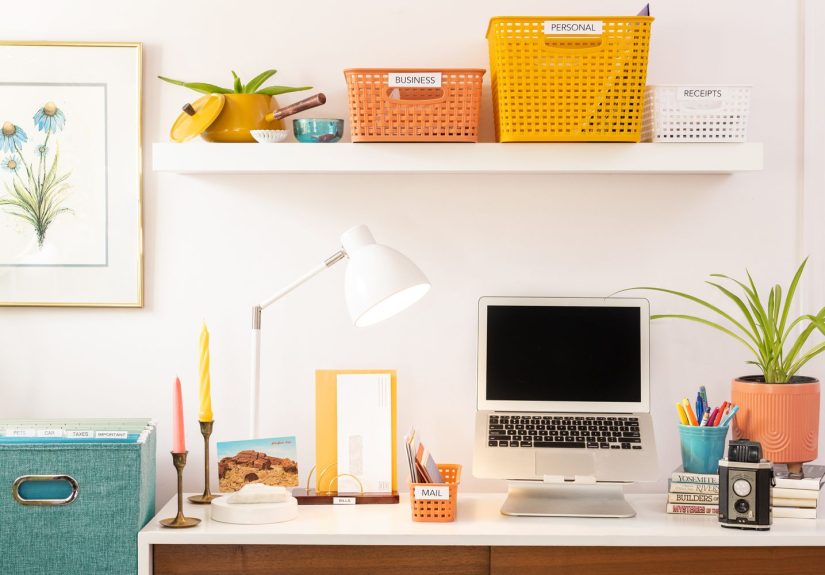
Put a tray, basket, or inbox by the door/kitchen counterwhere mail actually lands. One spot. Not five “temporary” spots that become permanent.
If paper has a home the moment it enters, it stops roaming your house like a lost tourist.
2. Use the “3-lane sorter”: Act, File, Recycle/Shred
Add two more trays (or folders): ACT (needs action), FILE (keep), and RECYCLE/SHRED (goodbye).
This prevents the classic “I’ll deal with it later” pile from becoming a historical landmark.
3. Open mail immediatelythen decide its lane in under 30 seconds
Unopened mail feels “safer” until it isn’t. Opening it right away reduces surprise fees, missed deadlines, and the thrilling plot twist of
“Oh, that was due last month.”
4. Add a tiny “To Pay / To Submit” folder for time-sensitive items
If you still mail checks, submit forms, or return school paperwork, give it a dedicated folder or clipboard. Time-sensitive paper should never
mingle with random coupons. Coupons are not known for their reliability.
5. Schedule a weekly paper reset (15 minutes, same day/time)
Pick a daySunday evening, Friday morning, whatever works. During the reset: empty the ACT tray, file the FILE tray, and shred/recycle the rest.
A small weekly habit prevents the “paper avalanche” season from returning.
The Filing System: Simple, Flexible, and Not Overengineered
A home filing system should feel boringin the best way. If you can file something while half-listening to a podcast, you’ve built a great system.
Here are the ideas that make filing fast and retrieval even faster.
6. Choose one filing style: hanging files, binders, or portable file box
The “best” system is the one you’ll use. A file cabinet is great if you have space. A portable file box works in apartments. Binders work well for
families who prefer flipping pages over digging through folders. Pick one primary home for paperdon’t spread it across three furniture pieces.
7. Keep your categories broad (10–15 main folders is a sweet spot)
Example broad categories:
- Identity (birth certificates, Social Security cards, passports copies)
- Home (mortgage/lease, deeds, property taxes, warranties, manuals)
- Insurance (auto, home, renters, life, health)
- Taxes (returns + supporting docs)
- Medical (EOBs, vaccination records, ongoing care)
- Vehicles (titles, registration, repair records)
- School / Kids (report cards, special programs, key contacts)
- Banking (account info, loan documents, major statements)
- Work (contracts, benefits summaries, key HR docs)
- Legal (wills, powers of attorney, trusts)
8. Use “front-of-folder rules” so retrieval is instant
Place the most-used or most important items at the front of each folder. Example: In Insurance, put the declarations pages and agent
contact sheet first. In Home, put your closing statement, deed copy, and current property tax info up front.
9. Label like you’re helping your future self on zero sleep
Labels should be obvious, not clever. “House Stuff” feels fun until you need a specific warranty in 90 seconds. Use plain terms:
“Home – Mortgage,” “Home – Repairs,” “Medical – 2026,” “Taxes – 2025.”
10. Color-code only if it truly reduces thinking
Color can help (e.g., green for money, red for medical, blue for home), but only if you keep it consistent. If color-coding becomes a hobby,
it stops being a tool.
11. Keep a “Pending” folder for documents in transition
Examples: a new insurance policy you haven’t reviewed, a medical bill being disputed, a refund claim, a contractor quote you might accept.
Pending items shouldn’t clog your permanent filesand they definitely shouldn’t live in the ACT tray forever.
12. Create a “House History” folder for big-ticket improvements
This is the folder that pays you back. Keep permits, receipts for major renovations, appliance purchases, HVAC service, roof work, and
improvements that may matter for insurance claims or future resale. Add before/after photos if you want to feel powerful.
Keep vs. Toss: Retention Rules Without the Headache
Not all paper deserves a forever home. In fact, too much paper makes it harder to find the important stuff. A good rule:
If it contains sensitive info and you don’t need it, destroy it.
13. Use a retention “cheat sheet” for common documents
- Taxes: Keep returns and supporting documents at least 3 years (many people keep longer; some situations call for 7 years).
- Home purchase/sale: Keep closing documents for as long as you own the home (and for a while after sale, for tax/records purposes).
- Pay stubs: Keep until you confirm your W-2 is correct; then file digitally or shred if no longer needed.
- Bank/credit card statements: Keep short-term unless needed for taxes, disputes, or major purchases/warranties.
- Medical EOBs/bills: Keep while claims are active; longer for ongoing conditions or tax-related medical deductions.
- Warranties/manuals: Keep while you own the item; recycle manuals if you can access them online and keep proof of purchase.
14. Shred anything with personal or financial info you don’t need
Identity theft loves paper you forgot about. Shred statements, expired insurance cards, old bills with account numbers, and documents with signatures
or Social Security numbers. A cross-cut shredder makes reconstruction much harder than strip shredding.
15. Go digital for what’s already accessible online
If your bank, utility, insurer, or provider keeps a reliable online portal, you often don’t need to keep every paper statement. Keep what proves
coverage, ownership, or a major eventand let the rest live in the cloud (with good passwords and backups).
Protect the Irreplaceable: Safety, Emergencies, and “Grab-and-Go” Prep
Some documents are inconvenient to replace. Others are a full-on quest involving offices, fees, and “please allow 6–8 weeks.”
These deserve extra protection.
16. Store originals in a fire-resistant, water-resistant safe (or secure equivalent)
Originals like birth certificates, Social Security cards, passports, marriage certificates, and estate documents should be stored securely.
If you use a home safe, place it in a discreet spot and consider anchoring it if appropriate. If you use a safe deposit box, keep copies at home
so you’re not locked out after hours when you need something urgently.
17. Make a “Family Emergency Binder” (copies, not originals)
This binder is your calm in a crisis. Include copies of IDs, insurance cards, policy numbers, prescriptions list, emergency contacts, and account info.
Add a simple one-page “What to do if…” sheet (house fire, evacuation, hospital visit).
18. Create a portable “grab-and-go” folder for urgent situations
Use a small expanding file or zipped document pouch. Keep it in your safe or near it. Inside: copies of IDs, insurance declarations pages, a list of
critical logins stored securely (or instructions for where to find them), and a printed contact list in case your phone dies at the worst possible time.
19. Photograph or video your home and valuables (and file it properly)
For insurance claims, proof matters. Do a quick phone video walkthrough once a year and after major purchases. Save it in a clearly labeled folder
like “Home Inventory – 2026” and back it up.
Digitize the Smart Way (So Scans Don’t Become Another Pile)
Scanning is greatuntil you have 1,842 photos named “IMG_4839” and none of them are the one you need. Digital organization needs structure, too.
20. Use a simple naming system: YYYY-MM-DD + Vendor + Topic
Example: 2026-01-18_Geico_AutoPolicy.pdf or 2025-04-10_CityWater_FinalBill.pdf.
Sort by date, and your future self can find documents by scrolling instead of guessing.
21. Mirror your paper folders digitally (don’t reinvent the wheel)
Use the same top-level categories: Identity, Home, Insurance, Taxes, Medical, Vehicles, etc. Consistency is your best friend. If you scan a document,
save it immediately into its folderdon’t let your “Downloads” folder become the digital version of the kitchen counter.
22. Back up your most important files in two places
A strong approach is “one cloud + one offline backup” (like an encrypted external drive stored securely). The goal: if one method fails, you’re not
starting from zero. Also, enable multi-factor authentication on key accounts whenever possible.
A Maintenance Plan That Actually Sticks
Systems fail when they demand perfection. Instead, aim for minimum effective organizationthe smallest habits that prevent chaos.
- Daily: Sort incoming paper into Act/File/Shred.
- Weekly (15 minutes): Pay/submit, file, shred/recycle.
- Monthly (20 minutes): Purge old receipts, archive completed items, verify upcoming renewals.
- Yearly (30–60 minutes): Update emergency binder, refresh home inventory video, review retention needs for taxes and major purchases.
Real-World Experiences: What It Feels Like After You Organize (About )
Here’s what people often notice after they finally set up a paper systemespecially if they’ve lived in “pile mode” for years.
First, there’s a weird emotional moment where you realize the piles weren’t just paper. They were unfinished decisions. A folder labeled
“Medical – 2026” doesn’t just store documentsit stores relief. It says, “This is handled.” And that’s a surprisingly big deal.
One common “aha” is how quickly small routines compound. The first week, a 15-minute reset can feel almost too easy, like you’re cheating.
Then the second week, you realize you didn’t lose a single permission slip, you didn’t pay a late fee, and you didn’t have to dig through
a stack of envelopes while muttering threats at your own past self. The system starts paying you back in tiny ways that add up:
fewer repeat phone calls, fewer frantic searches, fewer “Where did I put that?” interruptions that break your day in half.
Another real-life pattern: people tend to over-save at first. You might keep every receipt because you’re not sure what matters. That’s normal.
Once you have a retention cheat sheet and a shredder you trust, the confidence grows. You start thinking, “If I can access this online and it’s not
tied to taxes, warranties, or disputes, it doesn’t need a permanent address.” The paper volume drops, and your files become more useful because
they’re not stuffed with irrelevant extras.
Families often discover that the biggest “paper stress” isn’t taxesit’s random life admin. School paperwork, medical EOBs, car repair receipts,
insurance renewals. The moment you create a clear “Pending” folder and a simple “To Pay/To Submit” lane, that stress calms down.
It’s not that life gets less busy. It’s that busy stops leaving paper footprints all over your home.
Then there’s the emergency binder effect: it’s quietly empowering. Even if you never face a disaster, having copies of IDs, insurance information,
and key contacts in one place makes everyday problems smaller. A surprise trip to urgent care? You’ve got what you need. A stolen wallet?
You’re not scrambling to remember policy numbers. A home repair claim? The declarations page is right there, not buried under old catalogs.
Finally, the biggest “experience” is the shift from searching to knowing. You stop hoping you have the document and start trusting you can find it.
That trust reduces stress in a way people don’t expect from something as unglamorous as folders. It’s a small household upgrade that makes your
future self say, very sincerely: “Thank you.”
Conclusion
Organizing important papers doesn’t require a perfect home office or a weekend-long filing marathon. It requires a paper pipeline (so paper stops
drifting), a simple filing structure (so decisions stay easy), smart retention (so you keep what matters), and backups (so you’re protected when
life gets unpredictable). Start with the landing zone and the 3-lane sorter, then build from there. In a week, you’ll feel the difference.
In a month, you’ll wonder how you ever lived without it.